# Procédure annuel pour updater les taxes (Deprecated)

### <span style="text-decoration: underline;">**Deprecated**</span>: Veuillez regarder la nouvelle marche à suivre dans la page "*Procédure annuel pour updater les taxes (updated version 2026)*"

<p class="callout info"><span style="text-decoration: line-through;">[https://docs.google.com/spreadsheets/d/1PMzc2vGeanmDXVKw8s8-hKepxstYUCIR\_W1q4XSa5lE/edit#gid=0](https://docs.google.com/spreadsheets/d/1PMzc2vGeanmDXVKw8s8-hKepxstYUCIR_W1q4XSa5lE/edit#gid=0)</span></p>

##### <span style="text-decoration: line-through;">Onglets</span>

- <span style="text-decoration: line-through;">taxes</span><p class="callout info"><span style="text-decoration: line-through;">[https://docs.google.com/spreadsheets/d/1PMzc2vGeanmDXVKw8s8-hKepxstYUCIR\_W1q4XSa5lE/edit#gid=1321289989](https://docs.google.com/spreadsheets/d/1PMzc2vGeanmDXVKw8s8-hKepxstYUCIR_W1q4XSa5lE/edit#gid=1321289989)</span></p>
    
    
    - <span style="text-decoration: line-through;">duplicté une colonne d'une année précédente et l'intituler : $"{année}(str)"</span>
    - <span style="text-decoration: line-through;">Modifier les valeurs associés aux Uids sauf pour \["**school**", "**municipal**"\]</span>
        - <span style="text-decoration: line-through;">Les informations peuvent être trouvé sur un site comme celui-ci : [https://empirecpa.ca/canadian-sales-tax-rates-for-2023/](https://empirecpa.ca/canadian-sales-tax-rates-for-2023/)</span>
- <span style="text-decoration: line-through;">income\_taxes</span><p class="callout info"><span style="text-decoration: line-through;">[https://docs.google.com/spreadsheets/d/1PMzc2vGeanmDXVKw8s8-hKepxstYUCIR\_W1q4XSa5lE/edit#gid=407446484](https://docs.google.com/spreadsheets/d/1PMzc2vGeanmDXVKw8s8-hKepxstYUCIR_W1q4XSa5lE/edit#gid=407446484)</span></p>
    
    
    - <span style="text-decoration: line-through;">duplicté une colonne d'une année précédente et l'intituler : $"{année}(str)"</span>
    - <span style="text-decoration: line-through;">Modifier les valeurs associés aux Uids</span>
        - <span style="text-decoration: line-through;">Certains identifiants ont des sources associés afin facilité la recherche d'information</span>
    - <span style="text-decoration: line-through;">Il faudra aussi ajouter un nouveau document googleSheet dans le folder suivant</span>
        - <span style="text-decoration: line-through;">[https://drive.google.com/drive/u/0/folders/1-7PMGfURsl47mcbA4z\_Pb0y8\_BUSUma4](https://drive.google.com/drive/u/0/folders/1-7PMGfURsl47mcbA4z_Pb0y8_BUSUma4)</span>
        - <span style="text-decoration: line-through;">il faudra alors remplir un onglet pour chaque impot possible (en utilisant le format de 26 période de paie) à l'aide de "sim\_accounting\_1" et de ses liens</span>
            - <span style="text-decoration: line-through;">Note: Les retenues d'impôt est le même pour Ontario (On), Nouveau Brunswick (NB) et L'île-du-Prince-Édouard (PE)</span>
        - <span style="text-decoration: line-through;">Utiliser [https://www.adobe.com/ca/acrobat/online/pdf-to-excel.html](https://www.adobe.com/ca/acrobat/online/pdf-to-excel.html) afin de transformer les chartes d'impot en format Excel </span>
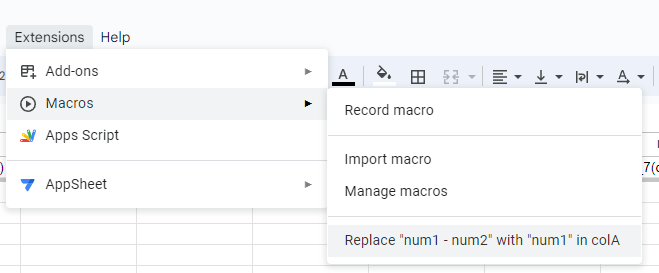
            - <span style="text-decoration: line-through;">Utiliser la macro suivante afin de remplacer la colonne de min\_salary</span><span style="text-decoration: line-through;">![](https://wiki.uniksim.com/uploads/images/gallery/2023-07-Jul/scaled-840-0/image-1689339715880.png)</span>
                
                ---

<span style="text-decoration: line-through;">**Conflit avec la Macro**</span>

- - - - - <span style="text-decoration: line-through;">Si la macro n'est pas disponible dans le menu, pour cela il faut:</span>
                    - <span style="text-decoration: line-through;">Dans le menu Extensions&gt;Macos</span>
                    - <span style="text-decoration: line-through;">Faire un "Record macro" puis arrêter immédiatement la macro, afin de créer une macro rapidement</span>
                    - <span style="text-decoration: line-through;">Faire un "Manage macros" dans une année précédente (possèdent la macro "Replace "num1 - num2" with "num1" in colA")</span>
                    - <span style="text-decoration: line-through;">Cliquer sur les ![](https://wiki.uniksim.com/uploads/images/gallery/2024-05-May/scaled-840-0/image-1715264721834.png), puis "Edit Script"</span>
                    - <span style="text-decoration: line-through;">Copier le code de macros.gs</span>
                    - <span style="text-decoration: line-through;">Faire un "Manage macros" dans le sheet en vigeur</span>
                    - <span style="text-decoration: line-through;">Cliquer sur les ![](https://wiki.uniksim.com/uploads/images/gallery/2024-05-May/scaled-840-0/image-1715264721834.png), puis "Edit Script"</span>
                    - <span style="text-decoration: line-through;">Coller le script copié précédamment</span>
                    - <span style="text-decoration: line-through;">Renommer votre macro avec les mêmes valeurs que celui copié</span>
                - <span style="text-decoration: line-through;">S'il y a un problème de "Authorization required" ou autre durant l'exécution de la macro, voici la version manuel:</span>
                    
                    
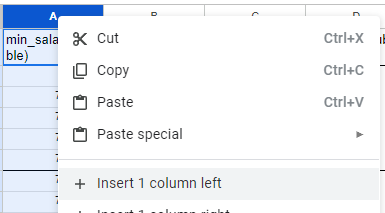
                    - <span style="text-decoration: line-through;">Faites un clique droite sur la colonne A, puis ajouter une nouvelle colonne à gauche</span>
                    - <span style="text-decoration: line-through;">![](https://wiki.uniksim.com/uploads/images/gallery/2024-05-May/scaled-840-0/image-1715267033668.png)</span>
                    - <span style="text-decoration: line-through;">Copié le code ci-dessous</span>
                        - <span style="text-decoration: line-through;">**<span class=" default-formula-text-color" dir="auto">=</span><span class=" default-formula-text-color" dir="auto">ArrayFormula</span><span class=" default-formula-text-color" dir="auto">(</span><span class=" default-formula-text-color" dir="auto">IF</span><span class=" default-formula-text-color" dir="auto">(</span><span class=" default-formula-text-color" dir="auto">REGEXMATCH</span><span class=" default-formula-text-color" dir="auto">(</span><span class=" default-formula-text-color" dir="auto">TO\_TEXT</span><span class=" default-formula-text-color" dir="auto">(</span><span dir="auto">B2:B</span><span class=" default-formula-text-color" dir="auto">)</span><span class=" default-formula-text-color" dir="auto">,</span> <span class=" string " dir="auto">"\[–|-\]"</span><span class=" default-formula-text-color" dir="auto">)</span><span class=" default-formula-text-color" dir="auto">,</span> <span class=" default-formula-text-color" dir="auto">TO\_PURE\_NUMBER</span><span class=" default-formula-text-color" dir="auto">(</span><span class=" default-formula-text-color" dir="auto">REGEXREPLACE</span><span class=" default-formula-text-color" dir="auto">(</span><span dir="auto">B2:B</span><span class=" default-formula-text-color" dir="auto">,</span> <span class=" string " dir="auto">"(\\D+\\.\*\\D+.\*)"</span><span class=" default-formula-text-color" dir="auto">,</span> <span class=" string " dir="auto">""</span><span class=" default-formula-text-color" dir="auto">)</span><span class=" default-formula-text-color" dir="auto">)</span><span class=" default-formula-text-color" dir="auto">,</span> <span class="number" dir="auto">0</span><span class=" default-formula-text-color" dir="auto">)</span><span class=" default-formula-text-color" dir="auto">)</span>**</span>
                    - <span style="text-decoration: line-through;">Coller le code sur la case A2 ou avant les rangées à modifier (sur la colonne A)</span>
                    - <span style="text-decoration: line-through;">À ce point normalement, les cases de la colonne A devrait-être à jour</span>
                    - <span style="text-decoration: line-through;">Copié la colonne A à B</span>
                        - <span style="text-decoration: line-through;">**ATTENTION**, il se peut que certaines valeurs ne sont pas bien modifiées. Prenez seulement les valeurs adéquates</span>
                    - <span style="text-decoration: line-through;">Supprimé la colonne A</span>
                    
                    
                    ---
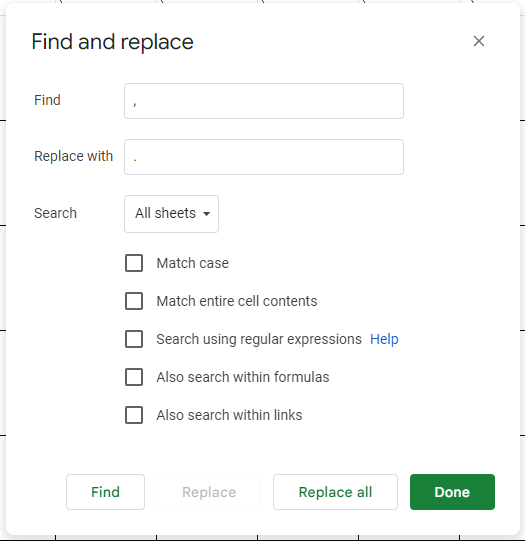
            - <span style="text-decoration: line-through;">Remplacer toutes les instances de "**,**" (virgule) par "**.**" (point) </span>
                
                
                - <span style="text-decoration: line-through;">À l'aide de (Ctrl + H)</span>
                - <span style="text-decoration: line-through;">![](https://wiki.uniksim.com/uploads/images/gallery/2024-05-May/scaled-840-0/image-1715264243002.png)</span>
        - <span style="text-decoration: line-through;">Il faudra alors updater {AllSimsRepository}/node.js/exports/exportAllData.js afin de pouvoir exporter les nouveaux document créer avec la structure suivante:</span><span style="text-decoration: line-through;">![](https://wiki.uniksim.com/uploads/images/gallery/2023-07-Jul/scaled-840-0/image-1689347925339.png)</span>
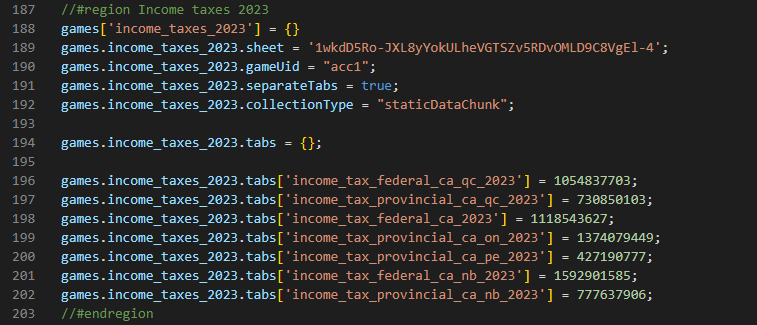
            
            
            - <span style="text-decoration: line-through;">Dans la zone de "games.income\_taxes\_X.sheet" : Mettre la première partie de l'url (après "d/") du document "income\_taxes\_X"</span>
            - <span style="text-decoration: line-through;">Dans les autres plus specifiques ("games.income\_taxes\_X.tabs"): Mettre le "gid" de l'url</span>
- <span style="text-decoration: line-through;">employer\_income\_taxes</span><p class="callout info"><span style="text-decoration: line-through;">[https://docs.google.com/spreadsheets/d/1PMzc2vGeanmDXVKw8s8-hKepxstYUCIR\_W1q4XSa5lE/edit#gid=754552986](https://docs.google.com/spreadsheets/d/1PMzc2vGeanmDXVKw8s8-hKepxstYUCIR_W1q4XSa5lE/edit#gid=754552986)</span></p>
    
    
    - <span style="text-decoration: line-through;">duplicté une colonne d'une année précédente et l'intituler : $"{année}(str)"</span>
    - <span style="text-decoration: line-through;">Modifier les valeurs associés aux Uids</span>
        - <span style="text-decoration: line-through;">Certains identifiants ont des sources associés afin facilité la recherche d'information</span>
- <span style="text-decoration: line-through;">interests</span><p class="callout info"><span style="text-decoration: line-through;">[https://docs.google.com/spreadsheets/d/1PMzc2vGeanmDXVKw8s8-hKepxstYUCIR\_W1q4XSa5lE/edit#gid=1745231992](https://docs.google.com/spreadsheets/d/1PMzc2vGeanmDXVKw8s8-hKepxstYUCIR_W1q4XSa5lE/edit#gid=1745231992)</span></p>
    
    
    - <span style="text-decoration: line-through;">duplicté une colonne d'une année précédente et l'intituler : $"{année}(str)"</span>
    - <span style="text-decoration: line-through;">Modifier les valeurs associés aux Uids</span>
        - <span style="text-decoration: line-through;">Certains identifiants ont des sources associés afin facilité la recherche d'information</span>

##### <span style="text-decoration: line-through;">Modifications liés à l'année par défaut</span>

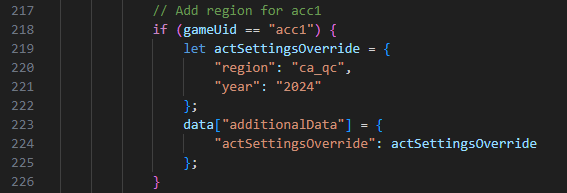
- <span style="text-decoration: line-through;">Modifier le champs year pour l'année par défaut voulu</span><span style="text-decoration: line-through;">![](https://wiki.uniksim.com/uploads/images/gallery/2023-07-Jul/scaled-840-0/image-1689349217892.png)</span>

    
    <p class="callout info"><span style="text-decoration: line-through;">{AllSimsRepository}\\game\\Assets\\GameSpecific\\acc1\\Resources\\data\_acc1\\act\_settings.json</span></p>
    
    
    - <span style="text-decoration: line-through;">duplicté une colonne d'une année précédente et l'intituler : $"{année}(str)"</span>
    - <span style="text-decoration: line-through;">Modifier les valeurs associés aux Uids</span>
        - <span style="text-decoration: line-through;">Certains identifiants ont des sources associés afin facilité la recherche d'information</span>
- <span style="text-decoration: line-through;">Modifier l'année par défaut pour la création des sims démo</span>
    
    <p class="callout info"><span style="text-decoration: line-through;">{uniksimweb}\\uniksim-back-end\\src\\node.js\\server\\backend\_braincloud.js</span></p>
    
    <span style="text-decoration: line-through;">![](https://wiki.uniksim.com/uploads/images/gallery/2025-04-Apr/scaled-840-0/image-1743609472785.png)</span>

##### <span style="text-decoration: line-through;">Document PDF accessible en jeu</span>

- <span style="text-decoration: line-through;">Ajouter un document liés à l'année dans ce dossier</span>
    
    <p class="callout info"><span style="text-decoration: line-through;">[https://cloud.digitalocean.com/spaces/uniksim-data?path=acc1/](https://cloud.digitalocean.com/spaces/uniksim-data?path=acc1/)</span></p>
- <span style="text-decoration: line-through;">Il faudra alors un document PDF intitulé "{thème}\_{langue}" pour chacun des thèmes et langue suivantes, le tout dans le format "26 périodes de paie par année" (en public). N'oubliez pas de retirer l'extension .pdf</span>
    - <span style="text-decoration: line-through;">Thème</span>
        - <span style="text-decoration: line-through;">cpp\_ca</span>
        - <span style="text-decoration: line-through;">employment\_insurance\_ca</span>
        - <span style="text-decoration: line-through;">employment\_insurance\_ca\_qc</span>
        - <span style="text-decoration: line-through;">income\_tax\_federal\_ca</span>
        - <span style="text-decoration: line-through;">income\_tax\_federal\_ca\_nb</span>
        - <span style="text-decoration: line-through;">income\_tax\_federal\_ca\_qc</span>
        - <span style="text-decoration: line-through;">income\_tax\_provincial\_ca\_nb</span>
        - <span style="text-decoration: line-through;">income\_tax\_provincial\_ca\_on</span>
        - <span style="text-decoration: line-through;">income\_tax\_provincial\_ca\_pe</span>
        - <span style="text-decoration: line-through;">income\_tax\_provincial\_ca\_qc</span>
        - <span style="text-decoration: line-through;">rqap\_ca\_qc</span>
        - <span style="text-decoration: line-through;">rrq\_ca\_qc</span>
    - <span style="text-decoration: line-through;">Langue</span>
        - <span style="text-decoration: line-through;">fr</span>
        - <span style="text-decoration: line-through;">en</span>

##### <span style="text-decoration: line-through;">Finitions</span>

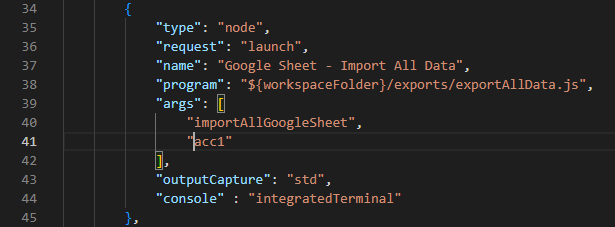
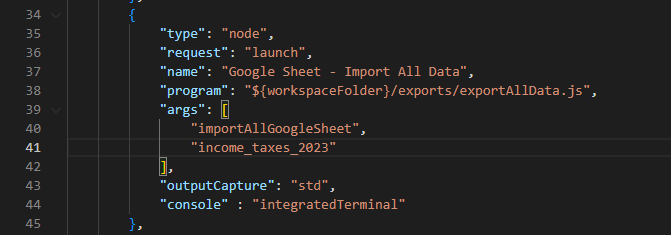
- <span style="text-decoration: line-through;">Executer la commande suivante sur node.js:</span><span style="text-decoration: line-through;">![](https://wiki.uniksim.com/uploads/images/gallery/2023-07-Jul/scaled-840-0/image-1689348151682.png)</span>

    
    
    - <span style="text-decoration: line-through;">Une fois avec les paramêtres suivants ![](https://wiki.uniksim.com/uploads/images/gallery/2023-07-Jul/scaled-840-0/image-1689348648533.png)</span>
    - <span style="text-decoration: line-through;">et une autre avec ceux-ci (remplacer par la bonne année)</span><span style="text-decoration: line-through;">![](https://wiki.uniksim.com/uploads/images/gallery/2023-07-Jul/scaled-840-0/image-1689348688286.png)</span>
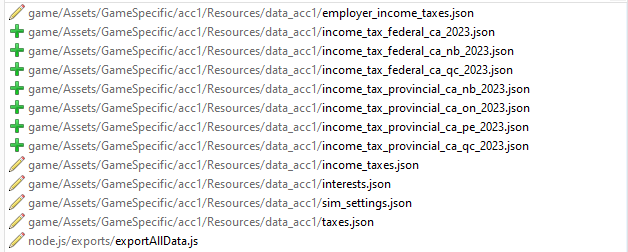
- <span style="text-decoration: line-through;">Une fois terminé les files suivants devrait avoir des modifications</span>
    - <span style="text-decoration: line-through;">pour "AllSimsRepository"</span>  
        <span style="text-decoration: line-through;">![](https://wiki.uniksim.com/uploads/images/gallery/2023-07-Jul/scaled-840-0/image-1689350868036.png)</span>
    - <span style="text-decoration: line-through;">pour "UniksimWebRepository"</span>  
        <span style="text-decoration: line-through;">![](https://wiki.uniksim.com/uploads/images/gallery/2023-07-Jul/scaled-840-0/image-1689353689899.png)</span>
- <span style="text-decoration: line-through;">Il nous reste qu'à exporter la data à la destination voulu (toujours sur node.js).</span><span style="text-decoration: line-through;">![](https://wiki.uniksim.com/uploads/images/gallery/2023-07-Jul/scaled-840-0/image-1689353835466.png)</span>

    
    
    - <span style="text-decoration: line-through;">Utiliser cette export pour le StaticData![](https://wiki.uniksim.com/uploads/images/gallery/2023-07-Jul/scaled-840-0/image-1689353848206.png)</span>

    - <span style="text-decoration: line-through;">Utiliser cette export pour le StaticDataChunk</span><span style="text-decoration: line-through;">![](https://wiki.uniksim.com/uploads/images/gallery/2023-07-Jul/scaled-840-0/image-1689353947856.png)</span>

        
        <span style="text-decoration: line-through;"> (Modifier le "args" de la requête pour chacun des requêtes)</span>