# Acc

# Correction Acc1

##### Préparation

  
Avant de commencer la correction, plusieurs informations sont stocker dans differents dictionnaires afin qu'elles soient plus facile d'accès par la suite.

Par la suite, le score des différents modules pages est calculés.

##### Journal des Achats, Ventes, Encaissements, Décaissements, Salaires 

1. Regarder chacune des rows de la table 
    1. Certains champs sont requis pour effectuer la correction d'une rangée (dépends du modulePage) 
        - si manquant, ajoute une erreur ("row\_input\_value\_missing")
    2. Trouver la facture de reference avec les champs appropriées (dépend du modulePage) 
        - si la référence n'est pas trouvée, ajoute une erreur ("row\_reference\_not\_found")
    3. Correction des différents inputs de la row selon les informations de la facture trouvée 
        - Voir la section, Aide à la correction 1
    4. Vérifier que les identifiants ne sont pas déjà utilisé 
        - Voir la section, Aide à la correction 2
2. Vérifier que toutes les factures sont présentes 
    - s'il manque des factures, ajoute l'erreur ("bill\_missing")
3. Calculer le score total du journal 
    - s'il n'y a pas de rows dans la table, ajoute l'erreur ("empty\_table")

##### Grand livre auxiliaire des Fournisseurs/Clients

1. Vérifier qu'il y a des Fournisseurs/Clients d'ajouter 
    - s'il y en a pas, ajoute l'erreur ("no\_dynamic\_dropdown\_data")
2. Pour chacun des Fournisseurs/Clients, faire les vérification suivantes 
    1. Vérifier les conditions de la compagnie 
        - Si la condition choisi n'est pas la bonne, ajouter l'erreur ("dynamic\_dropdown\_data\_secondary\_wrong\_answer")
    2. Vérifier qu'il y a des décisions prise pour le Fournisseurs/clients 
        - s'il y en a pas, ajoute l'erreur ("empty\_table")
    3. Pour chacune des rows du Fournisseurs/clients, effectuer les vérification suivantes 
        1. Vérifier l'ordre des lignes selon la date 
            - s'il ne le sont pas, ajoute l'erreur ("row\_wrong\_order")
        2. Trouver la ligne de reference (une ligne des Journaux) avec les champs appropriées (dépend du modulePage) 
            - si la référence n'est pas trouvée, ajoute une erreur ("row\_reference\_not\_found")
        3. Correction des différents inputs de la row selon les informations de le ligne de référence trouvée et de la balance qui est modifier selon les autres inputs de la row 
            - Voir la section, Aide à la correction 1
        4. Vérifier que les identifiants ne sont pas déjà utilisé 
            - Voir la section, Aide à la correction 2
    4. Vérifier qu'il y a des lignes de présentes 
        - s'il y en a pas, ajoute l'erreur ("empty\_table")
    5. Vérifier que toutes les rows sont présentes 
        - si ce n'est pas le cas, ajoute l'erreur ("referenced\_row\_missing")
    6. Calculer le score de la table
3. Calculer le score total du modulePage

##### Grand livre

1. Calculer la balance de tout les comptes ainsi que les montants finaux du journal general(Cela sera utilisés durant la correction).
2. Pour chacune des tables (chaque table est associé à un compte) 
    1. Pour chacune des rows dans la table 
        1. Vérifier l'ordre des rows avec la date 
            - si l'ordre n'est pas le bon, ajoute l'erreur ("row\_wrong\_order")
        2. Trouver la ligne de reference (une ligne des Journaux) avec les champs appropriées (dépend du modulePage) 
            - si la référence n'est pas trouvée, ajoute une erreur ("row\_reference\_missing")
        3. Correction des différents inputs de la row selon les informations du compte de référence trouvée et de la balance qui est modifier selon les autres inputs de la row 
            - Voir la section, Aide à la correction 1
        4. Vérifier que les identifiants ne sont pas déjà utilisé 
            - Voir la section, Aide à la correction 2
    2. Vérifier qu'il y a des lignes de présentes 
        - s'il y en a pas, ajoute l'erreur ("empty\_table")
    3. Vérifier que toutes les comptes sont présents 
        - si ce n'est pas le cas, ajoute l'erreur ("referenced\_page\_missing")
    4. Calculer le score de la table
3. Vérifier que tout les comptes soit présents 
    - si un compte n'est pas présent, ajoute l'erreur ("account\_empty")
4. Calculer le score total du modulePage 
    1. s'il n'y a pas de comptes, ajoute l'erreur ("no\_accounts")

##### Journal Général

1. Trier les differentes sections (écritures) du modulePage en plusieurs differentes catégories (charges, produits, équité).
2. Vérifier l'ordre des rows dans les catégories, 
    - s'il ne sont pas dans le bon ordre, ajoute l'erreur ("row\_wrong\_order")
3. Pour chacune des rows des catégories 
    1. Correction des différents inputs de la row selon les informations du compte de référence et de la catégorie 
        - Voir la section, Aide à la correction 1
    2. Vérifier que les identifiants ne sont pas déjà utilisé 
        - Voir la section, Aide à la correction 2
4. Vérifier que tout les comptes "produit" ou "charges" sont bien présents 
    - S'il en manquent, ajoute l'erreur ("table\_account\_missing")
5. Calculuer le score final du journal 
    - Si une catégorie est vide, ajoute l'erreur ("group\_empty")

##### Balance de vérification

1. Regarder chacune des rows de la table 
    1. Certains champs sont requis pour effectuer la correction d'une rangée (Numero de compte, nom de compte) 
        - si manquant, ajoute une erreur ("row\_input\_value\_missing")
    2. Vérifier que l'ordre de la row est le bon 
        - s'il l'ordre n'est pas le bon, ajoute l'erreur ("row\_wrong\_order")
    3. Correction des différents inputs de la row selon les informations du compte trouvé 
        - Voir la section, Aide à la correction 1
    4. Vérifier que les identifiants ne sont pas déjà utilisé 
        - Voir la section, Aide à la correction 2
2. Vérifier que tous les comptes sont présents 
    - si un compte est manquant, ajoute l'erreur ("table\_account\_missing")
3. Vérifier que le module page n'est pas vide 
    1. si c'est le cas, ajoute l'erreur ("empty\_table")
4. Calculer le score du module page

##### État des résultats

1. Pour chaque section de la table 
    1. Pour chaque rows de la section  
        
        1. Trouver le compte de référence 
            - si la référence n'est pas trouvée, ajoute une erreur ("row\_reference\_missing")
        2. Vérifier que le compte est dans la bonne section (Chaque section à des comptes spécifiques) 
            - Si le compte n'est pas dans la bonne section, ajoute l'erreur ("row\_wrong\_section")
        3. Correction des différents inputs de la row selon les informations du compte de référence trouvée et de la balance qui est modifier selon les autres inputs de la row 
            - Voir la section, Aide à la correction 1
        4. Vérifier que les identifiants ne sont pas déjà utilisé 
            - Voir la section, Aide à la correction 2
2. Correction des différents inputs de la table (leurs valeurs dépends de la valeur des inputs de la table) 
    - Voir la section, Aide à la correction 1
3. Vérifier que tout les comptes sont présents 
    - s'il en manque, ajoute l'erreur ("table\_account\_missing")
4. Calculer de score des options de la table 
    - Voir la section, Aide à la correction 3
5. Calculer le score final du journal 
    - Si une catégorie est vide, ajoute l'erreur ("empty\_table")

##### État des capitaux propres

1. Pour chaque rows de la table  
    
    1. Trouver le compte de référence 
        - si la référence n'est pas trouvée, ajoute une erreur ("row\_reference\_missing")
    2. Correction des différents inputs de la row selon les informations du compte de référence trouvée et de la balance qui est modifier selon les autres inputs de la row 
        - Voir la section, Aide à la correction 1
    3. Vérifier que les identifiants ne sont pas déjà utilisé 
        - Voir la section, Aide à la correction 2
2. Correction des différents inputs de la table (leurs valeurs dépends de la valeur des inputs de la table) 
    - Voir la section, Aide à la correction 1
3. Calculer de score des options de la table 
    - Voir la section, Aide à la correction 3
4. Calculer le score final du journal 
    - Si une catégorie est vide, ajoute l'erreur ("empty\_table")

##### Bilan

1. Pour chaque section de la table 
    1. Pour chaque rows de la section  
        
        1. Trouver le compte de référence 
            - si la référence n'est pas trouvée, ajoute une erreur ("row\_reference\_missing")
        2. Vérifier que le compte est dans la bonne section (Chaque section à des comptes spécifiques) 
            - Si le compte n'est pas dans la bonne section, ajoute l'erreur ("row\_wrong\_section")
        3. Correction des différents inputs de la row selon les informations du compte de référence trouvée et de la balance qui est modifier selon les autres inputs de la row 
            - Voir la section, Aide à la correction 1
        4. Vérifier que les identifiants ne sont pas déjà utilisé 
            - Voir la section, Aide à la correction 2
2. Correction des différents inputs de la table (leurs valeurs dépends de la valeur des inputs de la table) 
    - Voir la section, Aide à la correction 1
3. Vérifier que tout les comptes sont présents 
    - s'il en manque, ajoute l'erreur ("table\_account\_missing")
4. Calculer de score des options de la table 
    - Voir la section, Aide à la correction 3
5. Calculer le score final du journal 
    - Si une catégorie est vide, ajoute l'erreur ("empty\_table")

- 

#### Aide à la correction

1. Méthodologie pour corriger les bonne réponses d'une série d'input 
    1. Regarder chacun des inputs et les comparé a une liste de bonne réponse 
        - Si la réponses d'input est mauvaise, ajoute une erreur ("row\_input\_value\_wrong\_answer")
        - Si l'input n'as pas de valeur, ajoute l'erreur ("row\_input\_value\_missing")
        - si l'input à une valeur mais ne devrait pas encore avoir, ajoute l'erreur ("row\_input\_value\_should\_be\_empty")
2. Vérifier que la référence d'une row n'est pas utiliser à multiples reprises 
    1. Comparer les identifiants envoyer avec les identifiants des autres rows 
        - si une autre row à les même identifiants, conserver le meilleur score et ajoute l'erreur ("row\_reference\_used")
3. Méthodologie pour calculer le score des options d'un module page 
    1. Les informations pour les options voulu sont stocker dans le staticData 
        - Si les critère ne sont pas respecter, 3 erreurs peuvent se produire pour les options d'input dans une row 
            - Si l'input à une options mais ne devrait pas l'avoir, ("row\_input\_option\_should\_be\_empty")
            - Si l'input à la mauvaise réponse, ("row\_input\_option\_wrong\_answer")
            - Si l'input n'a pas d'option mais devrait en avoir, ("row\_input\_option\_missing")
        - et 3 autres erreurs sont possible pour les options d'input dans une table 
            - Si l'input à une options mais ne devrait pas l'avoir, ("table\_input\_option\_should\_be\_empty")
            - Si l'input à la mauvaise réponse, ("table\_input\_option\_wrong\_answer")
            - Si l'input n'a pas d'option mais devrait en avoir, ("table\_input\_option\_missing")

# Exemple de donnée d'une équipe pour un module (Module_Test)

```JSON
{
  "uid": "7200188c-a8e6-4904-a92b-b8bbf64086f9-module_TEST",
  "simUid": "0a189c03-43db-4585-a1bd-171d2c6ec3ff",
  "gameUid": "acc1",
  "teamUid": "7200188c-a8e6-4904-a92b-b8bbf64086f9",
  "moduleUid": "module_TEST",
  "moduleTypesData": {
    "practice": {
      "seed": 2032993953,
      "pagesData": {
        "payroll_journal": {
          "tables": {
            "default": {
              "sections": {
                "default": {
                  "rowsIndex": [
                    "7ca74915-56fe-4452-8290-141d6ed0ac0d"
                  ],
                  "rows": {
                    "7ca74915-56fe-4452-8290-141d6ed0ac0d": {
                      "inputs": {
                        "employee": {
                          "value": "employee_1"
                        },
                        "date": {
                          "value": "2020-07-02"
                        },
                        "amount_hours": {
                          "value": "38.00"
                        },
                        "hourly_rate": {
                          "value": "17.07"
                        },
                        "salaries": {
                          "value": "648.66"
                        },
                        "rrq_to_pay": {
                          "value": "38.27"
                        },
                        "rqap_to_pay": {
                          "value": "3.20"
                        },
                        "employment_insurance_to_pay": {
                          "value": "7.65"
                        },
                        "provincial_tax_to_pay": {
                          "value": "97.30"
                        },
                        "federal_tax_to_pay": {
                          "value": "97.30"
                        },
                        "salaries_to_pay": {
                          "value": "404.94"
                        },
                        "bill_id": {
                          "value": "1921"
                        }
                      }
                    }
                  }
                }
              }
            }
          }
        },
        "withdrawals_journal": {
          "tables": {
            "default": {
              "sections": {
                "default": {
                  "rowsIndex": [
                    "453f40df-950e-4fe2-bcbf-618811cd7b7e",
                    "d8d50ce1-d048-48ba-ab06-994aa9561b11"
                  ],
                  "rows": {
                    "453f40df-950e-4fe2-bcbf-618811cd7b7e": {
                      "inputs": {
                        "date": {
                          "value": "2020-07-02"
                        },
                        "company_uid": {
                          "value": "employee_1"
                        },
                        "bill_id": {
                          "value": "1918"
                        },
                        "cashings": {
                          "value": "404.94"
                        },
                        "salaries_to_pay": {
                          "value": "404.94"
                        },
                        "report_to_account": {
                          "value": "1"
                        }
                      }
                    },
                    "d8d50ce1-d048-48ba-ab06-994aa9561b11": {
                      "inputs": {
                        "date": {
                          "value": "2020-08-22"
                        },
                        "company_uid": {
                          "value": "motor_company"
                        },
                        "bill_id": {
                          "value": "1919"
                        },
                        "cashings": {
                          "value": "67596.84"
                        },
                        "purchases": {
                          "value": ""
                        },
                        "report_to_account": {
                          "value": "1"
                        },
                        "providers": {
                          "value": "67596.84"
                        }
                      }
                    }
                  }
                }
              }
            }
          }
        },
        "purchases_journal": {
          "tables": {
            "default": {
              "sections": {
                "default": {
                  "rowsIndex": [
                    "4b8da7f3-8cf9-4de6-bda9-d62aef2ce493"
                  ],
                  "rows": {
                    "4b8da7f3-8cf9-4de6-bda9-d62aef2ce493": {
                      "inputs": {
                        "company_uid": {
                          "value": "motor_company"
                        },
                        "date": {
                          "value": "2020-08-21"
                        },
                        "bill_id": {
                          "value": "127"
                        },
                        "providers": {
                          "value": "67596.84"
                        },
                        "purchases": {
                          "value": "58792.64"
                        },
                        "tps_to_receive": {
                          "value": "2939.63"
                        },
                        "tvq_to_receive": {
                          "value": "5864.57"
                        },
                        "report_to_account": {
                          "value": "1"
                        }
                      }
                    }
                  }
                }
              }
            }
          }
        },
        "providers_subledger": {
          "tables": {
            "motor_company": {
              "sections": {
                "default": {
                  "rowsIndex": [
                    "5a8f6c19-81ff-4e95-9baa-0d1263519ed4",
                    "da745157-f975-4b8e-85fe-b9d79e6f7e38",
                    "3600b4df-9958-4f95-9c02-0eca0b790f85"
                  ],
                  "rows": {
                    "5a8f6c19-81ff-4e95-9baa-0d1263519ed4": {
                      "inputs": {
                        "date": {
                          "value": "2020-08-21"
                        },
                        "reference": {
                          "value": "purchases_journal_short"
                        },
                        "bill_id": {
                          "value": "127"
                        },
                        "balance": {
                          "value": "67596.84"
                        },
                        "credit": {
                          "value": "67596.84"
                        },
                        "debit_credit": {
                          "value": "credit_short"
                        }
                      }
                    },
                    "da745157-f975-4b8e-85fe-b9d79e6f7e38": {
                      "inputs": {
                        "date": {
                          "value": "2020-08-22"
                        },
                        "other_bill_id": {
                          "value": "check-1919"
                        },
                        "reference": {
                          "value": "withdrawals_journal_short"
                        },
                        "debit": {
                          "value": "67596.84"
                        },
                        "balance": {
                          "value": ""
                        },
                        "debit_credit": {
                          "value": ""
                        }
                      }
                    },
                    "3600b4df-9958-4f95-9c02-0eca0b790f85": {
                      "inputs": {
                        "date": {
                          "value": "2020-08-22"
                        },
                        "other_bill_id": {
                          "value": "check-1919"
                        },
                        "reference": {
                          "value": "withdrawals_journal_short"
                        },
                        "debit": {
                          "value": "67596.84"
                        }
                      }
                    }
                  }
                }
              }
            }
          }
        },
        "clients_subledger": {
          "tables": {
            "client_15": {
              "sections": {
                "default": {
                  "rowsIndex": [
                    "97792d10-a5ba-4018-baad-81526f2e9e54",
                    "b82f9546-587c-4eef-876c-d87e3eb96db1"
                  ],
                  "rows": {
                    "97792d10-a5ba-4018-baad-81526f2e9e54": {
                      "inputs": {
                        "date": {
                          "value": "2020-05-12"
                        },
                        "bill_id": {
                          "value": "1920"
                        },
                        "reference": {
                          "value": "sales_journal_short"
                        },
                        "debit": {
                          "value": "68847.91"
                        },
                        "balance": {
                          "value": "68847.91"
                        },
                        "debit_credit": {
                          "value": "debit_short"
                        }
                      }
                    },
                    "b82f9546-587c-4eef-876c-d87e3eb96db1": {
                      "inputs": {
                        "other_bill_id": {
                          "value": "check-1755"
                        },
                        "reference": {
                          "value": "cashings_journal_short"
                        },
                        "credit": {
                          "value": "68847.91"
                        },
                        "date": {
                          "value": "2020-06-11"
                        }
                      }
                    }
                  }
                }
              }
            }
          }
        },
        "sales_journal": {
          "tables": {
            "default": {
              "sections": {
                "default": {
                  "rowsIndex": [
                    "72b6098f-49da-4fa1-a937-69b18aca2918"
                  ],
                  "rows": {
                    "72b6098f-49da-4fa1-a937-69b18aca2918": {
                      "inputs": {
                        "date": {
                          "value": "2020-05-12"
                        },
                        "company_uid": {
                          "value": "client_15"
                        },
                        "report_to_account": {
                          "value": "1"
                        },
                        "bill_id": {
                          "value": "1920"
                        },
                        "clients": {
                          "value": "68847.91"
                        },
                        "sales": {
                          "value": "59880.76"
                        },
                        "tps_to_pay": {
                          "value": "2994.04"
                        },
                        "tvq_to_pay": {
                          "value": "5973.11"
                        }
                      }
                    }
                  }
                }
              }
            }
          }
        },
        "cashings_journal": {
          "tables": {
            "default": {
              "sections": {
                "default": {
                  "rowsIndex": [
                    "5da0cd48-15ef-4770-88b2-4b696ac93557",
                    "8a3d0e7c-80a6-45f5-8715-1e9fdefdd316"
                  ],
                  "rows": {
                    "5da0cd48-15ef-4770-88b2-4b696ac93557": {
                      "inputs": {
                        "report_to_account": {
                          "value": "1"
                        },
                        "date": {
                          "value": "2020-06-11"
                        },
                        "company_uid": {
                          "value": "client_15"
                        },
                        "bill_id": {
                          "value": "1755"
                        },
                        "cashings": {
                          "value": "68847.91"
                        },
                        "clients": {
                          "value": "68847.91"
                        }
                      }
                    },
                    "8a3d0e7c-80a6-45f5-8715-1e9fdefdd316": {
                      "inputs": {
                        "company_uid": {
                          "value": "our_retail_sales"
                        },
                        "date": {
                          "value": "2020-08-28"
                        },
                        "cashings": {
                          "value": "2701.52"
                        },
                        "sales": {
                          "value": "2349.66"
                        },
                        "tps_to_pay": {
                          "value": "117.48"
                        },
                        "tvq_to_pay": {
                          "value": "234.38"
                        },
                        "report_to_account": {
                          "value": "1"
                        }
                      }
                    }
                  }
                }
              }
            }
          }
        },
        "ledger": {
          "tables": {
            "clients": {
              "sections": {
                "default": {
                  "rowsIndex": [
                    "fa840a02-81b5-4881-8add-503c9f6258cf",
                    "0dac078b-6ecf-4a40-bade-a183f31800d4"
                  ],
                  "rows": {
                    "fa840a02-81b5-4881-8add-503c9f6258cf": {
                      "inputs": {
                        "date": {
                          "value": "2020-08-31"
                        },
                        "reference": {
                          "value": "sales_journal_short"
                        },
                        "debit": {
                          "value": "68847.91"
                        },
                        "balance": {
                          "value": "68847.91"
                        },
                        "debit_credit": {
                          "value": "debit_short"
                        }
                      }
                    },
                    "0dac078b-6ecf-4a40-bade-a183f31800d4": {
                      "inputs": {
                        "credit": {
                          "value": "68847.91"
                        },
                        "reference": {
                          "value": "cashings_journal_short"
                        },
                        "date": {
                          "value": "2020-08-31"
                        }
                      }
                    }
                  }
                }
              }
            },
            "sales": {
              "sections": {
                "default": {
                  "rowsIndex": [
                    "5559f52d-4629-40e4-b51e-84556d81006f",
                    "0f417b99-9b01-454b-ac47-767d4adbb32c",
                    "6648f48e-aac6-454b-88d3-e9a868c0e783"
                  ],
                  "rows": {
                    "5559f52d-4629-40e4-b51e-84556d81006f": {
                      "inputs": {
                        "date": {
                          "value": "2020-08-31"
                        },
                        "reference": {
                          "value": "sales_journal_short"
                        },
                        "credit": {
                          "value": "59880.76"
                        },
                        "balance": {
                          "value": "59880.76"
                        },
                        "debit_credit": {
                          "value": "credit_short"
                        }
                      }
                    },
                    "0f417b99-9b01-454b-ac47-767d4adbb32c": {
                      "inputs": {
                        "credit": {
                          "value": "2349.66"
                        },
                        "reference": {
                          "value": "cashings_journal_short"
                        },
                        "date": {
                          "value": "2020-08-31"
                        },
                        "balance": {
                          "value": "62230.42"
                        },
                        "debit_credit": {
                          "value": "credit_short"
                        }
                      }
                    },
                    "6648f48e-aac6-454b-88d3-e9a868c0e783": {
                      "inputs": {
                        "debit": {
                          "value": "62230.42"
                        },
                        "reference": {
                          "value": "general_journal_short"
                        },
                        "date": {
                          "value": "2020-08-31"
                        }
                      }
                    }
                  }
                }
              }
            },
            "tps_to_pay": {
              "sections": {
                "default": {
                  "rowsIndex": [
                    "90b193c3-4de1-444d-8ea7-6275b5a0bae8",
                    "5d127cc7-3eb2-49a5-b1a7-9aaaa42e870f"
                  ],
                  "rows": {
                    "90b193c3-4de1-444d-8ea7-6275b5a0bae8": {
                      "inputs": {
                        "credit": {
                          "value": "2994.04"
                        },
                        "reference": {
                          "value": "sales_journal_short"
                        },
                        "date": {
                          "value": "2020-08-31"
                        },
                        "balance": {
                          "value": "2994.04"
                        },
                        "debit_credit": {
                          "value": "credit_short"
                        }
                      }
                    },
                    "5d127cc7-3eb2-49a5-b1a7-9aaaa42e870f": {
                      "inputs": {
                        "credit": {
                          "value": "117.48"
                        },
                        "debit_credit": {
                          "value": "credit_short"
                        },
                        "reference": {
                          "value": "cashings_journal_short"
                        },
                        "date": {
                          "value": "2020-08-31"
                        },
                        "balance": {
                          "value": "3111.52"
                        }
                      }
                    }
                  }
                }
              }
            },
            "tvq_to_pay": {
              "sections": {
                "default": {
                  "rowsIndex": [
                    "a419a7bd-dcfe-4164-b06c-81d03535feca",
                    "05529076-f6ab-4477-9a8d-9732689af6ac"
                  ],
                  "rows": {
                    "a419a7bd-dcfe-4164-b06c-81d03535feca": {
                      "inputs": {
                        "credit": {
                          "value": "5973.11"
                        },
                        "balance": {
                          "value": "5973.11"
                        },
                        "debit_credit": {
                          "value": "credit_short"
                        },
                        "reference": {
                          "value": "sales_journal_short"
                        },
                        "date": {
                          "value": "2020-08-31"
                        }
                      }
                    },
                    "05529076-f6ab-4477-9a8d-9732689af6ac": {
                      "inputs": {
                        "credit": {
                          "value": "234.38"
                        },
                        "reference": {
                          "value": "cashings_journal_short"
                        },
                        "date": {
                          "value": "2020-08-31"
                        },
                        "debit_credit": {
                          "value": "credit_short"
                        },
                        "balance": {
                          "value": "6207.49"
                        }
                      }
                    }
                  }
                }
              }
            },
            "salaries": {
              "sections": {
                "default": {
                  "rowsIndex": [
                    "605e8613-3ee9-4c17-85a7-8e4e65592eb6",
                    "27aa78fb-152b-450a-aa0b-308b907e778c"
                  ],
                  "rows": {
                    "605e8613-3ee9-4c17-85a7-8e4e65592eb6": {
                      "inputs": {
                        "debit": {
                          "value": "648.66"
                        },
                        "balance": {
                          "value": "648.66"
                        },
                        "debit_credit": {
                          "value": "debit_short"
                        },
                        "reference": {
                          "value": "payroll_journal_short"
                        },
                        "date": {
                          "value": "2020-08-31"
                        }
                      }
                    },
                    "27aa78fb-152b-450a-aa0b-308b907e778c": {
                      "inputs": {
                        "credit": {
                          "value": "648.66"
                        },
                        "reference": {
                          "value": "general_journal_short"
                        },
                        "date": {
                          "value": "2020-08-31"
                        }
                      }
                    }
                  }
                }
              }
            },
            "rrq_to_pay": {
              "sections": {
                "default": {
                  "rowsIndex": [
                    "631e4938-0213-4699-88cd-efee2eab5c0e"
                  ],
                  "rows": {
                    "631e4938-0213-4699-88cd-efee2eab5c0e": {
                      "inputs": {
                        "credit": {
                          "value": "38.27"
                        },
                        "balance": {
                          "value": "38.27"
                        },
                        "debit_credit": {
                          "value": "credit_short"
                        },
                        "reference": {
                          "value": "payroll_journal_short"
                        },
                        "date": {
                          "value": "2020-08-31"
                        }
                      }
                    }
                  }
                }
              }
            },
            "rqap_to_pay": {
              "sections": {
                "default": {
                  "rowsIndex": [
                    "014b8383-ec9f-40d5-a40f-37b09c9a130f"
                  ],
                  "rows": {
                    "014b8383-ec9f-40d5-a40f-37b09c9a130f": {
                      "inputs": {
                        "credit": {
                          "value": "3.20"
                        },
                        "balance": {
                          "value": "3.20"
                        },
                        "debit_credit": {
                          "value": "credit_short"
                        },
                        "reference": {
                          "value": "payroll_journal_short"
                        },
                        "date": {
                          "value": "2020-08-31"
                        }
                      }
                    }
                  }
                }
              }
            },
            "employment_insurance_to_pay": {
              "sections": {
                "default": {
                  "rowsIndex": [
                    "e3141192-e259-4239-a8b3-94d0911a6f3f"
                  ],
                  "rows": {
                    "e3141192-e259-4239-a8b3-94d0911a6f3f": {
                      "inputs": {
                        "date": {
                          "value": "2020-08-31"
                        },
                        "reference": {
                          "value": "payroll_journal_short"
                        },
                        "credit": {
                          "value": "7.65"
                        },
                        "balance": {
                          "value": "7.65"
                        },
                        "debit_credit": {
                          "value": "credit_short"
                        }
                      }
                    }
                  }
                }
              }
            },
            "provincial_tax_to_pay": {
              "sections": {
                "default": {
                  "rowsIndex": [
                    "c2aaaf47-9d93-479c-8cdf-f05f9c017c7f"
                  ],
                  "rows": {
                    "c2aaaf47-9d93-479c-8cdf-f05f9c017c7f": {
                      "inputs": {
                        "debit_credit": 
                        },
                        "balance": {
                          "value": "97.30"
                        },
                        "credit": {
                          "value": "97.30"
                        },
                        "reference": {
                          "value": "payroll_journal_short"
                        },
                        "date": {
                          "value": "2020-08-31"
                        }
                      }
                    }
                  }
                }
              }
            },
            "federal_tax_to_pay": {
              "sections": {
                "default": {
                  "rowsIndex": [
                    "325166c7-167a-4538-94dd-82a30e1c8c6f"
                  ],
                  "rows": {
                    "325166c7-167a-4538-94dd-82a30e1c8c6f": {
                      "inputs": {
                        "balance": {
                          "value": "97.30"
                        },
                        "credit": {
                          "value": "97.30"
                        },
                        "debit_credit": {
                          "value": "credit_short"
                        },
                        "reference": {
                          "value": "payroll_journal_short"
                        },
                        "date": {
                          "value": "2020-08-31"
                        }
                      }
                    }
                  }
                }
              }
            },
            "salaries_to_pay": {
              "sections": {
                "default": {
                  "rowsIndex": [
                    "0d3ea85c-29f9-45d0-a9a3-e369e26fb59d",
                    "472d65a3-ea4d-4e7a-8682-9a4212b0c7b2"
                  ],
                  "rows": {
                    "0d3ea85c-29f9-45d0-a9a3-e369e26fb59d": {
                      "inputs": {
                        "credit": {
                          "value": "404.94"
                        },
                        "balance": {
                          "value": "404.94"
                        },
                        "debit_credit": {
                          "value": "credit_short"
                        },
                        "reference": {
                          "value": "payroll_journal_short"
                        },
                        "date": {
                          "value": "2020-08-31"
                        }
                      }
                    },
                    "472d65a3-ea4d-4e7a-8682-9a4212b0c7b2": {
                      "inputs": {
                        "debit": {
                          "value": "404.94"
                        },
                        "reference": {
                          "value": "withdrawals_journal_short"
                        },
                        "date": {
                          "value": "2020-08-31"
                        }
                      }
                    }
                  }
                }
              }
            },
            "cashings": {
              "sections": {
                "default": {
                  "rowsIndex": [
                    "a1090fff-c9b1-4ad4-af6c-53ed4635d08d",
                    "7595b2dc-3256-4c5c-a70c-d5ae9becf2d4"
                  ],
                  "rows": {
                    "a1090fff-c9b1-4ad4-af6c-53ed4635d08d": {
                      "inputs": {
                        "credit": {
                          "value": "68001.78"
                        },
                        "balance": {
                          "value": "68001.78"
                        },
                        "debit_credit": {
                          "value": "credit_short"
                        },
                        "reference": {
                          "value": "withdrawals_journal_short"
                        },
                        "date": {
                          "value": "2020-08-31"
                        }
                      }
                    },
                    "7595b2dc-3256-4c5c-a70c-d5ae9becf2d4": {
                      "inputs": {
                        "debit": {
                          "value": "71549.43"
                        },
                        "balance": {
                          "value": "3547.65"
                        },
                        "debit_credit": {
                          "value": "debit_short"
                        },
                        "reference": {
                          "value": "cashings_journal_short"
                        },
                        "date": {
                          "value": "2020-08-31"
                        }
                      }
                    }
                  }
                }
              }
            },
            "providers": {
              "sections": {
                "default": {
                  "rowsIndex": [
                    "403da98b-72ef-4b15-b0d3-62ecea118478",
                    "1dc24abc-f2e0-4e90-8fcd-a2ef721adceb"
                  ],
                  "rows": {
                    "403da98b-72ef-4b15-b0d3-62ecea118478": {
                      "inputs": {
                        "debit": {
                          "value": "67596.84"
                        },
                        "balance": {
                          "value": "67596.84"
                        },
                        "debit_credit": {
                          "value": "debit_short"
                        },
                        "reference": {
                          "value": "withdrawals_journal_short"
                        },
                        "date": {
                          "value": "2020-08-31"
                        }
                      }
                    },
                    "1dc24abc-f2e0-4e90-8fcd-a2ef721adceb": {
                      "inputs": {
                        "credit": {
                          "value": "67596.84"
                        },
                        "date": {
                          "value": "2020-08-31"
                        },
                        "reference": {
                          "value": "purchases_journal_short"
                        }
                      }
                    }
                  }
                }
              }
            },
            "purchases": {
              "sections": {
                "default": {
                  "rowsIndex": [
                    "4aafac5f-e169-4277-b4fd-536b2853a049",
                    "349a39b5-f175-4a83-aa0e-c7776699bbef"
                  ],
                  "rows": {
                    "4aafac5f-e169-4277-b4fd-536b2853a049": {
                      "inputs": {
                        "debit": {
                          "value": "58792.64"
                        },
                        "balance": {
                          "value": "58792.64"
                        },
                        "debit_credit": {
                          "value": "debit_short"
                        },
                        "reference": {
                          "value": "purchases_journal_short"
                        },
                        "date": {
                          "value": "2020-08-31"
                        }
                      }
                    },
                    "349a39b5-f175-4a83-aa0e-c7776699bbef": {
                      "inputs": {
                        "reference": {
                          "value": "general_journal_short"
                        },
                        "date": {
                          "value": "2020-08-31"
                        },
                        "credit": {
                          "value": "58792.64"
                        }
                      }
                    }
                  }
                }
              }
            },
            "tps_to_receive": {
              "sections": {
                "default": {
                  "rowsIndex": [
                    "6c856c2a-52ed-425a-a00c-6b9200cf26a0"
                  ],
                  "rows": {
                    "6c856c2a-52ed-425a-a00c-6b9200cf26a0": {
                      "inputs": {
                        "debit": {
                          "value": "2939.63"
                        },
                        "reference": {
                          "value": "purchases_journal_short"
                        },
                        "date": {
                          "value": "2020-08-31"
                        },
                        "balance": {
                          "value": "2939.63"
                        },
                        "debit_credit": {
                          "value": "debit_short"
                        }
                      }
                    }
                  }
                }
              }
            },
            "tvq_to_receive": {
              "sections": {
                "default": {
                  "rowsIndex": [
                    "8e3f5666-6e28-4b52-944e-e77f9bd7b25d"
                  ],
                  "rows": {
                    "8e3f5666-6e28-4b52-944e-e77f9bd7b25d": {
                      "inputs": {
                        "debit": {
                          "value": "5864.57"
                        },
                        "balance": {
                          "value": "5864.57"
                        },
                        "debit_credit": {
                          "value": "debit_short"
                        },
                        "reference": {
                          "value": "purchases_journal_short"
                        },
                        "date": {
                          "value": "2020-08-31"
                        }
                      }
                    }
                  }
                }
              }
            },
            "summary_results": {
              "sections": {
                "default": {
                  "rowsIndex": [
                    "8ae25bde-0008-4500-bfc9-d86c0ed7cd83",
                    "07d0de0f-c060-4e7e-870a-398253f0dcf4",
                    "b28de293-5fed-44f3-b8b8-63ec1e3c3faa"
                  ],
                  "rows": {
                    "8ae25bde-0008-4500-bfc9-d86c0ed7cd83": {
                      "inputs": {
                        "reference": {
                          "value": "general_journal_short"
                        },
                        "date": {
                          "value": "2020-08-31"
                        },
                        "credit": {
                          "value": "62230.42"
                        },
                        "balance": {
                          "value": "62230.42"
                        },
                        "debit_credit": {
                          "value": "credit_short"
                        }
                      }
                    },
                    "07d0de0f-c060-4e7e-870a-398253f0dcf4": {
                      "inputs": {
                        "date": {
                          "value": "2020-08-31"
                        },
                        "reference": {
                          "value": "general_journal_short"
                        },
                        "debit": {
                          "value": "59441.30"
                        },
                        "balance": {
                          "value": "2789.12"
                        },
                        "debit_credit": {
                          "value": "credit_short"
                        }
                      }
                    },
                    "b28de293-5fed-44f3-b8b8-63ec1e3c3faa": {
                      "inputs": {
                        "reference": {
                          "value": "general_journal_short"
                        },
                        "date": {
                          "value": "2020-08-31"
                        },
                        "debit": {
                          "value": "2789.12"
                        }
                      }
                    }
                  }
                }
              }
            },
            "our_company_capital": {
              "sections": {
                "default": {
                  "rowsIndex": [
                    "3417681b-e40a-4a31-8da9-546666cab847"
                  ],
                  "rows": {
                    "3417681b-e40a-4a31-8da9-546666cab847": {
                      "inputs": {
                        "credit": {
                          "value": "2789.12"
                        },
                        "balance": {
                          "value": "2789.12"
                        },
                        "debit_credit": {
                          "value": "credit_short"
                        },
                        "reference": {
                          "value": "general_journal_short"
                        },
                        "date": {
                          "value": "2020-08-31"
                        }
                      }
                    }
                  }
                }
              }
            }
          }
        },
        "trial_balance": {
          "tables": {
            "default": {
              "sections": {
                "default": {
                  "rowsIndex": [
                    "d7137ecd-59b3-4886-ada8-84c3cb87c165",
                    "282f36e3-8efb-42b9-aa99-04f8a276e04c",
                    "673b9089-69ae-471d-adf0-6135f221ef4f",
                    "03d70141-af72-4d8f-8bf6-3a6c3e6992f9",
                    "afef2bd4-ce4a-40f2-8639-58f55c34e049",
                    "0fd3733f-1b0d-4bde-9d01-ab0e75fbaed0",
                    "48c16621-000b-4e8e-b6b5-5a3a1027cb6b",
                    "902a1eea-186d-4a55-a880-01905a04834a",
                    "f4c5eaad-9f97-4ace-9172-18d71f1a51f4",
                    "65b100fc-6c9c-4384-b0b5-b8baafec345b",
                    "a060b654-77b4-4ce6-854a-29bfc49630ac",
                    "5933c3e2-7624-49c6-a04e-9bae879433df",
                    "7107e62a-3d97-46f1-8288-da51a1a620ac",
                    "9480fb3a-a2d8-494e-8335-e72f2d827667",
                    "a160ab94-8494-4063-ab71-f245603a6b7e",
                    "53140098-e7ba-4790-89a4-813ee3b93ace",
                    "e58c3d8d-924c-4500-93a4-b084c5a13be5",
                    "7761dcc1-9f17-481e-907a-949d2ef21786",
                    "e7cdf168-a199-44e3-887f-8f536a31fe12",
                    "9d3bdce8-eae7-4395-a7ad-79f2b20aa875",
                    "ebd2fdef-6ea2-42d1-80ba-3f750eb028a5",
                    "d3eb1e1a-77e6-449a-a5ad-3d20ccc8b35f",
                    "819eed8e-5c49-4975-b4d8-3cbcca01a5b6",
                    "4d886dec-6101-4e57-9f1c-5d6d1dadac57",
                    "afdffb3c-0dbe-4aa3-a8c8-5266c797a357"
                  ],
                  "rows": {
                    "d7137ecd-59b3-4886-ada8-84c3cb87c165": {
                      "inputs": {
                        "account_nbr": {
                          "value": "1010"
                        },
                        "account_name": {
                          "value": "cashings"
                        },
                        "debit": {
                          "value": "3547.65"
                        }
                      }
                    },
                    "282f36e3-8efb-42b9-aa99-04f8a276e04c": {
                      "inputs": {
                        "account_nbr": {
                          "value": "1100"
                        },
                        "account_name": {
                          "value": "clients"
                        }
                      }
                    },
                    "673b9089-69ae-471d-adf0-6135f221ef4f": {
                      "inputs": {
                        "account_nbr": {
                          "value": "1105"
                        },
                        "account_name": {
                          "value": "tps_to_receive"
                        },
                        "credit": {
                          "value": ""
                        },
                        "debit": {
                          "value": "2939.63"
                        }
                      }
                    },
                    "03d70141-af72-4d8f-8bf6-3a6c3e6992f9": {
                      "inputs": {
                        "account_name": {
                          "value": "tvq_to_receive"
                        },
                        "account_nbr": {
                          "value": "1110"
                        },
                        "credit": {
                          "value": ""
                        },
                        "debit": {
                          "value": "5864.57"
                        }
                      }
                    },
                    "afef2bd4-ce4a-40f2-8639-58f55c34e049": {
                      "inputs": {
                        "account_nbr": {
                          "value": "2100"
                        },
                        "account_name": {
                          "value": "providers"
                        }
                      }
                    },
                    "0fd3733f-1b0d-4bde-9d01-ab0e75fbaed0": {
                      "inputs": {
                        "account_nbr": {
                          "value": "2305"
                        },
                        "account_name": {
                          "value": "tps_to_pay"
                        },
                        "credit": {
                          "value": "3111.52"
                        }
                      }
                    },
                    "48c16621-000b-4e8e-b6b5-5a3a1027cb6b": {
                      "inputs": {
                        "account_name": {
                          "value": "tvq_to_pay"
                        },
                        "account_nbr": {
                          "value": "2310"
                        },
                        "credit": {
                          "value": "6207.49"
                        }
                      }
                    },
                    "902a1eea-186d-4a55-a880-01905a04834a": {
                      "inputs": {
                        "account_nbr": {
                          "value": "2350"
                        },
                        "account_name": {
                          "value": "salaries_to_pay"
                        }
                      }
                    },
                    "f4c5eaad-9f97-4ace-9172-18d71f1a51f4": {
                      "inputs": {
                        "account_nbr": {
                          "value": "2360"
                        },
                        "account_name": {
                          "value": "rrq_to_pay"
                        },
                        "credit": {
                          "value": "38.27"
                        }
                      }
                    },
                    "65b100fc-6c9c-4384-b0b5-b8baafec345b": {
                      "inputs": {
                        "account_name": {
                          "value": "rqap_to_pay"
                        },
                        "account_nbr": {
                          "value": "2365"
                        },
                        "credit": {
                          "value": "3.20"
                        }
                      }
                    },
                    "a060b654-77b4-4ce6-854a-29bfc49630ac": {
                      "inputs": {
                        "account_name": {
                          "value": "provincial_tax_to_pay"
                        },
                        "account_nbr": {
                          "value": "2375"
                        },
                        "credit": {
                          "value": "97.30"
                        }
                      }
                    },
                    "5933c3e2-7624-49c6-a04e-9bae879433df": {
                      "inputs": {
                        "account_nbr": {
                          "value": "2390"
                        },
                        "account_name": {
                          "value": "employment_insurance_to_pay"
                        },
                        "credit": {
                          "value": "7.65"
                        }
                      }
                    },
                    "7107e62a-3d97-46f1-8288-da51a1a620ac": {
                      "inputs": {
                        "account_nbr": {
                          "value": "2395"
                        },
                        "account_name": {
                          "value": "federal_tax_to_pay"
                        },
                        "credit": {
                          "value": "97.30"
                        }
                      }
                    },
                    "9480fb3a-a2d8-494e-8335-e72f2d827667": {
                      "inputs": {
                        "account_nbr": {
                          "value": "3100"
                        },
                        "account_name": {
                          "value": "our_company_capital"
                        }
                      }
                    },
                    "a160ab94-8494-4063-ab71-f245603a6b7e": {
                      "inputs": {
                        "account_nbr": {
                          "value": "3200"
                        },
                        "account_name": {
                          "value": "our_company_deposit"
                        }
                      }
                    },
                    "53140098-e7ba-4790-89a4-813ee3b93ace": {
                      "inputs": {
                        "account_nbr": {
                          "value": "3300"
                        },
                        "account_name": {
                          "value": "our_company_withdrawals"
                        }
                      }
                    },
                    "e58c3d8d-924c-4500-93a4-b084c5a13be5": {
                      "inputs": {
                        "account_nbr": {
                          "value": "4120"
                        },
                        "account_name": {
                          "value": "services_given"
                        }
                      }
                    },
                    "7761dcc1-9f17-481e-907a-949d2ef21786": {
                      "inputs": {
                        "account_nbr": {
                          "value": "4500",
                        },
                        "account_name": {
                          "value": "sales"
                        },
                        "credit": {
                          "value": "62230.42"
                        }
                      }
                    },
                    "e7cdf168-a199-44e3-887f-8f536a31fe12": {
                      "inputs": {
                        "account_nbr": {
                          "value": "4510"
                        },
                        "account_name": {
                          "value": "sales_returns_and_discounts"
                        }
                      }
                    },
                    "9d3bdce8-eae7-4395-a7ad-79f2b20aa875": {
                      "inputs": {
                        "account_nbr": {
                          "value": "4520"
                        },
                        "account_name": {
                          "value": "sales_deductions"
                        }
                      }
                    },
                    "ebd2fdef-6ea2-42d1-80ba-3f750eb028a5": {
                      "inputs": {
                        "account_nbr": {
                          "value": "5100"
                        },
                        "account_name": {
                          "value": "purchases"
                        },
                        "debit": {
                          "value": "58792.64"
                        }
                      }
                    },
                    "d3eb1e1a-77e6-449a-a5ad-3d20ccc8b35f": {
                      "inputs": {
                        "account_nbr": {
                          "value": "5110"
                        },
                        "account_name": {
                          "value": "purchases_returns_and_discounts"
                        }
                      }
                    },
                    "819eed8e-5c49-4975-b4d8-3cbcca01a5b6": {
                      "inputs": {
                        "account_nbr": {
                          "value": "5120"
                        },
                        "account_name": {
                          "value": "purchases_deductions"
                        }
                      }
                    },
                    "4d886dec-6101-4e57-9f1c-5d6d1dadac57": {
                      "inputs": {
                        "account_nbr": {
                          "value": "5300"
                        },
                        "account_name": {
                          "value": "salaries"
                        },
                        "debit": {
                          "value": "648.66"
                        }
                      }
                    },
                    "afdffb3c-0dbe-4aa3-a8c8-5266c797a357": {
                      "inputs": {
                        "account_nbr": {
                          "value": "5999"
                        },
                        "account_name": {
                          "value": "summary_results"
                        }
                      }
                    }
                  }
                }
              }
            }
          },
          "inputs": {
            "end_date": {
              "value": "2020-08-31"
            }
          }
        },
        "general_journal": {
          "tables": {
            "default": {
              "sectionsIndex": [
                "one",
                "two",
                "three"
              ],
              "sections": {
                "one": {
                  "rowsIndex": [
                    "53197625-1da8-48b0-9e2c-f30b28f25b83",
                    "c6272574-2b83-4ffa-9858-887c1f055964"
                  ],
                  "rows": {
                    "c6272574-2b83-4ffa-9858-887c1f055964": {
                      "inputs": {
                        "reference": {
                          "value": "summary_results",
                          "options": {
                            "indent": 1
                          }
                        },
                        "date": {
                          "value": "2020-08-31"
                        },
                        "credit": {
                          "value": "62230.42"
                        },
                        "account_nbr": {
                          "value": "5999"
                        },
                        "debit": {
                          "value": ""
                        }
                      }
                    },
                    "53197625-1da8-48b0-9e2c-f30b28f25b83": {
                      "inputs": {
                        "reference": {
                          "value": "sales"
                        },
                        "date": {
                          "value": "2020-08-31"
                        },
                        "debit": {
                          "value": "62230.42"
                        },
                        "account_nbr": {
                          "value": "4500"
                        },
                        "credit": {
                          "value": ""
                        }
                      }
                    }
                  }
                },
                "two": {
                  "rowsIndex": [
                    "b00afda1-81f2-4ace-ad50-aec862b59f71",
                    "699ef4b8-84c0-42a0-a9c5-4938b1b2d7c0",
                    "4f850148-e023-429a-bcc8-0a661aaf54c1"
                  ],
                  "rows": {
                    "4f850148-e023-429a-bcc8-0a661aaf54c1": {
                      "inputs": {
                        "reference": {
                          "value": "salaries",
                          "options": {
                            "indent": 1
                          }
                        },
                        "date": {
                          "value": "2020-08-31"
                        },
                        "credit": {
                          "value": "648.66"
                        },
                        "account_nbr": {
                          "value": "5300"
                        },
                        "debit": {
                          "value": ""
                        }
                      }
                    },
                    "b00afda1-81f2-4ace-ad50-aec862b59f71": {
                      "inputs": {
                        "date": {
                          "value": "2020-08-31"
                        },
                        "reference": {
                          "value": "summary_results"
                        },
                        "debit": {
                          "value": "59441.30"
                        },
                        "account_nbr": {
                          "value": "5999"
                        },
                        "credit": {
                          "value": ""
                        }
                      }
                    },
                    "699ef4b8-84c0-42a0-a9c5-4938b1b2d7c0": {
                      "inputs": {
                        "reference": {
                          "value": "purchases",
                          "options": {
                            "indent": 1
                          }
                        },
                        "date": {
                          "value": "2020-08-31"
                        },
                        "credit": {
                          "value": "58792.64"
                        },
                        "account_nbr": {
                          "value": "5100"
                        },
                        "debit": {
                          "value": ""
                        }
                      }
                    }
                  }
                },
                "three": {
                  "rowsIndex": [
                    "24aa16b0-b1c9-4153-985c-c0627c438075",
                    "c43b3409-9398-4fb1-a793-27d8117f6b9f"
                  ],
                  "rows": {
                    "24aa16b0-b1c9-4153-985c-c0627c438075": {
                      "inputs": {
                        "debit": {
                          "value": "2789.12"
                        },
                        "date": {
                          "value": "2020-08-31"
                        },
                        "reference": {
                          "value": "summary_results"
                        },
                        "account_nbr": {
                          "value": "5999"
                        },
                        "credit": {
                          "value": ""
                        }
                      }
                    },
                    "c43b3409-9398-4fb1-a793-27d8117f6b9f": {
                      "inputs": {
                        "credit": {
                          "value": "2789.12"
                        },
                        "date": {
                          "value": "2020-08-31"
                        },
                        "reference": {
                          "value": "our_company_capital",
                          "options": {
                            "indent": 1
                          }
                        },
                        "account_nbr": {
                          "value": "3100"
                        },
                        "debit": {
                          "value": ""
                        }
                      }
                    }
                  }
                }
              }
            }
          }
        },
        "statement_income": {
          "tables": {
            "default": {
              "sections": {
                "operating_income": {
                  "rowsIndex": [
                    "35021938-f789-4741-8b57-69ce9587ef23"
                  ],
                  "rows": {
                    "35021938-f789-4741-8b57-69ce9587ef23": {
                      "inputs": {
                        "text": {
                          "value": "sales"
                        },
                        "money2": {
                          "value": "62230.42",
                          "options": {
                            "underline": 1
                          }
                        },
                        "money1": {
                          "value": "62230.42"
                        }
                      }
                    }
                  }
                },
                "cost_of_goods_sold": {
                  "rowsIndex": [
                    "f7b1ca4f-a67b-4aef-814f-b98d847d82d4"
                  ],
                  "rows": {
                    "f7b1ca4f-a67b-4aef-814f-b98d847d82d4": {
                      "inputs": {
                        "text": {
                          "value": "purchases"
                        },
                        "money2": {
                          "value": "58792.64",
                          "options": {
                            "underline": 1
                          }
                        },
                        "money1": {
                          "value": "58792.64",
                          "options": {
                            "underline": 1
                          }
                        }
                      }
                    }
                  }
                },
                "operating_expenses": {
                  "rowsIndex": [
                    "salaries"
                  ],
                  "rows": {
                    "salaries": {
                      "inputs": {
                        "money2": {
                          "value": "648.66",
                          "options": {
                            "underline": 1
                          }
                        },
                        "money1": {
                          "value": "648.66",
                          "options": {
                            "underline": 1
                          }
                        },
                        "text": {
                          "value": "salaries"
                        }
                      }
                    }
                  }
                }
              },
              "inputs": {
                "end_date": {
                  "value": "2020-08-31"
                },
                "profit_margin": {
                  "value": "3437.78"
                },
                "net_profit": {
                  "value": "2789.12",
                  "options": {
                    "underline": 2
                  }
                }
              }
            }
          }
        },
        "statement_equity": {
          "tables": {
            "default": {
              "sections": {
                "default": {
                  "rowsIndex": [
                    "f760cbb2-b2ea-4dba-a802-38ca28cd78f2"
                  ],
                  "rows": {
                    "f760cbb2-b2ea-4dba-a802-38ca28cd78f2": {
                      "inputs": {
                        "text": {
                          "value": "net_profit"
                        },
                        "money2": {
                          "value": "2789.12",
                          "options": {
                            "underline": 1
                          }
                        },
                        "money1": {
                          "value": "2789.12",
                          "options": {
                            "underline": 1
                          }
                        }
                      }
                    }
                  }
                }
              },
              "inputs": {
                "start_capital": {
                  "value": "152737.00"
                },
                "end_capital": {
                  "value": "155526.12",
                  "options": {
                    "underline": 2
                  }
                }
              }
            }
          }
        },
        "balance_sheet": {
          "tables": {
            "default": {
              "sections": {
                "fixed_assets": {
                  "rowsIndex": [],
                  "rows": {}
                },
                "active_short_term": {
                  "rowsIndex": [
                    "a55691ba-98bb-43f8-9d9e-a863e5c47752",
                    "228f9a4f-cfc9-47d6-a116-aea6e967d542",
                    "b2fe6bd8-684b-4568-adc0-a699dc6e00cb"
                  ],
                  "rows": {
                    "228f9a4f-cfc9-47d6-a116-aea6e967d542": {
                      "inputs": {
                        "text": {
                          "value": "tps_to_receive"
                        },
                        "money2": {
                          "value": "2939.63"
                        }
                      }
                    },
                    "a55691ba-98bb-43f8-9d9e-a863e5c47752": {
                      "inputs": {
                        "text": {
                          "value": "cashings"
                        },
                        "money2": {
                          "value": "3547.65"
                        }
                      }
                    },
                    "b2fe6bd8-684b-4568-adc0-a699dc6e00cb": {
                      "inputs": {
                        "text": {
                          "value": "tvq_to_receive"
                        },
                        "money2": {
                          "value": "5864.57",
                          "options": {
                            "underline": 1
                          }
                        }
                      }
                    }
                  }
                },
                "passive_short_term": {
                  "rowsIndex": [
                    "ac741f08-8a90-4237-aa67-128ddcdbb2d1",
                    "84e08352-3983-4cd7-8fe8-cb8c82995370",
                    "e5795cfd-fc65-4c4c-a5a6-761ee88dde56",
                    "5596bd17-f932-4cff-9e36-15285be9626a",
                    "b23347f0-c647-4370-b366-5e65cebf5fda",
                    "b8f14675-28a0-4fbd-81ee-497bfbd8ac65",
                    "f93070f9-8ee6-45a0-b544-b8363d112a73"
                  ],
                  "rows": {
                    "ac741f08-8a90-4237-aa67-128ddcdbb2d1": {
                      "inputs": {
                        "text": {
                          "value": "tps_to_pay"
                        },
                        "money2": {
                          "value": "3111.52"
                        }
                      }
                    },
                    "84e08352-3983-4cd7-8fe8-cb8c82995370": {
                      "inputs": {
                        "text": {
                          "value": "tvq_to_pay"
                        },
                        "money2": {
                          "value": "6207.49"
                        }
                      }
                    },
                    "b23347f0-c647-4370-b366-5e65cebf5fda": {
                      "inputs": {
                        "text": {
                          "value": "provincial_tax_to_pay"
                        },
                        "money2": {
                          "value": "97.30"
                        }
                      }
                    },
                    "e5795cfd-fc65-4c4c-a5a6-761ee88dde56": {
                      "inputs": {
                        "text": {
                          "value": "rrq_to_pay"
                        },
                        "money2": {
                          "value": "38.27"
                        }
                      }
                    },
                    "f93070f9-8ee6-45a0-b544-b8363d112a73": {
                      "inputs": {
                        "money2": {
                          "value": "97.30",
                          "options": {
                            "underline": 1
                          }
                        },
                        "text": {
                          "value": "federal_tax_to_pay"
                        }
                      }
                    },
                    "b8f14675-28a0-4fbd-81ee-497bfbd8ac65": {
                      "inputs": {
                        "text": {
                          "value": "employment_insurance_to_pay"
                        },
                        "money2": {
                          "value": "7.65"
                        }
                      }
                    },
                    "5596bd17-f932-4cff-9e36-15285be9626a": {
                      "inputs": {
                        "text": {
                          "value": "rqap_to_pay"
                        },
                        "money2": {
                          "value": "3.20"
                        }
                      }
                    }
                  }
                }
              },
              "inputs": {
                "fixed_assets_total": {
                  "value": "0.00",
                  "options": {
                    "underline": 1
                  }
                },
                "active_total": {
                  "value": "12351.85",
                  "options": {
                    "underline": 2
                  }
                },
                "passive_short_term_total": {
                  "value": "9562.73"
                },
                "passive_equity_total": {
                  "value": "165088.85",
                  "options": {
                    "underline": 2
                  }
                },
                "equity_unique_owner_total": {
                  "value": "155526.12",
                  "options": {
                    "underline": 1
                  }
                },
                "active_short_term_total": {
                  "value": "12351.85"
                }
              }
            }
          }
        }
      },
      "bills": {
        "billsData": {
          "motor_company-send-127": {
            "uid": "motor_company-send-127",
            "billType": "provider",
            "billData": {
              "date": 1597979621257,
              "paidDate": 1598140584033,
              "billEntries": [
                {
                  "seededProductUid": "p_chlore_machine",
                  "quantity": 29
                },
                {
                  "seededProductUid": "p_chlore",
                  "quantity": 112
                },
                {
                  "seededProductUid": "p_robot_cleaner",
                  "quantity": 8
                },
                {
                  "seededProductUid": "p_winter_canvas",
                  "quantity": 10
                },
                {
                  "seededProductUid": "p_inflatables",
                  "quantity": 5
                },
                {
                  "seededProductUid": "p_paper_ribbon",
                  "quantity": 192
                },
                {
                  "seededProductUid": "p_led",
                  "quantity": 42
                },
                {
                  "seededProductUid": "p_treated_wood",
                  "quantity": 5
                },
                {
                  "seededProductUid": "p_water_heater",
                  "quantity": 15
                },
                {
                  "seededProductUid": "p_ladder",
                  "quantity": 30
                }
              ]
            },
            "senderCompanyUid": "motor_company",
            "receiverCompanyUid": "our_company",
            "billNumber": 127
          },
          "client_15-receive-1920": {
            "uid": "client_15-receive-1920",
            "billType": "client",
            "billData": {
              "date": 1589267904270,
              "paidDate": 1591899124557,
              "billEntries": [
                {
                  "seededProductUid": "c_in_pool_21ft",
                  "quantity": 1
                },
                {
                  "seededProductUid": "c_in_pool_24ft",
                  "quantity": 1
                },
                {
                  "seededProductUid": "c_above_pool_24ft",
                  "quantity": 1
                },
                {
                  "seededProductUid": "c_above_pool_21ft",
                  "quantity": 1
                },
                {
                  "seededProductUid": "c_mid_pool_21ft",
                  "quantity": 1
                },
                {
                  "seededProductUid": "c_mid_pool_24ft",
                  "quantity": 1
                }
              ]
            },
            "senderCompanyUid": "our_company",
            "receiverCompanyUid": "client_15",
            "billNumber": 1920
          },
          "client_15-send-1755": {
            "uid": "client_15-send-1755",
            "billType": "client_check",
            "billData": {
              "billUid": "client_15-receive-1920"
            },
            "senderCompanyUid": "client_15",
            "receiverCompanyUid": "our_company",
            "billNumber": 1755
          },
          "motor_company-receive-1919": {
            "uid": "motor_company-receive-1919",
            "billType": "provider_check",
            "billData": {
              "billUid": "motor_company-send-127"
            },
            "senderCompanyUid": "our_company",
            "receiverCompanyUid": "motor_company",
            "billNumber": 1919
          },
          "employee_1-receive-1921": {
            "uid": "employee_1-receive-1921",
            "billType": "employee",
            "billData": {
              "date": 1593648000000,
              "paidDate": 1593648000000,
              "billEntries": [
                {
                  "seededProductUid": "e_salary_service",
                  "quantity": 38
                }
              ]
            },
            "senderCompanyUid": "our_company",
            "receiverCompanyUid": "employee_1",
            "billNumber": 1921
          },
          "employee_1-receive-1918": {
            "uid": "employee_1-receive-1918",
            "billType": "employee_check",
            "billData": {
              "billUid": "employee_1-receive-1921"
            },
            "senderCompanyUid": "our_company",
            "receiverCompanyUid": "employee_1",
            "billNumber": 1918
          },
          "our_retail_sales-send-2020-08-28": {
            "uid": "our_retail_sales-send-2020-08-28",
            "billType": "retail_sales",
            "billData": {
              "date": 1598572800000,
              "billEntries": [
                {
                  "productDataUid": "rs_outdoor_sofa",
                  "price": 2349.66
                }
              ]
            },
            "senderCompanyUid": "our_retail_sales",
            "receiverCompanyUid": "our_company",
            "billNumber": 13234
          }
        },
        "billsOrder": [
          "employee_1-receive-1921",
          "employee_1-receive-1918",
          "client_15-send-1755",
          "motor_company-send-127",
          "motor_company-receive-1919",
          "client_15-receive-1920",
          "our_retail_sales-send-2020-08-28"
        ],
        "products": {
          "p_chlore_machine": {
            "productDataUid": "p_chlore_machine",
            "price": 58.15
          },
          "p_chlore": {
            "productDataUid": "p_chlore",
            "price": 39.24
          },
          "p_robot_cleaner": {
            "productDataUid": "p_robot_cleaner",
            "price": 840.38
          },
          "p_winter_canvas": {
            "productDataUid": "p_winter_canvas",
            "price": 107.41
          },
          "p_inflatables": {
            "productDataUid": "p_inflatables",
            "price": 55.91
          },
          "p_paper_ribbon": {
            "productDataUid": "p_paper_ribbon",
            "price": 7.9
          },
          "p_led": {
            "productDataUid": "p_led",
            "price": 30.06
          },
          "p_treated_wood": {
            "productDataUid": "p_treated_wood",
            "price": 1811.31
          },
          "p_water_heater": {
            "productDataUid": "p_water_heater",
            "price": 1845.67
          },
          "p_ladder": {
            "productDataUid": "p_ladder",
            "price": 170.46
          },
          "c_in_pool_21ft": {
            "productDataUid": "c_in_pool_21ft",
            "price": 13310.04
          },
          "c_in_pool_24ft": {
            "productDataUid": "c_in_pool_24ft",
            "price": 14616.43
          },
          "c_above_pool_24ft": {
            "productDataUid": "c_above_pool_24ft",
            "price": 6061.06
          },
          "c_above_pool_21ft": {
            "productDataUid": "c_above_pool_21ft",
            "price": 5104.07
          },
          "c_mid_pool_21ft": {
            "productDataUid": "c_mid_pool_21ft",
            "price": 9050.26
          },
          "c_mid_pool_24ft": {
            "productDataUid": "c_mid_pool_24ft",
            "price": 11738.9
          },
          "e_salary_service": {
            "productDataUid": "e_salary_service",
            "price": 17.07
          }
        },
        "companies": {
          "motor_company": {
            "companyDataUid": "motor_company",
            "discount": 5
          },
          "our_company": {
            "companyDataUid": "our_company",
            "discount": 0
          },
          "client_15": {
            "companyDataUid": "client_15",
            "discount": 0
          },
          "employee_1": {
            "companyDataUid": "employee_1",
            "discount": 0
          },
          "our_retail_sales": {
            "companyDataUid": "our_retail_sales",
            "discount": 0
          }
        }
      },
      "dynamicDropdownsData": {
        "provider": {
          "motor_company": {
            "condition": "0_0_n_30"
          },
          "piscina_max": {
            "condition": "2_10_n_30"
          }
        },
        "client": {
          "client_15": {
            "condition": "0_0_n_30"
          }
        }
      }
    }
  }
}
```

# Création du corrigé Acc1

### Étape 1: Trier les factures selon leur type

Les factures triées seront stocker dans un dictionnaire

### Étape 2: Remplir les journaux avec les factures

#####  

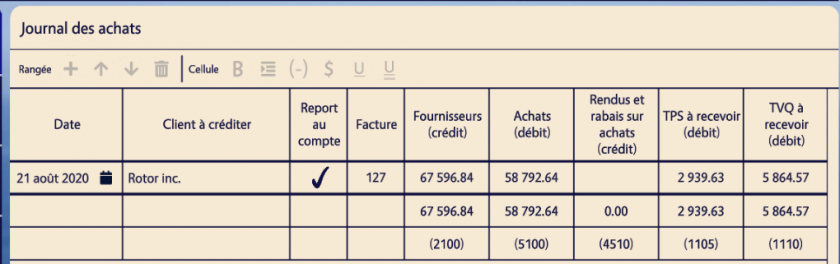
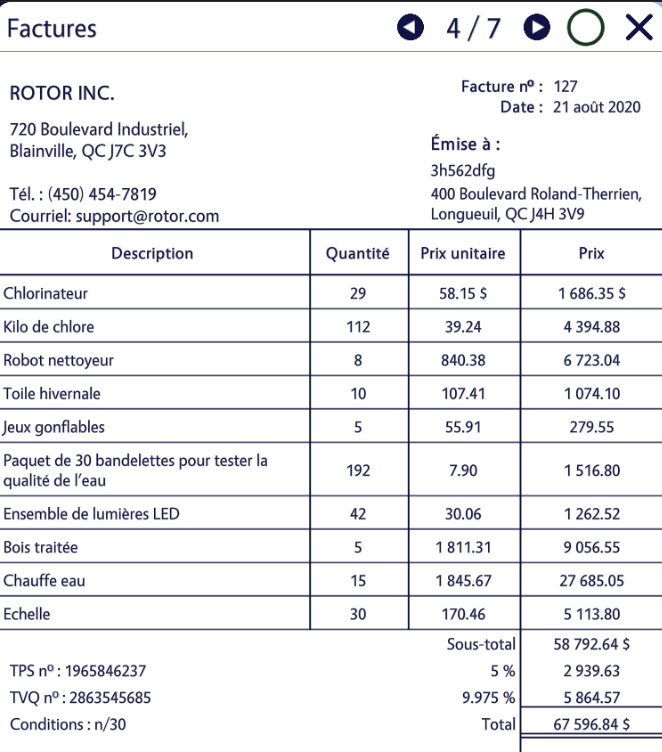
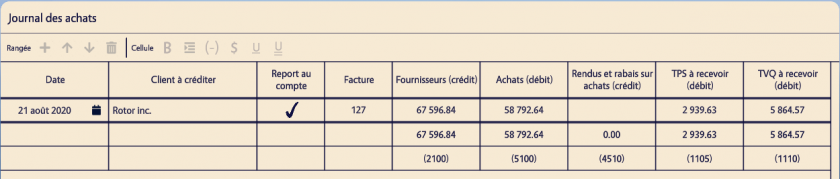
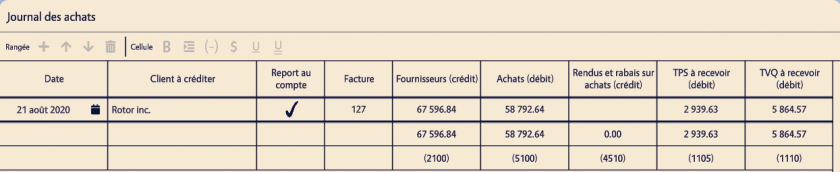
##### 1. Journals des achats (facture de type: "provider")
![](https://wiki.uniksim.com/uploads/images/gallery/2021-04-Apr/scaled-840-0/image-1618406834492.png)![](https://wiki.uniksim.com/uploads/images/gallery/2021-04-Apr/scaled-840-0/image-1618406432813.png)

1. Pour chacune des facture de type "provider", ajouter une row. 
    1. (2pts) Date -&gt;Date écrite sur la facture
    2. (2pts) Client à créditer -&gt; Nom du fournisseur
    3. (1pts) Report au compte -&gt; si la row a été reporter au Grand Livre aux.
    4. (Identifiant de la row) Facture -&gt; le numero de la facture
    5. (4pts) Fournisseurs (crédit) -&gt; le "Total" de la facture
    6. (4pts) Achats (débit) -&gt; le "Sous-total" de la facture
    7. (2pts) Rendus et ravais sur achats (crédit) -&gt; le rabais de la facture
    8. (2pts) TPS à recevoir (débit) -&gt; le "TPS (5%)" de la facture
    9. (2pts) TVQ à recevoir (débit) -&gt; le "TVQ (9.975%)" de la facture

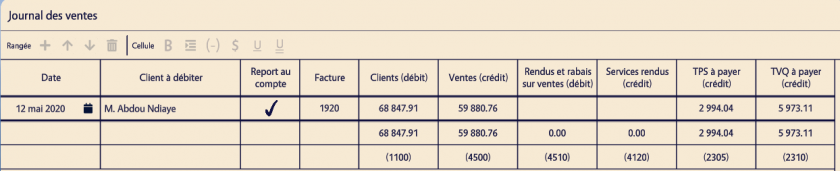
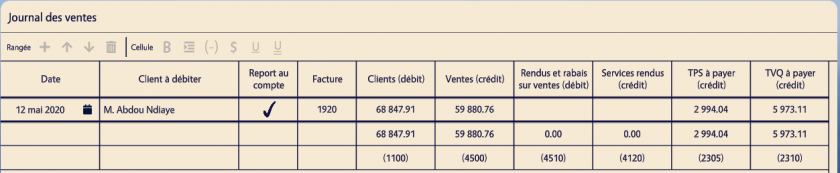
##### 2. Journals des ventes (facture de type: "client")
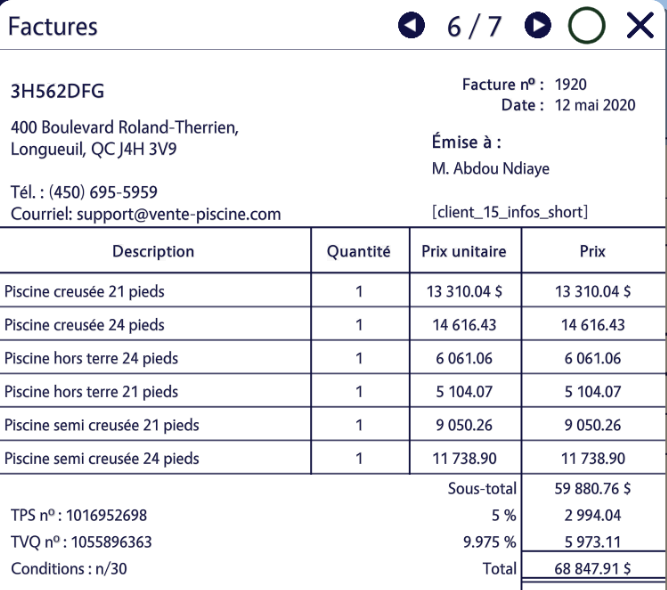
![](https://wiki.uniksim.com/uploads/images/gallery/2021-04-Apr/scaled-840-0/image-1618409064873.png)![](https://wiki.uniksim.com/uploads/images/gallery/2021-04-Apr/scaled-840-0/image-1618409147361.png)

1. Pour chacune des facture de type "client", ajouter une row. 
    1. (2pts) Date -&gt;Date écrite sur la facture
    2. (2pts) Client à débiter-&gt; Nom du client
    3. (1pts) Report au compte -&gt; si la row a été reporter au Grand Livre aux.
    4. (Identifiant de la row) Facture -&gt; le numero de la facture
    5. (4pts) Clients (débit) -&gt; le "Total" de la facture
    6. (4pts) Ventes (crédit) -&gt; le "Sous-total" de la facture
    7. (2pts) Rendus et rabais sur ventes -&gt; le rabais de la facture
    8. (2pts) TPS à payer (crédit) -&gt; le "TPS (5%)" de la facture
    9. (2pts) TVQ à payer (crédit) -&gt; le "TVQ (9.975%)" de la facture

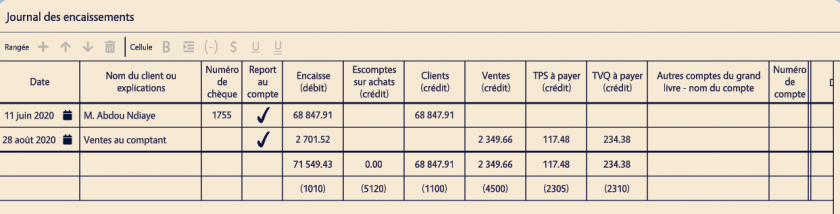
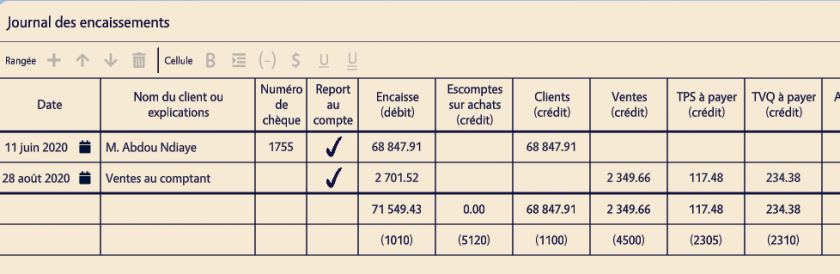
##### 3. Journals des encaissements (facture de type: "client\_check" et "retail\_sales")
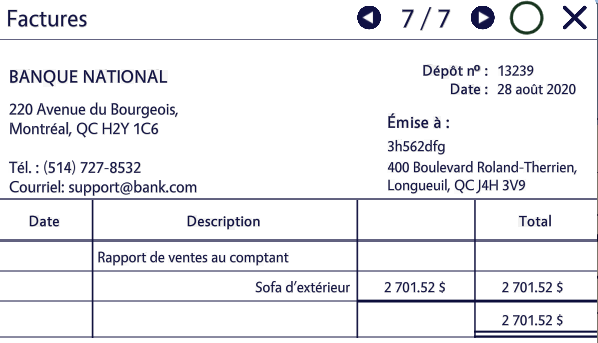
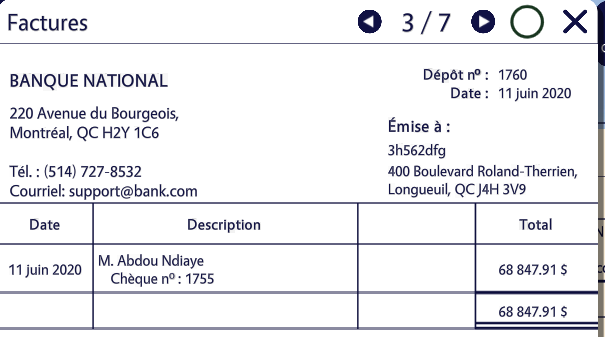
![](https://wiki.uniksim.com/uploads/images/gallery/2021-04-Apr/scaled-840-0/image-1618409518625.png)![](https://wiki.uniksim.com/uploads/images/gallery/2021-04-Apr/scaled-840-0/image-1618409470362.png)

![](https://wiki.uniksim.com/uploads/images/gallery/2021-04-Apr/scaled-840-0/image-1618409548494.png)

1. Pour chacune des facture de type "client\_check", ajouter une row. 
    1. (2pts) Date -&gt;Date écrite sur la facture
    2. (2pts) Nom du client ou explications -&gt; Nom du client inscrit dans la section "Description"
    3. (2pts) Numéro du chèque -&gt; le numero de chèque inscrit dans la section "Description"
    4. (2pts) Report au compte -&gt; si la row a été reporter au Grand Livre aux.
    5. (2pts) Encaisse (débit) -&gt; le montant inscrit dans la section "Total"
    6. (2pts) Clients (crédit) -&gt; le montant inscrit dans la section "Total"
2. Pour chacune des facture de type "retail\_sales", ajouter une row. 
    1. Date -&gt;Date écrite sur la facture
    2. Nom du client ou explications -&gt; "Ventes au comptant"
    3. Report au compte -&gt; si la row a été reporter au Grand Livre aux.
    4. Encaisse (débit) -&gt; le montant inscrit dans la section "Total"
    5. Ventes (crédit) -&gt; le montant doit être calculer en retirant les taxes du "Total" ("Total" / 1.14975)
    6. TPS à payer (crédit) -&gt; le montant doit être calculer (montant de ventes \* 0.05)
    7. TVQ à payer (crédit) -&gt; le montant doit être calculer (montant de ventes \* 0.09975)

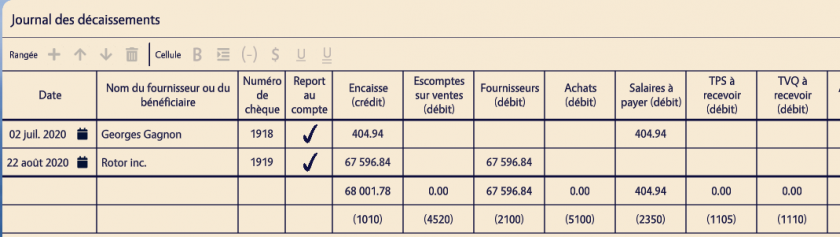
##### 4. Journals des Décaissements (facture de type: "provider\_check" et "employee\_check")
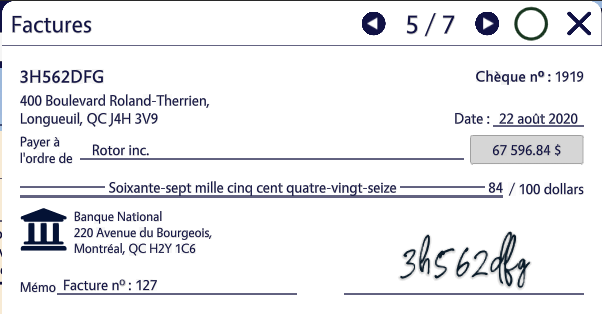
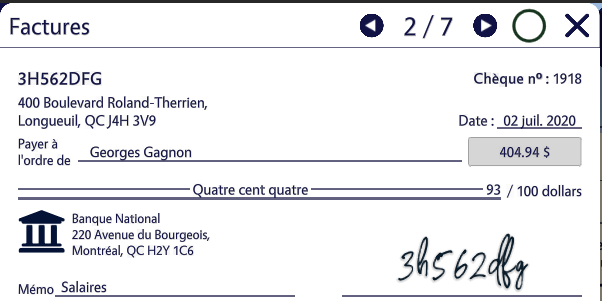
![](https://wiki.uniksim.com/uploads/images/gallery/2021-04-Apr/scaled-840-0/image-1618411725504.png)![](https://wiki.uniksim.com/uploads/images/gallery/2021-04-Apr/scaled-840-0/image-1618411802557.png)

![](https://wiki.uniksim.com/uploads/images/gallery/2021-04-Apr/scaled-840-0/image-1618411823865.png)

1. Pour chacune des facture de type "provider\_check", ajouter une row. 
    1. Date -&gt;Date écrite sur la facture
    2. Nom du fournisseur ou du bénéficiaire -&gt; Nom du Fournisseurs inscrit après "Payer à l'ordre de"
    3. Numéro du chèque -&gt; le numero de chèque
    4. Report au compte -&gt; si la row a été reporter au Grand Livre aux.
    5. Encaisse (crédit) -&gt; le montant inscrit dans l'encadré à droite
    6. Fournisseurs (débit) -&gt; le montant inscrit dans l'encadré à droite
2. Pour chacune des facture de type "employee\_check", ajouter une row. 
    1. Date -&gt;Date écrite sur la facture
    2. Nom du fournisseur ou du bénéficiaire -&gt; Nom du Fournisseurs inscrit après "Payer à l'ordre de"
    3. Numéro du chèque -&gt; le numero de chèque
    4. Report au compte -&gt; si la row a été reporter au Grand Livre aux.
    5. Encaisse (crédit) -&gt; le montant inscrit dans l'encadré à droite
    6. Salaires à payer (débit) -&gt; le montant inscrit dans l'encadré à droite

##### 5. Journals des salaires(facture de type: "employee")
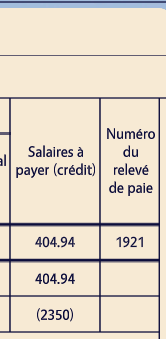
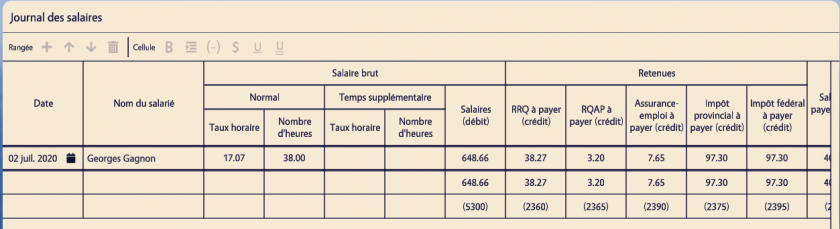
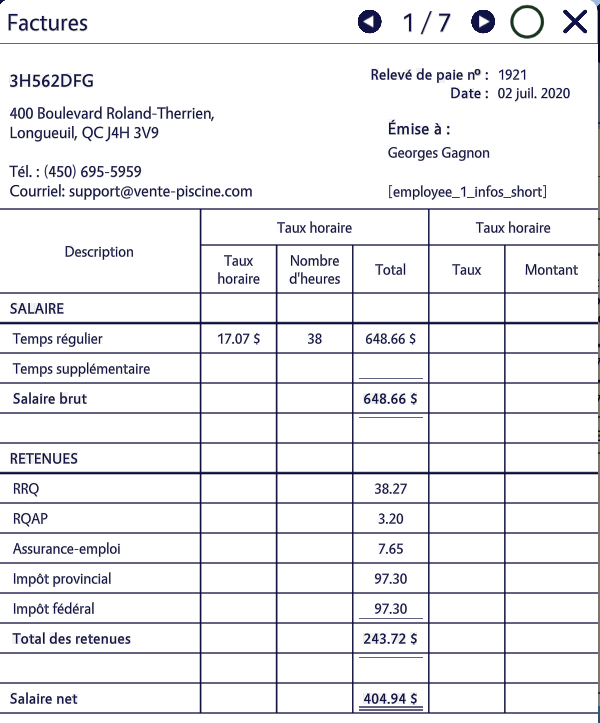
![](https://wiki.uniksim.com/uploads/images/gallery/2021-04-Apr/scaled-840-0/image-1618415449273.png)![](https://wiki.uniksim.com/uploads/images/gallery/2021-04-Apr/scaled-840-0/image-1618415515095.png)![](https://wiki.uniksim.com/uploads/images/gallery/2021-04-Apr/scaled-840-0/image-1618415530765.png)

1. Pour chacune des facture de type "employee", ajouter une row. 
    1. Date -&gt; Date écrite sur la facture
    2. Nom du salarié -&gt; Nom de l'employée écrit sous "Émise à"
    3. Taux horaire -&gt; montant dans la section "Taux horaire" de la facture
    4. Nombre d'heures -&gt; montant dans la section "Nombre d'heures" de la facture
    5. Salaires (débit) -&gt; "Salaire brut" de la facture
    6. RRQ à payer (crédit) -&gt; "RRQ" dans la secton "Retenus" de la facture
    7. RQAP à payer (crédit) -&gt; "RQAP" dans la secton "Retenus" de la facture
    8. Assurance-emploi à payer (crédit) -&gt; "Assurance-emploi" dans la secton "Retenus" de la facture
    9. Impôt provincial à payer (crédit) -&gt; "Impôt provincial" dans la secton "Retenus" de la facture
    10. Impôt fédéral à payer (crédit) -&gt; "Impôt fédéral" dans la secton "Retenus" de la facture
    11. Salaires à payer (crédit) -&gt; "Salaire net" de la facture
    12. Numéro du relevé de paie -&gt; le numéro de relevé de paie écrit sur la facture en haut à droite

### Étape 3: Remplir les grands livres auxiliaires

##### 1. Grand livre auxiliaire des fournisseurs


![](https://wiki.uniksim.com/uploads/images/gallery/2021-04-Apr/scaled-840-0/image-1618417068113.png)![](https://wiki.uniksim.com/uploads/images/gallery/2021-04-Apr/scaled-840-0/image-1618417085885.png)![](https://wiki.uniksim.com/uploads/images/gallery/2021-04-Apr/scaled-840-0/image-1618417028474.png)

1. Pour chacune des rows qui affecte un fournisseur dans le journal des achats/décaissements, ajouter une row. (les rows doivent être trier par date) 
    1. Date -&gt; Date de la row de référence
    2. Facture -&gt; Si la row de référence vient du Journal des achats, écrire le numéro de la facture
    3. Libellé -&gt; Si la row de référence vient du Journals des décaissements, écrire si c'est un chèque ou une note de crédit, et écrire le numéro de la facture
    4. Référence -&gt; D'où vient la row de référence
    5. Débit -&gt; Si la colonne de fournisseur de la row de référence est du type "débit", écrire le même montant
    6. Crédit -&gt; Si la colonne de fournisseur de la row de référence est du type "crédit", écrire le même montant
    7. Solde -&gt; montant du "solde" de la row précédente +/- le montant de débit/crédit de la row actuel
    8. Dt / Ct -&gt; si le montant du solde est en Débit ou en Crédit ##### 2. Grand livre auxiliaire des clients
        
        ![](https://wiki.uniksim.com/uploads/images/gallery/2021-04-Apr/scaled-840-0/image-1618423536161.png)
        
        ![](https://wiki.uniksim.com/uploads/images/gallery/2021-04-Apr/scaled-840-0/image-1618423552111.png)
        
        ![](https://wiki.uniksim.com/uploads/images/gallery/2021-04-Apr/scaled-840-0/image-1618423575884.png)
        
        
        1. Pour chacune des rows qui affecte un fournisseur dans le journal des ventes/encaissements, ajouter une row. (les rows doivent être trier par date) 
            1. Date -&gt; Date de la row de référence
            2. Facture -&gt; Si la row de référence vient du Journal des ventes, écrire le numéro de la facture
            3. Libellé -&gt; Si la row de référence vient du Journals des encaissements, écrire si c'est un chèque ou une note de crédit, et écrire le numéro de la facture
            4. Référence -&gt; D'où vient la row de référence
            5. Débit -&gt; Si la colonne de fournisseur de la row de référence est du type "débit", écrire le même montant
            6. Crédit -&gt; Si la colonne de fournisseur de la row de référence est du type "crédit", écrire le même montant
            7. Solde -&gt; montant du "solde" de la row précédente +/- le montant de débit/crédit de la row actuel
            8. Dt / Ct -&gt; si le montant du solde est en Débit ou en Crédit

### Étape 3: Remplir le grand livre et le journal général

##### 1. Grand livre

![](https://wiki.uniksim.com/uploads/images/gallery/2021-04-Apr/scaled-840-0/image-1618424226005.png)![](https://wiki.uniksim.com/uploads/images/gallery/2021-04-Apr/scaled-840-0/image-1618424238050.png)![](https://wiki.uniksim.com/uploads/images/gallery/2021-04-Apr/scaled-840-0/image-1618424777307.png)

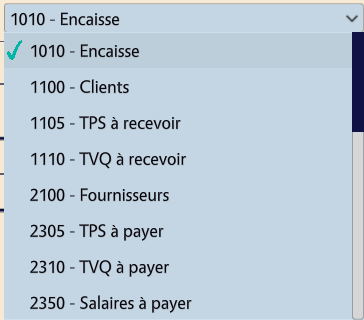
1. Remplir chacun des comptes disponible à l'aide des montants total afficher dans l'avant dernière ligne des journals (Achats, Ventes, Encaissements, Décaissements, Salaires) 
    1. Date -&gt; Date de la fin de l'exercise financier
    2. Référence -&gt; de quel Journal vient le montant
    3. Débit ou Crédit -&gt; Selon le type de la colonne du journals en question, écrire le montant du total (Avant dernière ligne)
    4. Solde -&gt; montant du "solde" de la row précédente +/- le montant de débit/crédit de la row actuel
    5. Dt / Ct -&gt; si le montant du solde est en Débit ou en Crédit ##### 2. Journal général
        
        ![](https://wiki.uniksim.com/uploads/images/gallery/2021-04-Apr/scaled-840-0/image-1618425524512.png)
        
        
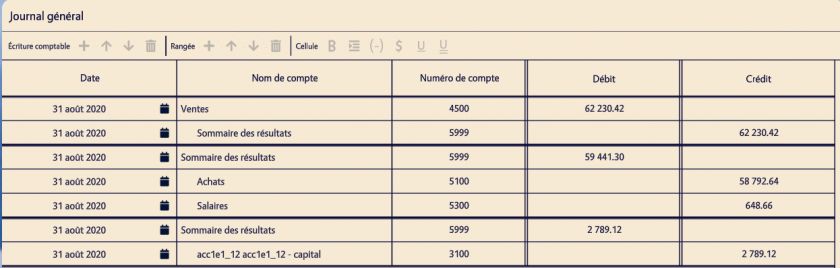
        1. Remplir le journal général à l'aide du solde final des comptes dans le Grand libre.
        2. 3 Sections qui regroupe des compte differents devront être présent: Produits, Charges et Équité.
        3. L'ordre de la section de produits ou de charges n'a pas d'importance mais, la section d'équité doit être à la fin.
        4. Dans le cas de la section de produits, les comptes doivent être en premier dans la section sans indentation et le sommaire des résultats doit être à la fin avec un niveau d'indentation de 1
        5. Pour le cas de la section de charges, c'est l'inverse, le sommaire des résultats doit être en premier sans indentation tandis que les comptes doivent être à la fin avec un niveau d'indentation de 1
        6. Pour le cas de la section d'équité, le placement dans la section dépend de si les charges sont plus haute que les produits. Si les Produits sont plus grand, le sommaire des résultats est en premier sans indentation et le compte de capitaux est en deuxième avec un niveau d'indentation de 1. Si les Charges sont plus grande, la section des capitaux est en premier sans indentation et le sommaire des résultats est en deuxième avec un niveau d'indentation de 1
        7. La valeur à écrire dans la section équité est la valeur absolue des produits moins les charges.
        8. Dans chaque section, l'entrée sur le sommaire des résultats sert à balancer la somme du reste de la section dans type opposée.
        9. Remplir une row 
            1. Date -&gt; date de fin de l'exercise financier
            2. Nom de compte -&gt; Voir les informations en haut
            3. Numéro de compte -&gt; numéro associé au nom du compte
            4. Débit -&gt; Si le compte est de produits ou voir les informations en haut
            5. Crédit -&gt; Si le compte est de charges ou voir les informations en haut

##### 3. Grand livre (Suite)
![](https://wiki.uniksim.com/uploads/images/gallery/2021-04-Apr/scaled-840-0/image-1618428476327.png)

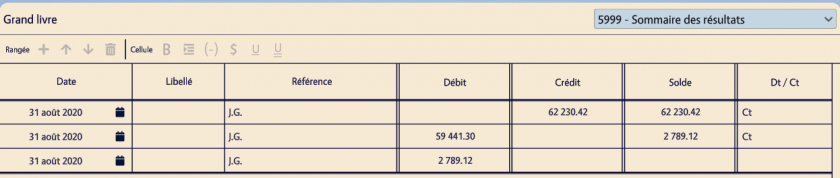
1. Pour chacune des lignes dans le journal général, ajouter une ligne dans le compte approprié du Grand livre  
    
    1. Date -&gt; Date de la fin de l'exercise financier
    2. Référence -&gt; Journal général
    3. Débit ou Crédit -&gt; Selon le type de la colonne du montant, écrire le montant.
    4. Solde -&gt; montant du "solde" de la row précédente +/- le montant de débit/crédit de la row actuel
    5. Dt / Ct -&gt; si le montant du solde est en Débit ou en

### Étape 4: Remplir la balance de vérification

##### 1. Balance de vérification

![](https://wiki.uniksim.com/uploads/images/gallery/2021-04-Apr/scaled-840-0/image-1618428669454.png)![](https://wiki.uniksim.com/uploads/images/gallery/2021-04-Apr/scaled-840-0/image-1618429169303.png)

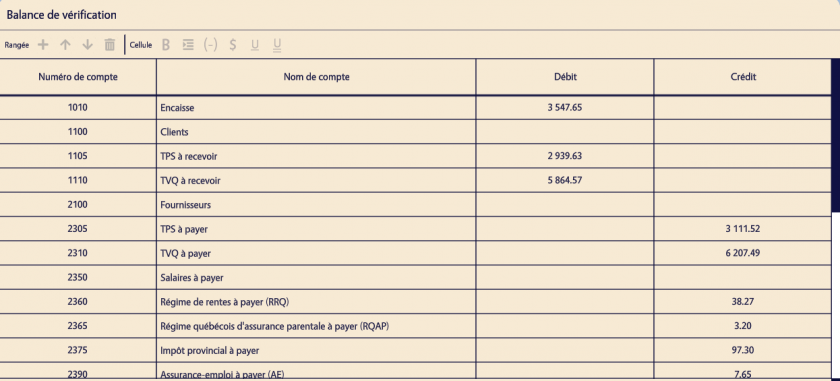
1. Pour chaque compte du grand livre, ajouter une ligne pour le compte correspondant (Trier par numéro de compte) 
    1. Numéro de compte -&gt; Numéro du compte
    2. Nom du compte -&gt; Nom du compte
    3. Débit/Crédit -&gt; Écrire le solde final du compte (Sans compter les lignes dont la référence est le journal général) dans la colonne que Dt/Ct indique et si le compte à un solde ne rien écrire dans aucun des deux champs

### Étape 5: Remplir les états financiers

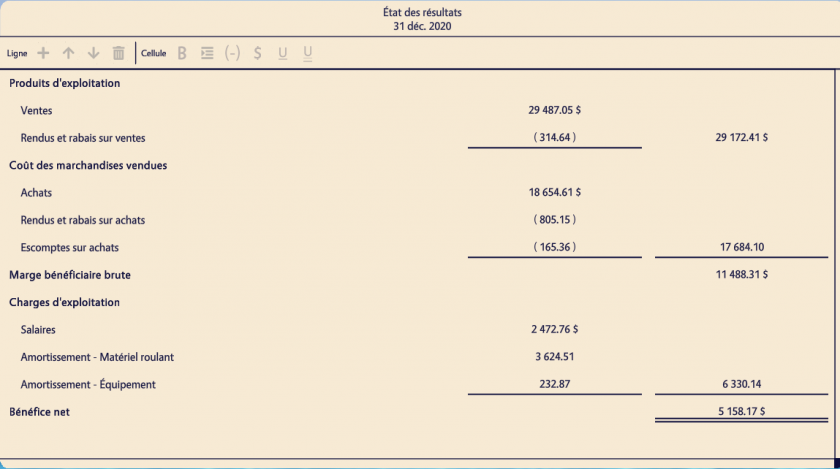
##### 1. État des résultats
![](https://wiki.uniksim.com/uploads/images/gallery/2021-04-Apr/scaled-840-0/image-1618429656696.png)

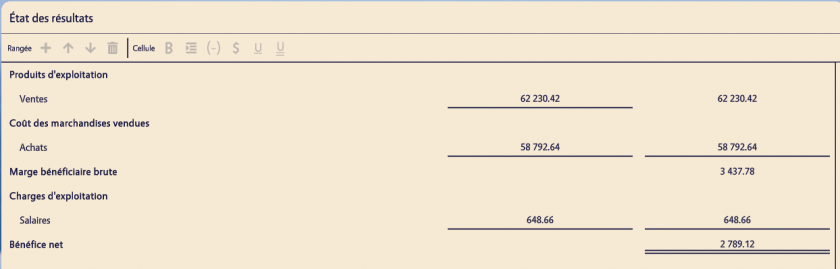
1. Section Produits d'exploitation 
    1. Ajouter une ligne pour chaque compte de produits et la valeur du compte dans l'input de gauche
    2. La dernière ligne de la section doit avoir le montant total de la section dans l'input de droite et avoir l'input de gauche avec un underline.
2. Section Coût des marchandises vendues 
    1. Ajouter une ligne pour chaque compte de charges (avec sous type Coût des marchandises vendues) et la valeur du compte dans l'input de gauche
    2. La dernière ligne de la section doit avoir le montant total de la section dans l'input de droite et avoir l'input de gauche et de droite avec un underline.
3. Input de Marge bénéficiaire brute 
    1. Le montant de l'input est calculé à l'aide du total de la section Produits d'exploitation moins le total de la section Coût des marchandises vendues
4. Section Charges d'exploitation 
    1. Ajouter une ligne pour chaque compte de charges (avec sous type Charges d'exploitation) et la valeur du compte dans l'input de gauche
    2. La dernière ligne de la section doit avoir le montant total de la section dans l'input de droite et avoir l'input de gauche et de droite avec un underline.
5. Input de Bénéfice net 
    1. Le montant de l'input est calculé à l'aide de l'input Marge bénéficiaire brute moins le total de la section Charges d'eploitation
    2. Avoir deux underline.

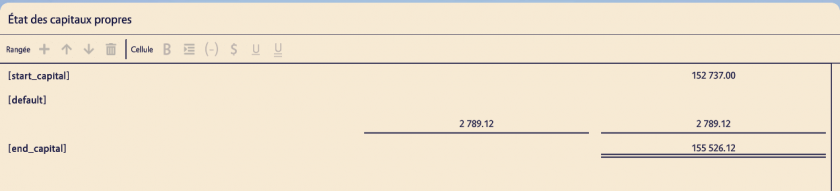
##### 2. État des capitaux propres
![](https://wiki.uniksim.com/uploads/images/gallery/2021-04-Apr/scaled-840-0/image-1618431466123.png)

1. Input de capital au début de l'exercise financier 
    1. Capitals au départ de l'états financiers
2. Pour les lignes, ajouter une ligne par choses qui impact le capital finaux de l'entreprise. 
    1. Écrire le montant de l'impact dans l'input de gauche
    2. La dernière ligne de la section doit avoir le montant total de la section dans l'input de droite et avoir l'input de gauche et de droite avec un underline.
3. Input du capital à la fin de l'exercise financier 
    1. Le montant de l'input est calculé à l'aide de l'input capital au début de l'exercise financier plus le total de la section Charges d'eploitation ##### 3. Bilan
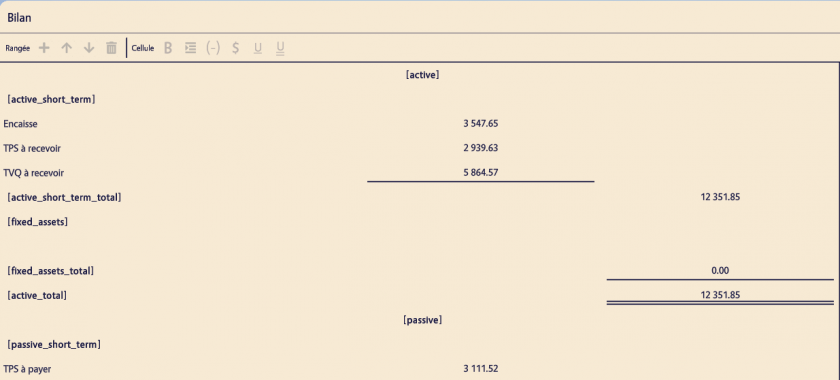
        
        ![](https://wiki.uniksim.com/uploads/images/gallery/2021-04-Apr/scaled-840-0/image-1618433404400.png)
        
        ![](https://wiki.uniksim.com/uploads/images/gallery/2021-04-Apr/scaled-840-0/image-1618433422063.png)
        
        
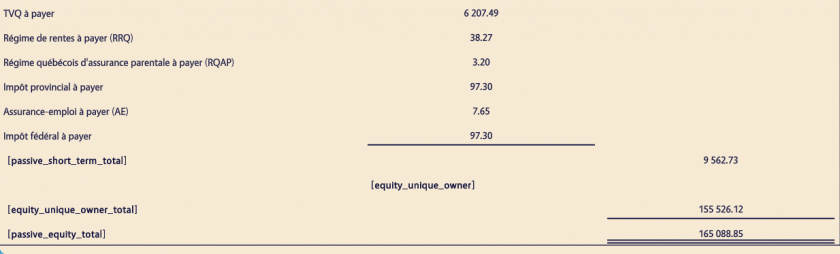
        1. Section d'Actif à court terme 
            1. Ajouter une ligne pour chaque compte d'actif à court terme et la valeur du compte dans l'input de gauche
            2. La dernière ligne doit avoir un underline sur l'input de gauche
        2. Input de Total d'actif à court terme 
            1. Le montant de l'input est calculé à l'aide du total de la Section d'actif à court terme
        3. Section d'Immobilisations 
            1. Ajouter une ligne pour chaque compte d'Immobilisations et la valeur du compte dans l'input de gauche
            2. La dernière ligne doit avoir un underline sur l'input de gauche
        4. Input de Total d'immobilisations 
            1. Le montant de l'input est calculé à l'aide du total de la Section d'immobilisations
            2. Doit avoir un underline
        5. Input de Total des actifs 
            1. Le montant de l'input est calculé à l'aide du total de l'input de Total d'actif à court terme plus Input de Total d'immobilisations
            2. Doit avoir deux underline
        6. Section de passif à court terme 
            1. Ajouter une ligne pour chaque compte de passif à court terme et la valeur du compte dans l'input de gauche
            2. La dernière ligne doit avoir un underline sur l'input de gauche
        7. Input de Total de passif à court terme 
            1. Le montant de l'input est calculé à l'aide du total de la Section de passif à court terme
        8. Section Capitaux propres 
            1. Avoir une ligne pour le et écrire le capitals final de l'entreprise dans l'input de droite et avoir un underline
        9. Input de Total des actifs 
            1. Le montant de l'input est calculé à l'aide du total de l'input de Total de passif à court terme plus le total de la section Capitaux propres
            2. Doit avoir deux underline.

# Pointage des differents champs
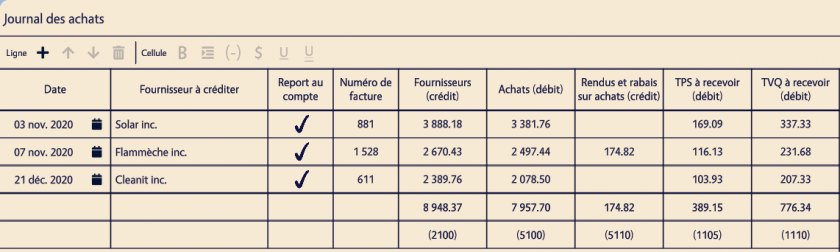
![](https://wiki.uniksim.com/uploads/images/gallery/2021-07-Jul/scaled-840-0/image-1627673226300.png)

1. (2pts) Date
2. (Identifiant de la ligne) Fournisseur à créditer
3. (1pts) Report au compte
4. (Identifiant de la ligne) Facture
5. (4pts) Fournisseurs (crédit)
6. (4pts) Achats (débit)
7. (2pts) Rendus et ravais sur achats (crédit)
8. (2pts) TPS à recevoir (débit)
9. (2pts) TVQ à recevoir (débit)
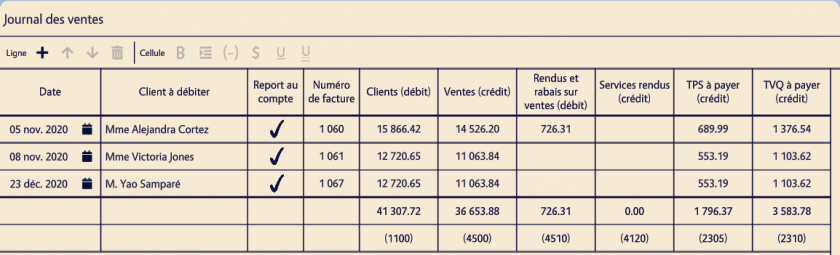
![](https://wiki.uniksim.com/uploads/images/gallery/2021-07-Jul/scaled-840-0/image-1627673339470.png)

1. (2pts) Date
2. (Identifiant de la ligne) Client à débiter
3. (1pts) Report au compte
4. (Identifiant de la ligne) Facture
5. (4pts) Clients (débit)
6. (4pts) Ventes (crédit)
7. (2pts) Rendus et rabais sur ventes
8. (2pts) TPS à payer (crédit)
9. (2pts) TVQ à payer (crédit)
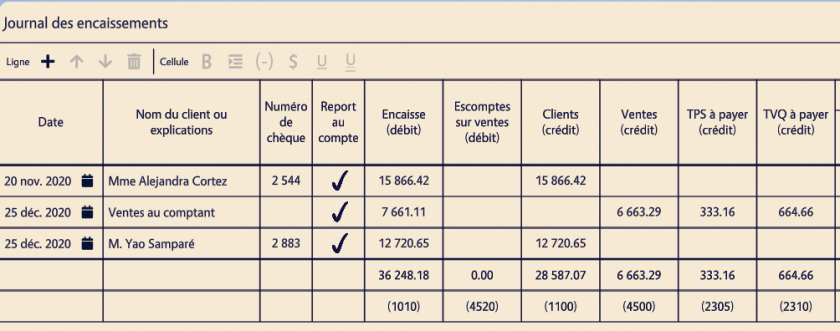
![](https://wiki.uniksim.com/uploads/images/gallery/2021-07-Jul/scaled-840-0/image-1627673486868.png)

1. (2pts) Date -&gt;Date écrite sur la facture
2. (identifiant de la ligne) Nom du client ou explications
3. (identifiant de la ligne) Numéro du chèque
4. (1pts) Report au compte
5. (4pts) Encaisse (débit)
6. (4pts) Clients (crédit)
7. (4pts) Ventes (crédit)
8. (2pts) TPS à payer (crédit)
9. (2pts) TVQ à payer (crédit)
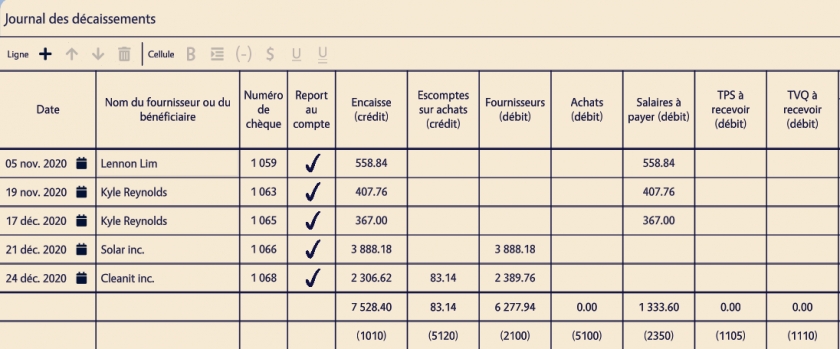
![](https://wiki.uniksim.com/uploads/images/gallery/2021-07-Jul/scaled-840-0/image-1627673706486.png)

1. (2pts) Date
2. (identifiant de la ligne) Nom du fournisseur ou du bénéficiaire
3. (identifiant de la ligne) Numéro du chèque
4. (1pts) Report au compte
5. (4pts) Encaisse (crédit)
6. (4pts) Fournisseurs (débit)
7. (4pts) Salaires à payer (débit)
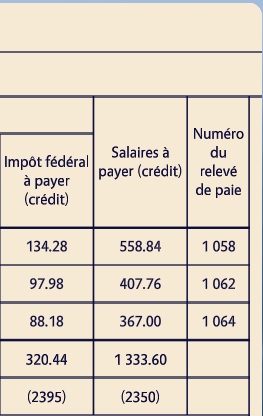
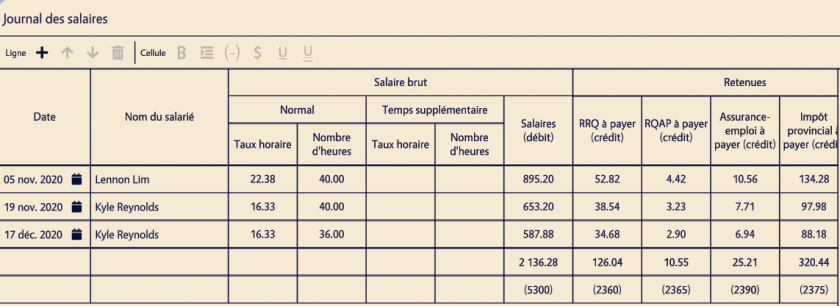
![](https://wiki.uniksim.com/uploads/images/gallery/2021-07-Jul/scaled-840-0/image-1627673928070.png)![](https://wiki.uniksim.com/uploads/images/gallery/2021-07-Jul/scaled-840-0/image-1627673944845.png)

1. (2pts) Date
2. (2pts) Nom du salarié
3. (2pts) Taux horaire
4. (2pts) Nombre d'heures
5. (2pts) Salaires (débit)
6. (2pts) RRQ à payer (crédit)
7. (2pts) RQAP à payer (crédit)
8. (2pts) Assurance-emploi à payer (crédit)
9. (2pts) Impôt provincial à payer (crédit)
10. (2pts) Impôt fédéral à payer (crédit)
11. (2pts) Salaires à payer (crédit)
12. (identifiant de la ligne) Numéro du relevé de paie
![](https://wiki.uniksim.com/uploads/images/gallery/2021-07-Jul/scaled-840-0/image-1627674852336.png)

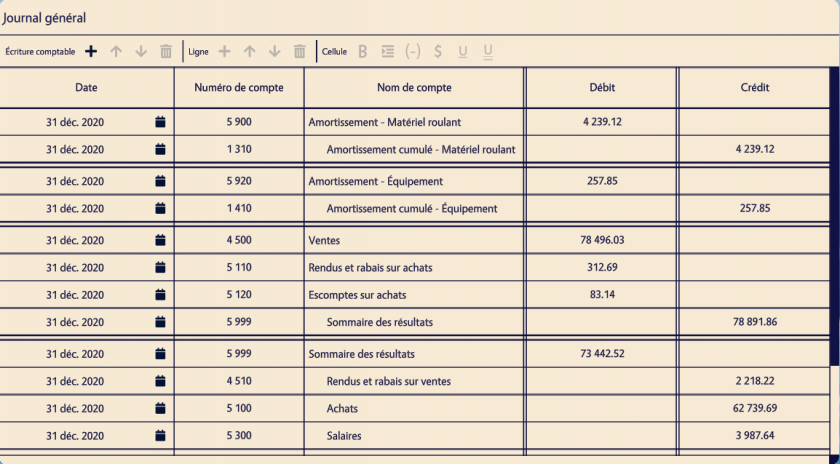
1. (2pts) Date
2. (1pts) Numéro de compte
3. (2pts) Nom de compte
4. (2pts) Débit
5. (2pts) Crédit
![](https://wiki.uniksim.com/uploads/images/gallery/2021-07-Jul/scaled-840-0/image-1627675014601.png)

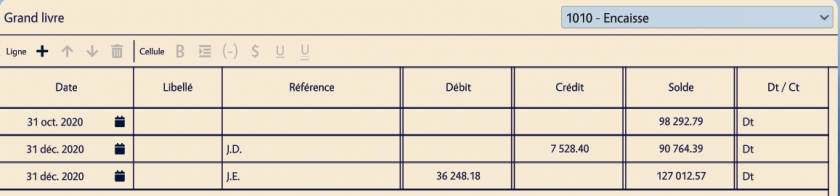
1. (2pts) Date
2. (2pts) Référence
3. (2pts) Débit
4. (2pts) Crédit
5. (2pts) Solde
6. (2pts) Dt / Ct

![](https://wiki.uniksim.com/uploads/images/gallery/2021-07-Jul/scaled-840-0/image-1627675163985.png)![](https://wiki.uniksim.com/uploads/images/gallery/2021-07-Jul/scaled-840-0/image-1627675592424.png)

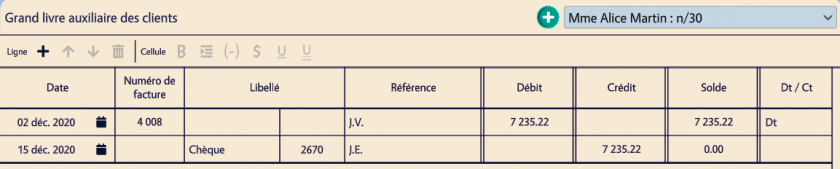
1. (2pts) Date
2. (identifiant de la ligne) Numéro de facture
3. (identifiant de la ligne) Libellé
4. (2pts) Référence
5. (2pts) Débit
6. (2pts) Crédit
7. (2pts) Solde
8. (2pts) Dt / Ct
![](https://wiki.uniksim.com/uploads/images/gallery/2021-07-Jul/scaled-840-0/image-1627675624918.png)

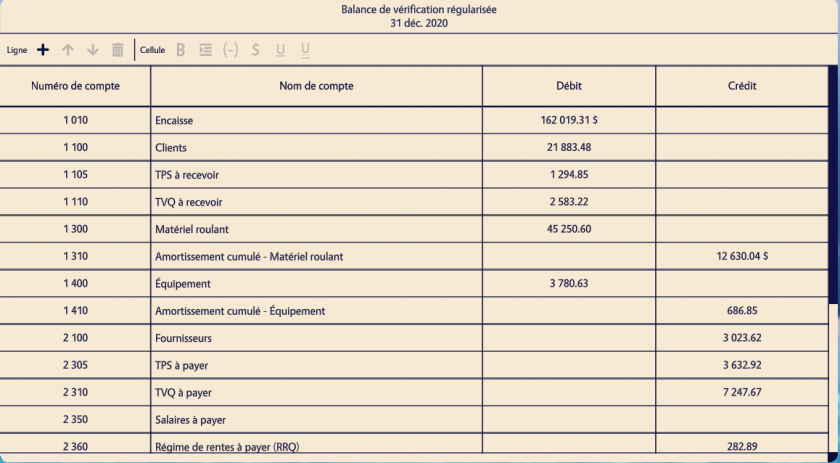
1. (identifiant de la ligne) Numéro de compte
2. (identifiant de la ligne) nom de compte
3. (2pts) Débit
4. (2pts) Crédit
![](https://wiki.uniksim.com/uploads/images/gallery/2021-07-Jul/scaled-840-0/image-1627676840867.png)

Inputs dans les sections avec des tabulations : 1pts chaque pour un total de 45% du modulePage

Inputs à droite des textes en gras : 1pts chaque pour un total de 25% du modulePage

10% du modulePage pour que les comptes soit dans les bonnes sections

20% du modulePage pour que les options des inputs soit bonnes ($, underline, signe négatif)

![](https://wiki.uniksim.com/uploads/images/gallery/2021-07-Jul/scaled-840-0/image-1627677110260.png)

Inputs dans les sections avec des tabulations : 1pts chaque pour un total de 50% du modulePage

Inputs à droite des textes en gras : 1pts chaque pour un total de 30% du modulePage

20% du modulePage pour que les options des inputs soit bonnes ($, underline, signe négatif)
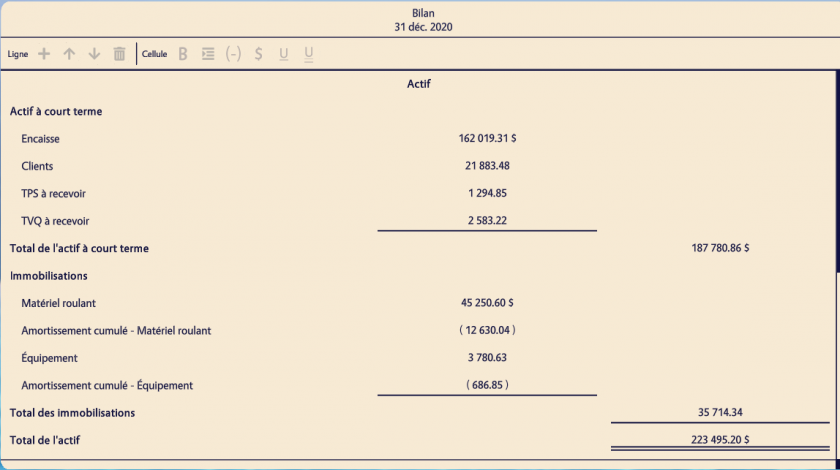
![](https://wiki.uniksim.com/uploads/images/gallery/2021-07-Jul/scaled-840-0/image-1627677121139.png)

Inputs dans les sections avec des tabulations : 1pts chaque pour un total de 45% du modulePage

Inputs à droite des textes en gras : 1pts chaque pour un total de 25% du modulePage

10% du modulePage pour que les comptes soit dans les bonnes sections

20% du modulePage pour que les options des inputs soit bonnes ($, underline, signe négatif)

# Préférences

<p class="callout info">Les dépendances sont présentés sous forme d'une **condition**.</p>

<p class="callout info">Pour les préférences de type **string**, c'est l'une des valeurs possibles qui sera le uid inscrit dans la condition. (e.g. La condition *products\_company* provient de la préférence *our\_company\_type*)</p>

<p class="callout info">Pour les préférences de type **int**, la valeur attendue est inscrite sous forme de condition. (e.g. *num\_columns* == 3)</p>

### Présentation des préférences

#### Préférences des modules

<table border="1" cellpadding="-5" id="bkmrk-nom-description-%C2%A0-%C2" style="height: 1120px; width: 100%; border-collapse: collapse; border-color: #000000; border-style: solid;"><tbody><tr style="height: 37px;"><td class="align-left" style="width: 32.9631%; height: 37px; vertical-align: middle; background-color: #f2f2f2;">**Uid**</td><td class="align-center align-left" style="width: 8.0864%; vertical-align: middle; height: 37px; background-color: #f2f2f2;">**Wizard**

</td><td class="align-left" style="width: 7.34564%; height: 37px; vertical-align: middle; background-color: #f2f2f2;">**Type**

</td><td class="align-left" style="width: 20.2469%; height: 37px; vertical-align: middle; background-color: #f2f2f2;">**Valeur par défaut** (constants)

\+ Valeurs possibles

</td><td class="align-left" style="width: 31.358%; height: 37px; vertical-align: middle; background-color: #f2f2f2;">**Description**

\+ Dépendances

</td></tr><tr style="height: 30px;"><td style="width: 32.9631%; height: 30px;"><div><div>our_company_type</div></div></td><td class="align-center" style="width: 8.0864%; vertical-align: middle; height: 30px;">✔

</td><td style="width: 7.34564%; height: 30px;">string

</td><td style="width: 20.2469%; height: 30px;"><div><div>products_company</div></div><div></div><div><span style="text-decoration: underline;">Valeurs possibles</span></div><div><div>- products_company</div><div>- services_company</div><div>- products_and</div><div> _services_company</div></div></td><td style="width: 31.358%; height: 30px;">Choix du type de companie

</td></tr><tr style="height: 31px;"><td style="width: 32.9631%; height: 31px;"><div><div>stock_type</div></div></td><td class="align-center" style="width: 8.0864%; vertical-align: middle; height: 31px;">✔</td><td style="width: 7.34564%; height: 31px;">string</td><td style="width: 20.2469%; height: 31px;"><div><div>permanent_stock</div></div><div><div><div></div></div><div><span style="text-decoration: underline;">Valeurs possibles</span>  
<div>- permanent_stock <div>- periodic_stock</div></div></div></div></td><td style="width: 31.358%; height: 31px;">Choix du type de stock <span style="text-decoration: underline;">Dépendances</span>

products\_company ||

<div><div>products_and_services_company</div></div></td></tr><tr style="height: 31px;"><td style="width: 32.9631%; height: 31px;"><div><div><div><div>has_taxes</div></div></div></div></td><td class="align-center" style="width: 8.0864%; vertical-align: middle; height: 31px;">✔</td><td style="width: 7.34564%; height: 31px;">bool</td><td style="width: 20.2469%; height: 31px;"><div><div>true</div></div></td><td style="width: 31.358%; height: 31px;">Contient des taxes à la consommation</td></tr><tr style="height: 31px;"><td style="width: 32.9631%; height: 30px;"><div><div>has_decimals</div></div></td><td class="align-center" style="width: 8.0864%; vertical-align: middle; height: 30px;">✔</td><td style="width: 7.34564%; height: 30px;">bool</td><td style="width: 20.2469%; height: 30px;"><div><div>true</div></div></td><td style="width: 31.358%; height: 30px;">Contient des valeurs décimales (s'il y a lieu, 2 décimales par défaut)

<span style="text-decoration: underline;">Dépendances</span>

has\_taxes

</td></tr><tr style="height: 31px;"><td style="width: 32.9631%; height: 31px;"><div><div><div><div>has_deductions</div></div></div></div></td><td class="align-center" style="width: 8.0864%; vertical-align: middle; height: 31px;">✔</td><td style="width: 7.34564%; height: 31px;">bool</td><td style="width: 20.2469%; height: 31px;"><div><div>true</div></div></td><td style="width: 31.358%; height: 31px;">Contient des e<span data-sheets-userformat="{"2":13185,"3":{"1":0},"10":2,"11":4,"12":0,"15":"Arial","16":11}" data-sheets-value="{"1":2,"2":"Escomptes sur ventes et achats"}">scomptes sur ventes et achats (avec les conditions de paiement e.g. 2/10 n/30)</span></td></tr><tr style="height: 31px;"><td style="width: 32.9631%; height: 31px;"><div><div><div><div>uses_auxiliary_journals</div></div></div></div></td><td class="align-center" style="width: 8.0864%; vertical-align: middle; height: 31px;">✔</td><td style="width: 7.34564%; height: 31px;">bool</td><td style="width: 20.2469%; height: 31px;"><div><div>true</div></div></td><td style="width: 31.358%; height: 31px;">Utiliser les journaux auxiliaires (ou le journal général) </td></tr><tr style="height: 31px;"><td style="width: 32.9631%; height: 31px;"><div><div><div><div><div><div>has_employees</div></div></div></div></div></div></td><td class="align-center" style="width: 8.0864%; vertical-align: middle; height: 31px;">✔</td><td style="width: 7.34564%; height: 31px;">bool</td><td style="width: 20.2469%; height: 31px;"><div><div>true</div></div></td><td style="width: 31.358%; height: 31px;">La compagnie possède des employées et traite les paies</td></tr><tr style="height: 31px;"><td style="width: 32.9631%; height: 31px;"><div><div><div><div><div><div>has_credit_notes</div></div></div></div></div></div></td><td class="align-center" style="width: 8.0864%; vertical-align: middle; height: 31px;">✔</td><td style="width: 7.34564%; height: 31px;">bool</td><td style="width: 20.2469%; height: 31px;"><div><div>true</div></div></td><td style="width: 31.358%; height: 31px;">Contient des r<span data-sheets-userformat="{"2":13185,"3":{"1":0},"10":2,"11":4,"12":0,"15":"Arial","16":11}" data-sheets-value="{"1":2,"2":"Rendus et rabais sur ventes et achats"}">endus et rabais sur ventes et achats (notes de crédit)</span></td></tr><tr style="height: 31px;"><td style="width: 32.9631%; height: 31px;"><div><div><div><div><div><div>ignored_accounts</div></div></div></div></div></div></td><td class="align-center" style="width: 8.0864%; vertical-align: middle; height: 31px;"> </td><td style="width: 7.34564%; height: 31px;">array</td><td style="width: 20.2469%; height: 31px;">\[ \]</td><td style="width: 31.358%; height: 31px;">Ignore les comptes du grand livre contenus dans la liste</td></tr><tr style="height: 31px;"><td style="width: 32.9631%; height: 31px;"><div><div><div><div><div><div>hidden_accounts</div></div></div></div></div></div></td><td class="align-center" style="width: 8.0864%; vertical-align: middle; height: 31px;"> </td><td style="width: 7.34564%; height: 31px;">array</td><td style="width: 20.2469%; height: 31px;">\[ \]</td><td style="width: 31.358%; height: 31px;">Cache les comptes du grand livre contenus dans la liste pour les étudiants. Les comptes sont utilisés dans la création du ou des contextes d'un module. Cette préférence est utile pour cacher des comptes qui ne sont vraiment pas utiles dans le contexte du module</td></tr><tr style="height: 31px;"><td style="width: 32.9631%; height: 31px;"><div><div>accounts_uses_last_financial_statement</div></div></td><td class="align-center" style="width: 8.0864%; vertical-align: middle; height: 31px;"> </td><td style="width: 7.34564%; height: 31px;">bool</td><td style="width: 20.2469%; height: 31px;">false</td><td style="width: 31.358%; height: 31px;">Crée un contexte pour initialiser des données comme des valeurs</td></tr><tr style="height: 31px;"><td style="width: 32.9631%; height: 31px;"><div><div><div><div>uses_accounting_closing</div></div></div></div></td><td class="align-center" style="width: 8.0864%; vertical-align: middle; height: 31px;">✔</td><td style="width: 7.34564%; height: 31px;">bool</td><td style="width: 20.2469%; height: 31px;"><div><div>true</div></div></td><td style="width: 31.358%; height: 31px;">Procède à la clôture (Fermeture des comptes débiteurs/cérditeurs, etc.)</td></tr><tr style="height: 31px;"><td style="width: 32.9631%; height: 31px;"><div><div><div><div>unique_{client or provider}_preference</div></div></div></div></td><td class="align-center" style="width: 8.0864%; vertical-align: middle; height: 31px;"> </td><td style="width: 7.34564%; height: 31px;">bool</td><td style="width: 20.2469%; height: 31px;">false</td><td style="width: 31.358%; height: 31px;">Utilisation de client/fournisseur unique lors de la création des factures</td></tr><tr style="height: 31px;"><td style="width: 32.9631%; height: 31px;"><div><div><div><div>last_year_partners_with_empty_balance</div></div></div></div></td><td class="align-center" style="width: 8.0864%; vertical-align: middle; height: 31px;"> </td><td style="width: 7.34564%; height: 31px;">bool</td><td style="width: 20.2469%; height: 31px;"><div><div>true</div></div></td><td style="width: 31.358%; height: 31px;">??? (Pas utilisé?)</td></tr><tr style="height: 31px;"><td style="width: 32.9631%; height: 31px;"><div><div><div><div>uses_bill_id_in_general_journal</div></div></div></div></td><td class="align-center" style="width: 8.0864%; vertical-align: middle; height: 31px;"> </td><td style="width: 7.34564%; height: 31px;">bool</td><td style="width: 20.2469%; height: 31px;">false</td><td style="width: 31.358%; height: 31px;">Détermine si le journal général utilise la vielle correction (valeur : true)</td></tr><tr style="height: 31px;"><td style="width: 32.9631%; height: 31px;"><div><div><div><div>uses_new_regularizations</div></div></div></div></td><td class="align-center" style="width: 8.0864%; vertical-align: middle; height: 31px;"> </td><td style="width: 7.34564%; height: 31px;">bool</td><td style="width: 20.2469%; height: 31px;">false</td><td style="width: 31.358%; height: 31px;">Utilisation de la nouvelle gestion des régularisations. La vielle version était utilisée pour l'ancien système des amortissements. <span style="text-decoration: underline;">Dépendances</span>

uses\_regularizations

</td></tr><tr style="height: 31px;"><td style="width: 32.9631%; height: 31px;"><div><div><div><div>has_new_immobilizations</div></div></div></div></td><td class="align-center" style="width: 8.0864%; vertical-align: middle; height: 31px;"> </td><td style="width: 7.34564%; height: 31px;">bool</td><td style="width: 20.2469%; height: 31px;"><div><div>true</div></div></td><td style="width: 31.358%; height: 31px;">Détermine s'il y a une création de nouvelles immobilisations <span style="text-decoration: underline;">Dépendances</span>

has\_immobilizations

</td></tr><tr style="height: 31px;"><td style="width: 32.9631%; height: 31px;"><div><div><div><div><div><div>has_new_contracts</div></div></div></div></div></div></td><td class="align-center" style="width: 8.0864%; vertical-align: middle; height: 31px;"> </td><td style="width: 7.34564%; height: 31px;">bool</td><td style="width: 20.2469%; height: 31px;"><div><div>true</div></div></td><td style="width: 31.358%; height: 31px;">Détermine s'il y a une création de nouveaux contrats <span style="text-decoration: underline;">Dépendances</span>

uses\_regularizations

</td></tr><tr style="height: 31px;"><td style="width: 32.9631%; height: 31px;"><div><div><div><div><div><div>uses_regularizations</div></div></div></div></div></div></td><td class="align-center" style="width: 8.0864%; vertical-align: middle; height: 31px;">✔</td><td style="width: 7.34564%; height: 31px;">bool</td><td style="width: 20.2469%; height: 31px;"><div><div>true</div></div></td><td style="width: 31.358%; height: 31px;">Procède aux écritures de clôture dans le journal général.

(Amortissements, Charges payées d'avance, Produits perçus d'avance, Charges à payer et Produits à recevoir)

\*\*Exclut la régularisation des stocks

</td></tr><tr style="height: 31px;"><td style="width: 32.9631%; height: 31px;"><div><div><div><div><div><div>pages</div></div></div></div></div></div></td><td class="align-center" style="width: 8.0864%; vertical-align: middle; height: 31px;">✔</td><td style="width: 7.34564%; height: 31px;">object</td><td style="width: 20.2469%; height: 31px;">{ }</td><td style="width: 31.358%; height: 31px;">Contient tous les settings de pages à écraser des originaux se trouvant dans pages\_settings.json. La plupart du temps, ce sont les préférences de pages qui sont écrasées dans cet objet.</td></tr><tr style="height: 31px;"><td style="width: 32.9631%; height: 31px;"><div><div><div><div><div><div>affected_regularizations_reports</div></div></div></div></div></div></td><td class="align-center" style="width: 8.0864%; vertical-align: middle; height: 31px;"> </td><td style="width: 7.34564%; height: 31px;">array?</td><td style="width: 20.2469%; height: 31px;">null</td><td style="width: 31.358%; height: 31px;">???</td></tr><tr style="height: 31px;"><td style="width: 32.9631%; height: 31px;"><div><div><div><div><div><div><div><div>has_immobilizations</div></div></div></div></div></div></div></div></td><td class="align-center" style="width: 8.0864%; vertical-align: middle; height: 31px;">✔</td><td style="width: 7.34564%; height: 31px;">bool</td><td style="width: 20.2469%; height: 31px;"><div><div>true</div></div></td><td style="width: 31.358%; height: 31px;">Contient des immobilisations

(i.e. Équipement de bureau, Matériel roulant, Ameublement)

</td></tr><tr style="height: 31px;"><td style="width: 32.9631%; height: 31px;"><div><div><div><div><div><div><div><div>practice_num_seeds</div></div></div></div></div></div></div></div></td><td class="align-center" style="width: 8.0864%; vertical-align: middle; height: 31px;">✔</td><td style="width: 7.34564%; height: 31px;">int</td><td style="width: 20.2469%; height: 31px;">0 <div></div><div><span style="text-decoration: underline;">Valeurs possibles</span></div><div>- 0 (infini)</div><div>- 1 à 10</div></td><td style="width: 31.358%; height: 31px;">Détermine le nombre de versions de modules. Avec une valeur de 0, chaque étudiant aura une version différente.</td></tr><tr style="height: 31px;"><td style="width: 32.9631%; height: 31px;"><div><div><div><div><div><div><div><div>summative_num_seeds</div></div></div></div></div></div></div></div></td><td class="align-center" style="width: 8.0864%; vertical-align: middle; height: 31px;">✔</td><td style="width: 7.34564%; height: 31px;">int</td><td style="width: 20.2469%; height: 31px;">0 <div></div><div><span style="text-decoration: underline;">Valeurs possibles</span></div><div>- 0 (infini)</div><div>- 1 à 10</div></td><td style="width: 31.358%; height: 31px;">Détermine le nombre de versions de modules. Avec une valeur de 0, chaque étudiant aura une version différente.</td></tr><tr style="height: 31px;"><td style="width: 32.9631%; height: 31px;"><div><div><div><div><div><div><div><div><div><div>has_helper_in_summative</div></div></div></div></div></div></div></div></div></div></td><td class="align-center" style="width: 8.0864%; vertical-align: middle; height: 31px;">✔</td><td style="width: 7.34564%; height: 31px;">bool</td><td style="width: 20.2469%; height: 31px;"><div><div>true</div></div></td><td style="width: 31.358%; height: 31px;">Détermine si le mode sommatif du module contient des modèles et/ou aides-mémoires. (i.e. modèle des états financiers de l'an passé) Le mode formatif contient toujours les modèles et/ou aides-mémoires.</td></tr><tr style="height: 31px;"><td style="width: 32.9631%; height: 31px;"><div><div><div><div><div><div><div><div><div><div>scenario_accounts_view_type</div></div></div></div></div></div></div></div></div></div></td><td class="align-center" style="width: 8.0864%; vertical-align: middle; height: 31px;">✔</td><td style="width: 7.34564%; height: 31px;">string</td><td style="width: 20.2469%; height: 31px;">trial\_balance

<div></div><div><span style="text-decoration: underline;">Valeurs possibles</span></div><div>- trial_balance</div><div>- accounts_list</div></td><td style="width: 31.358%; height: 31px;">Détermine si les comptes initiaux sont affichés dans la fenêtre du scénario à l'aide d'une balance de vérification ou d'une liste alphabétique de comptes</td></tr><tr style="height: 31px;"><td style="width: 32.9631%; height: 31px;"><div><div><div><div><div><div><div><div><div><div>uses_taxes_payment_form</div></div></div></div></div></div></div></div></div></div></td><td class="align-center" style="width: 8.0864%; vertical-align: middle; height: 31px;"> </td><td style="width: 7.34564%; height: 31px;">bool</td><td style="width: 20.2469%; height: 31px;"><div><div>true</div></div></td><td style="width: 31.358%; height: 31px;"><span data-sheets-userformat="{"2":15105,"3":{"1":0},"11":4,"12":0,"14":{"1":2,"2":2236962},"15":"Arial","16":11}" data-sheets-value="{"1":2,"2":"Inclut le rapport et la remise de taxe(s)"}">Inclut le rapport et la remise de taxe(s)</span>

<span data-sheets-userformat="{"2":15105,"3":{"1":0},"11":4,"12":0,"14":{"1":2,"2":2236962},"15":"Arial","16":11}" data-sheets-value="{"1":2,"2":"Inclut le rapport et la remise de taxe(s)"}"><span style="text-decoration: underline;">Dépendances</span></span>

has\_taxes

</td></tr><tr style="height: 31px;"><td style="width: 32.9631%; height: 31px;"><div><div><div><div><div><div><div><div><div><div>uses_stock_regularizations</div></div></div></div></div></div></div></div></div></div></td><td class="align-center" style="width: 8.0864%; vertical-align: middle; height: 31px;"> </td><td style="width: 7.34564%; height: 31px;">bool</td><td style="width: 20.2469%; height: 31px;"><div><div>true</div></div></td><td style="width: 31.358%; height: 31px;">Procède à la régularisation de stock

<span data-sheets-userformat="{"2":15105,"3":{"1":0},"11":4,"12":0,"14":{"1":2,"2":2236962},"15":"Arial","16":11}" data-sheets-value="{"1":2,"2":"Inclut le rapport et la remise de taxe(s)"}"><span style="text-decoration: underline;">Dépendances</span></span>

products\_company || products\_and\_services\_company

</td></tr><tr style="height: 31px;"><td style="width: 32.9631%; height: 31px;"><div><div><div><div><div><div><div><div><div><div>has_immobilizations_taxes_report</div></div></div></div></div></div></div></div></div></div></td><td class="align-center" style="width: 8.0864%; vertical-align: middle; height: 31px;"> </td><td style="width: 7.34564%; height: 31px;">bool</td><td style="width: 20.2469%; height: 31px;"><div><div>true</div></div></td><td style="width: 31.358%; height: 31px;">Procède à la création des pj et de l'écriture avec les taxes municipales et scolaires

<span style="text-decoration: underline;">Dépendances</span>

has\_immobilizations &amp;&amp; has\_land\_immobilizations &amp;&amp;

<div><div>uses_regularizations</div></div></td></tr><tr style="height: 31px;"><td style="width: 32.9631%; height: 31px;"><div><div><div><div><div><div><div><div><div><div>has_banking_transactions</div></div></div></div></div></div></div></div></div></div></td><td class="align-center" style="width: 8.0864%; vertical-align: middle; height: 31px;"> </td><td style="width: 7.34564%; height: 31px;">bool</td><td style="width: 20.2469%; height: 31px;"><div><div>true</div></div></td><td style="width: 31.358%; height: 31px;">Contient des transactions bancaires</td></tr><tr style="height: 31px;"><td style="width: 32.9631%; height: 31px;"><div><div><div><div><div><div><div><div><div><div>has_land_immobilizations</div></div></div></div></div></div></div></div></div></div></td><td class="align-center" style="width: 8.0864%; vertical-align: middle; height: 31px;"> </td><td style="width: 7.34564%; height: 31px;">bool</td><td style="width: 20.2469%; height: 31px;"><div><div>true</div></div></td><td style="width: 31.358%; height: 31px;">Contient un ou des terrains (+ taxes municipales et scolaires)

<span style="text-decoration: underline;">Dépendances</span>

has\_immobilizations

</td></tr></tbody></table>

#### Préférences des pages

<table border="1" cellpadding="-5" id="bkmrk-page-uid-uid-wizard-" style="height: 377px; width: 99.9999%; border-collapse: collapse;"><tbody><tr style="height: 37px;"><td style="width: 13.7654%; vertical-align: middle; height: 85px; background-color: #f2f2f2;">**Page Uid**</td><td class="align-left" style="width: 26.358%; height: 85px; vertical-align: middle; background-color: #f2f2f2;">**Uid**</td><td class="align-center align-left" style="width: 8.08644%; vertical-align: middle; height: 85px; background-color: #f2f2f2;">**Wizard**

</td><td class="align-left" style="width: 6.48141%; height: 85px; vertical-align: middle; background-color: #f2f2f2;">**Type**

</td><td class="align-left" style="width: 15.5556%; height: 85px; vertical-align: middle; background-color: #f2f2f2;">**Valeur par défaut** (constants)

\+ Valeurs possibles

</td><td class="align-left" style="width: 29.7531%; height: 85px; vertical-align: middle; background-color: #f2f2f2;">**Description**

\+ Dépendances

</td></tr><tr style="height: 48px;"><td style="width: 13.7654%; height: 48px;">all</td><td style="width: 26.358%; height: 48px;"><div><div>ignored_options</div></div></td><td class="align-center" style="width: 8.08644%; vertical-align: middle; height: 48px;"> </td><td style="width: 6.48141%; height: 48px;">array</td><td style="width: 15.5556%; height: 48px;">\[ \] <div>(constants)</div></td><td style="width: 29.7531%; height: 48px;">Les options d'inputs qui sont ignorées lors de la correction du module page (e.g. minus, indent, underline, etc.)</td></tr><tr style="height: 52px;"><td style="width: 13.7654%; height: 52px;"><div><div>all</div></div></td><td style="width: 26.358%; height: 52px;"><div><div><div><div>ignored_grading_column_uids</div></div></div></div></td><td style="width: 8.08644%; vertical-align: middle; height: 52px;"></td><td style="width: 6.48141%; height: 52px;">array

</td><td style="width: 15.5556%; height: 52px;">\[ \] <div>(constants)</div></td><td style="width: 29.7531%; height: 52px;">Les colonnes du tableau qui sont ignorées lors de la correction du module page (e.g. Les colonnes des noms de comptes prédeterminés dans le chiffrier)

</td></tr><tr style="height: 52px;"><td style="width: 13.7654%; height: 52px;">all</td><td style="width: 26.358%; height: 52px;"><div><div>ignored_grading_relation_uids</div></div></td><td style="width: 8.08644%; vertical-align: middle; height: 52px;"></td><td style="width: 6.48141%; height: 52px;">array

</td><td style="width: 15.5556%; height: 52px;"><div><div>[ ] <div>(constants)</div></div></div></td><td style="width: 29.7531%; height: 52px;">Les uids relationnels qui sont ignorées lors de la correction du module page (e.g. start\_stock\_of\_goods)

\*\* Seulement utilisé dans le journal général et le grand livre

</td></tr><tr style="height: 52px;"><td style="width: 13.7654%; height: 52px;">all</td><td style="width: 26.358%; height: 52px;"><div><div><div><div>money_tolerance_range</div></div></div></div></td><td style="width: 8.08644%; vertical-align: middle; height: 52px;"></td><td style="width: 6.48141%; height: 52px;">int

</td><td style="width: 15.5556%; height: 52px;"><div><div><div><div>1</div><div>(sim_settings)</div></div></div></div></td><td style="width: 29.7531%; height: 52px;">Tolérance négative/positive de valeur inscrite par l'étudiant dans un champs de nombre entier d'argent

</td></tr><tr style="height: 88px;"><td style="width: 13.7654%; height: 88px;"><div><div>balance_sheet</div></div></td><td style="width: 26.358%; height: 88px;"><div><div>num_columns</div></div></td><td class="align-center" style="width: 8.08644%; vertical-align: middle; height: 88px;">✔

</td><td style="width: 6.48141%; height: 88px;">int

</td><td style="width: 15.5556%; height: 88px;"><div><div>2</div><div>(pages_settings)</div><div></div></div><div><span style="text-decoration: underline;">Valeurs possibles</span></div><div><div>- 2 ou 3</div></div></td><td style="width: 29.7531%; height: 88px;">Nombre de colonnes pour les calculs des valeurs des comptes (money column inputs)

</td></tr></tbody></table>

---

### Dépendances

#### Comptes du grand livre

<p class="callout info">Se retrouvent dans accounts.json</p>

<table border="1" id="bkmrk-uid-d%C3%A9pendances-de-" style="width: 100%; border-collapse: collapse; height: 2344px;"><tbody><tr style="height: 27px;"><td class="align-left" style="width: 33.8272%; background-color: #f2f2f2; height: 50px; vertical-align: middle;">**Uid**</td><td class="align-left" style="width: 66.1728%; background-color: #f2f2f2; height: 50px; vertical-align: middle;">**Dépendances**

</td></tr><tr style="height: 31px;"><td class="td_row_even" style="width: 33.8272%; height: 31px;"><div>cashings</div></td><td style="width: 66.1728%; height: 31px;">✖</td></tr><tr style="height: 31px;"><td class="td_row_odd" style="width: 33.8272%; height: 31px;"><div>temporary_investments</div></td><td style="width: 66.1728%; height: 31px;"><div><div>has_banking_transactions</div></div></td></tr><tr style="height: 31px;"><td class="td_row_even" style="width: 33.8272%; height: 31px;"><div>clients</div></td><td style="width: 66.1728%; height: 31px;">✖</td></tr><tr style="height: 31px;"><td class="td_row_odd" style="width: 33.8272%; height: 31px;"><div>gst_ca_qc_to_receive</div></td><td style="width: 66.1728%; height: 31px;"><div><div>has_taxes</div></div></td></tr><tr style="height: 31px;"><td class="td_row_even" style="width: 33.8272%; height: 31px;"><div>qst_ca_qc_to_receive</div></td><td style="width: 66.1728%; height: 31px;"><div><div>has_taxes</div></div></td></tr><tr style="height: 31px;"><td class="td_row_odd" style="width: 33.8272%; height: 31px;"><div>hst_ca_on_to_receive</div></td><td style="width: 66.1728%; height: 31px;"><div><div>has_taxes</div></div></td></tr><tr style="height: 31px;"><td class="td_row_even" style="width: 33.8272%; height: 31px;"><div>hst_ca_nb_to_receive</div></td><td style="width: 66.1728%; height: 31px;"><div><div>has_taxes</div></div></td></tr><tr style="height: 31px;"><td class="td_row_odd" style="width: 33.8272%; height: 31px;"><div>hst_ca_pe_to_receive</div></td><td style="width: 66.1728%; height: 31px;"><div><div>has_taxes</div></div></td></tr><tr style="height: 31px;"><td class="td_row_even" style="width: 33.8272%; height: 31px;"><div>interest_to_receive</div></td><td style="width: 66.1728%; height: 31px;">has\_banking\_transactions &amp;&amp; uses\_regularizations</td></tr><tr style="height: 31px;"><td class="td_row_odd" style="width: 33.8272%; height: 31px;"><div>taxes_to_receive</div></td><td style="width: 66.1728%; height: 31px;"><div><div>has_taxes</div></div></td></tr><tr style="height: 31px;"><td class="td_row_even" style="width: 33.8272%; height: 31px;"><div>stock_of_goods</div></td><td style="width: 66.1728%; height: 31px;">products\_company || products\_and\_services\_company</td></tr><tr style="height: 31px;"><td class="td_row_odd" style="width: 33.8272%; height: 31px;"><div>office_supplies</div></td><td style="width: 66.1728%; height: 31px;">✖</td></tr><tr style="height: 31px;"><td class="td_row_even" style="width: 33.8272%; height: 31px;"><div>insurance_paid_in_advance</div></td><td style="width: 66.1728%; height: 31px;"><div><div>uses_regularizations</div></div></td></tr><tr style="height: 31px;"><td class="td_row_odd" style="width: 33.8272%; height: 31px;"><div>municipal_taxes_paid_in_advance</div></td><td style="width: 66.1728%; height: 31px;">has\_immobilizations &amp;&amp; has\_land\_immobilizations &amp;&amp; uses\_regularizations</td></tr><tr style="height: 31px;"><td class="td_row_even" style="width: 33.8272%; height: 31px;"><div>school_taxes_paid_in_advance</div></td><td style="width: 66.1728%; height: 31px;">has\_immobilizations &amp;&amp; has\_land\_immobilizations &amp;&amp; uses\_regularizations</td></tr><tr style="height: 31px;"><td class="td_row_odd" style="width: 33.8272%; height: 31px;"><div>publicity_paid_in_advance</div></td><td style="width: 66.1728%; height: 31px;"><div><div>uses_regularizations</div></div></td></tr><tr style="height: 31px;"><td class="td_row_even" style="width: 33.8272%; height: 31px;"><div>rolling_stock</div></td><td style="width: 66.1728%; height: 31px;"><div><div>has_immobilizations</div></div></td></tr><tr style="height: 31px;"><td class="td_row_odd" style="width: 33.8272%; height: 31px;"><div>rolling_stock_cumulative_depreciation</div></td><td style="width: 66.1728%; height: 31px;">has\_immobilizations &amp;&amp; uses\_regularizations</td></tr><tr style="height: 31px;"><td class="td_row_even" style="width: 33.8272%; height: 31px;"><div>equipment</div></td><td style="width: 66.1728%; height: 31px;"><div><div>has_immobilizations</div></div></td></tr><tr style="height: 31px;"><td class="td_row_odd" style="width: 33.8272%; height: 31px;"><div>equipment_cumulative_depreciation</div></td><td style="width: 66.1728%; height: 31px;">has\_immobilizations &amp;&amp; uses\_regularizations</td></tr><tr style="height: 31px;"><td class="td_row_even" style="width: 33.8272%; height: 31px;"><div>furnishings</div></td><td style="width: 66.1728%; height: 31px;"><div><div>has_immobilizations</div></div></td></tr><tr style="height: 31px;"><td class="td_row_odd" style="width: 33.8272%; height: 31px;"><div>furnishings_cumulative_depreciation</div></td><td style="width: 66.1728%; height: 31px;">has\_immobilizations &amp;&amp; uses\_regularizations</td></tr><tr style="height: 31px;"><td class="td_row_even" style="width: 33.8272%; height: 31px;"><div>land</div></td><td style="width: 66.1728%; height: 31px;">has\_immobilizations &amp;&amp; has\_land\_immobilizations</td></tr><tr style="height: 31px;"><td class="td_row_odd" style="width: 33.8272%; height: 31px;"><div>bank_loan</div></td><td style="width: 66.1728%; height: 31px;"><div><div>has_banking_transactions</div></div></td></tr><tr style="height: 31px;"><td class="td_row_even" style="width: 33.8272%; height: 31px;"><div>providers</div></td><td style="width: 66.1728%; height: 31px;">✖</td></tr><tr style="height: 31px;"><td class="td_row_odd" style="width: 33.8272%; height: 31px;"><div>hst_ca_on_to_pay</div></td><td style="width: 66.1728%; height: 31px;"><div><div>has_taxes</div></div></td></tr><tr style="height: 31px;"><td class="td_row_even" style="width: 33.8272%; height: 31px;"><div>hst_ca_nb_to_pay</div></td><td style="width: 66.1728%; height: 31px;"><div><div>has_taxes</div></div></td></tr><tr style="height: 31px;"><td class="td_row_odd" style="width: 33.8272%; height: 31px;"><div>hst_ca_pe_to_pay</div></td><td style="width: 66.1728%; height: 31px;"><div><div>has_taxes</div></div></td></tr><tr style="height: 31px;"><td class="td_row_even" style="width: 33.8272%; height: 31px;"><div>gst_ca_qc_to_pay</div></td><td style="width: 66.1728%; height: 31px;"><div><div>has_taxes</div></div></td></tr><tr style="height: 31px;"><td class="td_row_odd" style="width: 33.8272%; height: 31px;"><div>qst_ca_qc_to_pay</div></td><td style="width: 66.1728%; height: 31px;"><div><div>has_taxes</div></div></td></tr><tr style="height: 31px;"><td class="td_row_even" style="width: 33.8272%; height: 31px;"><div>taxes_to_pay</div></td><td style="width: 66.1728%; height: 31px;"><div><div>has_taxes</div></div></td></tr><tr style="height: 31px;"><td class="td_row_odd" style="width: 33.8272%; height: 31px;"><div>salaries_to_pay</div></td><td style="width: 66.1728%; height: 31px;"><div><div>has_employees</div></div></td></tr><tr style="height: 31px;"><td class="td_row_even" style="width: 33.8272%; height: 31px;"><div>rrq_ca_qc_to_pay</div></td><td style="width: 66.1728%; height: 31px;"><div><div>has_employees</div></div></td></tr><tr style="height: 31px;"><td class="td_row_odd" style="width: 33.8272%; height: 31px;"><div>cpp_ca_qc_to_pay</div></td><td style="width: 66.1728%; height: 31px;"><div><div>has_employees</div></div></td></tr><tr style="height: 31px;"><td class="td_row_even" style="width: 33.8272%; height: 31px;"><div>rqap_ca_qc_to_pay</div></td><td style="width: 66.1728%; height: 31px;"><div><div>has_employees</div></div></td></tr><tr style="height: 31px;"><td class="td_row_odd" style="width: 33.8272%; height: 31px;"><div>income_tax_provincial_ca_qc_to_pay</div></td><td style="width: 66.1728%; height: 31px;"><div><div>has_employees</div></div></td></tr><tr style="height: 31px;"><td class="td_row_even" style="width: 33.8272%; height: 31px;"><div>employment_insurance_ca_qc_to_pay</div></td><td style="width: 66.1728%; height: 31px;"><div><div>has_employees</div></div></td></tr><tr style="height: 31px;"><td class="td_row_odd" style="width: 33.8272%; height: 31px;"><div>income_tax_federal_ca_qc_to_pay</div></td><td style="width: 66.1728%; height: 31px;"><div><div>has_employees</div></div></td></tr><tr style="height: 31px;"><td class="td_row_even" style="width: 33.8272%; height: 31px;"><div>income_tax_provincial_ca_on_to_pay</div></td><td style="width: 66.1728%; height: 31px;"><div><div>has_employees</div></div></td></tr><tr style="height: 31px;"><td class="td_row_odd" style="width: 33.8272%; height: 31px;"><div>income_tax_provincial_ca_nb_to_pay</div></td><td style="width: 66.1728%; height: 31px;"><div><div>has_employees</div></div></td></tr><tr style="height: 31px;"><td class="td_row_even" style="width: 33.8272%; height: 31px;"><div>income_tax_provincial_ca_pe_to_pay</div></td><td style="width: 66.1728%; height: 31px;"><div><div>has_employees</div></div></td></tr><tr style="height: 31px;"><td class="td_row_odd" style="width: 33.8272%; height: 31px;"><div>employment_insurance_ca_to_pay</div></td><td style="width: 66.1728%; height: 31px;"><div><div>has_employees</div></div></td></tr><tr style="height: 31px;"><td class="td_row_even" style="width: 33.8272%; height: 31px;"><div>income_tax_federal_ca_nb_to_pay</div></td><td style="width: 66.1728%; height: 31px;"><div><div>has_employees</div></div></td></tr><tr style="height: 31px;"><td class="td_row_odd" style="width: 33.8272%; height: 31px;"><div>income_tax_federal_ca_to_pay</div></td><td style="width: 66.1728%; height: 31px;"><div><div>has_employees</div></div></td></tr><tr style="height: 31px;"><td class="td_row_even" style="width: 33.8272%; height: 31px;"><div>interest_to_pay</div></td><td style="width: 66.1728%; height: 31px;">has\_banking\_transactions &amp;&amp; uses\_regularizations</td></tr><tr style="height: 31px;"><td class="td_row_odd" style="width: 33.8272%; height: 31px;"><div>sales_received_in_advance</div></td><td style="width: 66.1728%; height: 31px;"><div><div>uses_regularizations</div></div></td></tr><tr style="height: 31px;"><td class="td_row_even" style="width: 33.8272%; height: 31px;"><div>services_given_received_in_advance</div></td><td style="width: 66.1728%; height: 31px;"><div><div>uses_regularizations</div></div></td></tr><tr style="height: 31px;"><td class="td_row_odd" style="width: 33.8272%; height: 31px;"><div>our_company_capital</div></td><td style="width: 66.1728%; height: 31px;">✖</td></tr><tr style="height: 31px;"><td class="td_row_even" style="width: 33.8272%; height: 31px;"><div>our_company_deposit</div></td><td style="width: 66.1728%; height: 31px;">✖</td></tr><tr style="height: 31px;"><td class="td_row_odd" style="width: 33.8272%; height: 31px;"><div>our_company_withdrawals</div></td><td style="width: 66.1728%; height: 31px;">✖</td></tr><tr style="height: 31px;"><td class="td_row_even" style="width: 33.8272%; height: 31px;"><div>services_given</div></td><td style="width: 66.1728%; height: 31px;">services\_company || products\_and\_services\_company</td></tr><tr style="height: 31px;"><td class="td_row_odd" style="width: 33.8272%; height: 31px;"><div>interest_income</div></td><td style="width: 66.1728%; height: 31px;"><div><div>uses_regularizations</div></div></td></tr><tr style="height: 31px;"><td class="td_row_even" style="width: 33.8272%; height: 31px;"><div>sales</div></td><td style="width: 66.1728%; height: 31px;"><div><div>products_company || products_and_services_company</div></div></td></tr><tr style="height: 31px;"><td class="td_row_odd" style="width: 33.8272%; height: 31px;"><div>sales_returns_and_discounts</div></td><td style="width: 66.1728%; height: 31px;"><div><div>has_credit_notes &amp;&amp; (products_company || products_and_services_company)</div></div></td></tr><tr style="height: 31px;"><td class="td_row_even" style="width: 33.8272%; height: 31px;"><div>sales_deductions</div></td><td style="width: 66.1728%; height: 31px;"><div><div>has_deductions &amp;&amp; (products_company || products_and_services_company)</div></div></td></tr><tr style="height: 31px;"><td class="td_row_odd" style="width: 33.8272%; height: 31px;"><div>start_stock_of_goods</div></td><td style="width: 66.1728%; height: 31px;">products\_company || products\_and\_services\_company</td></tr><tr style="height: 31px;"><td class="td_row_even" style="width: 33.8272%; height: 31px;"><div>purchases</div></td><td style="width: 66.1728%; height: 31px;">products\_company || products\_and\_services\_company</td></tr><tr style="height: 31px;"><td class="td_row_odd" style="width: 33.8272%; height: 31px;"><div>purchases_returns_and_discounts</div></td><td style="width: 66.1728%; height: 31px;">has\_credit\_notes &amp;&amp; (products\_company || products\_and\_services\_company)</td></tr><tr style="height: 31px;"><td class="td_row_even" style="width: 33.8272%; height: 31px;"><div>purchases_deductions</div></td><td style="width: 66.1728%; height: 31px;"><div><div>has_deductions &amp;&amp; (products_company || products_and_services_company)</div></div></td></tr><tr style="height: 31px;"><td class="td_row_odd" style="width: 33.8272%; height: 31px;"><div>end_stock_of_goods</div></td><td style="width: 66.1728%; height: 31px;">products\_company || products\_and\_services\_company</td></tr><tr style="height: 31px;"><td class="td_row_even" style="width: 33.8272%; height: 31px;"><div>salaries</div></td><td style="width: 66.1728%; height: 31px;"><div><div>has_employees</div></div></td></tr><tr style="height: 31px;"><td class="td_row_odd" style="width: 33.8272%; height: 31px;"><div>rent</div></td><td style="width: 66.1728%; height: 31px;">✖</td></tr><tr style="height: 31px;"><td class="td_row_even" style="width: 33.8272%; height: 31px;"><div>publicity</div></td><td style="width: 66.1728%; height: 31px;">✖</td></tr><tr style="height: 31px;"><td class="td_row_odd" style="width: 33.8272%; height: 31px;"><div>office_charges</div></td><td style="width: 66.1728%; height: 31px;">✖</td></tr><tr style="height: 31px;"><td class="td_row_even" style="width: 33.8272%; height: 31px;"><div>maintenance_supplies_charges</div></td><td style="width: 66.1728%; height: 31px;"><div><div>services_company</div></div></td></tr><tr style="height: 31px;"><td class="td_row_odd" style="width: 33.8272%; height: 31px;"><div>municipal_taxes</div></td><td style="width: 66.1728%; height: 31px;">has\_immobilizations &amp;&amp; has\_land\_immobilizations &amp;&amp; uses\_regularizations</td></tr><tr style="height: 31px;"><td class="td_row_even" style="width: 33.8272%; height: 31px;"><div>school_taxes</div></td><td style="width: 66.1728%; height: 31px;">has\_immobilizations &amp;&amp; has\_land\_immobilizations &amp;&amp; uses\_regularizations</td></tr><tr style="height: 31px;"><td class="td_row_odd" style="width: 33.8272%; height: 31px;"><div>insurance</div></td><td style="width: 66.1728%; height: 31px;">✖</td></tr><tr style="height: 31px;"><td class="td_row_even" style="width: 33.8272%; height: 31px;"><div>interests_charges</div></td><td style="width: 66.1728%; height: 31px;"><div><div>has_banking_transactions</div></div></td></tr><tr style="height: 31px;"><td class="td_row_odd" style="width: 33.8272%; height: 31px;"><div>bank_charges</div></td><td style="width: 66.1728%; height: 31px;"><div><div>has_banking_transactions</div></div></td></tr><tr style="height: 31px;"><td class="td_row_even" style="width: 33.8272%; height: 31px;"><div>rolling_stock_depreciation</div></td><td style="width: 66.1728%; height: 31px;"><div><div>has_immobilizations &amp;&amp; uses_regularizations</div></div></td></tr><tr style="height: 31px;"><td class="td_row_odd" style="width: 33.8272%; height: 31px;"><div>equipment_depreciation</div></td><td style="width: 66.1728%; height: 31px;">has\_immobilizations &amp;&amp; uses\_regularizations</td></tr><tr style="height: 31px;"><td class="td_row_even" style="width: 33.8272%; height: 31px;"><div>furnishings_depreciation</div></td><td style="width: 66.1728%; height: 31px;">has\_immobilizations &amp;&amp; uses\_regularizations</td></tr><tr style="height: 31px;"><td class="td_row_odd" style="width: 33.8272%; height: 31px;"><div>summary_results</div></td><td style="width: 66.1728%; height: 31px;">✖</td></tr></tbody></table>

#### Pièces justificatives

<p class="callout info">Se retrouvent dans bills\_settings\_definition.json et dans la fonction acc1\_utils\_create\_bills.createBillsByType</p>

<table border="1" id="bkmrk-uid-d%C3%A9pendances-pro" style="width: 100%; border-collapse: collapse; height: 1047px;"><tbody><tr style="height: 27px;"><td style="width: 40.2469%; background-color: #f2f2f2; height: 50px; vertical-align: middle;">**Uid**</td><td style="width: 59.7531%; background-color: #f2f2f2; height: 50px; vertical-align: middle;">**Dépendances**

</td></tr><tr style="height: 31px;"><td class="td_row_even" style="width: 40.2469%; height: 31px;"><div>provider_upfront_payment</div></td><td style="width: 59.7531%; height: 31px;"> ✖</td></tr><tr style="height: 31px;"><td class="td_row_odd" style="width: 40.2469%; height: 31px;"><div>provider</div></td><td style="width: 59.7531%; height: 31px;"> ✖</td></tr><tr style="height: 31px;"><td class="td_row_even" style="width: 40.2469%; height: 31px;"><div>provider_credit_note</div></td><td style="width: 59.7531%; height: 31px;"><div><div>has_credit_notes</div></div></td></tr><tr style="height: 31px;"><td class="td_row_odd" style="width: 40.2469%; height: 31px;"><div>provider_check</div></td><td style="width: 59.7531%; height: 31px;"> ✖</td></tr><tr style="height: 31px;"><td class="td_row_even" style="width: 40.2469%; height: 31px;"><div>client_upfront_payment</div></td><td style="width: 59.7531%; height: 31px;"> ✖</td></tr><tr style="height: 31px;"><td class="td_row_odd" style="width: 40.2469%; height: 31px;"><div>client</div></td><td style="width: 59.7531%; height: 31px;"> ✖</td></tr><tr style="height: 31px;"><td class="td_row_even" style="width: 40.2469%; height: 31px;"><div>client_credit_note</div></td><td style="width: 59.7531%; height: 31px;"><div><div>has_credit_notes</div></div></td></tr><tr style="height: 31px;"><td class="td_row_odd" style="width: 40.2469%; height: 31px;"><div>client_check</div></td><td style="width: 59.7531%; height: 31px;"> ✖</td></tr><tr style="height: 31px;"><td class="td_row_even" style="width: 40.2469%; height: 31px;"><div>employee</div></td><td style="width: 59.7531%; height: 31px;"><div><div>has_employees</div></div></td></tr><tr style="height: 31px;"><td class="td_row_odd" style="width: 40.2469%; height: 31px;"><div>employee_check</div></td><td style="width: 59.7531%; height: 31px;"><div><div>has_employees</div></div></td></tr><tr style="height: 31px;"><td class="td_row_even" style="width: 40.2469%; height: 31px;"><div>retail_sales</div></td><td style="width: 59.7531%; height: 31px;"><div><div>products_company || products_and_services_company</div></div></td></tr><tr style="height: 31px;"><td class="td_row_odd" style="width: 40.2469%; height: 31px;"><div>building_owner_misc_check</div></td><td style="width: 59.7531%; height: 31px;"> ✖</td></tr><tr style="height: 31px;"><td class="td_row_even" style="width: 40.2469%; height: 31px;"><div>insurance_provider_taxless_misc_check</div></td><td style="width: 59.7531%; height: 31px;"> ✖</td></tr><tr style="height: 31px;"><td class="td_row_odd" style="width: 40.2469%; height: 31px;"><div>bank_charges_report</div></td><td style="width: 59.7531%; height: 31px;"><div><div>has_banking_transactions</div></div></td></tr><tr style="height: 31px;"><td class="td_row_even" style="width: 40.2469%; height: 31px;"><div>bank_loan_report</div></td><td style="width: 59.7531%; height: 31px;">has\_banking\_transactions &amp;&amp; !uses\_auxiliary\_journals</td></tr><tr style="height: 31px;"><td class="td_row_odd" style="width: 40.2469%; height: 31px;"><div>deposit_check</div></td><td style="width: 59.7531%; height: 31px;">✖</td></tr><tr style="height: 31px;"><td class="td_row_even" style="width: 40.2469%; height: 31px;"><div>withdrawals_check</div></td><td style="width: 59.7531%; height: 31px;">✖</td></tr><tr style="height: 31px;"><td class="td_row_odd" style="width: 40.2469%; height: 31px;"><div>end_stock_of_goods_report</div></td><td style="width: 59.7531%; height: 31px;"><div>(products_company || products_and_services_company) &amp;&amp; periodic_stock</div></td></tr><tr style="height: 31px;"><td class="td_row_even" style="width: 40.2469%; height: 31px;"><div>rolling_stock_report</div></td><td style="width: 59.7531%; height: 31px;">has\_immobilizations &amp;&amp; uses\_regularizations</td></tr><tr style="height: 31px;"><td class="td_row_odd" style="width: 40.2469%; height: 31px;"><div>equipment_report</div></td><td style="width: 59.7531%; height: 31px;">has\_immobilizations &amp;&amp; uses\_regularizations</td></tr><tr style="height: 31px;"><td class="td_row_even" style="width: 40.2469%; height: 31px;"><div>furnishings_report</div></td><td style="width: 59.7531%; height: 31px;">has\_immobilizations &amp;&amp; uses\_regularizations</td></tr><tr style="height: 49px;"><td class="td_row_odd" style="width: 40.2469%; height: 49px;"><div>long_term_services_client_contracts_report</div></td><td style="width: 59.7531%; height: 49px;"><div><div>uses_regularizations</div></div>&amp;&amp; (services\_company || products\_and\_services\_company)</td></tr><tr style="height: 49px;"><td class="td_row_even" style="width: 40.2469%; height: 49px;"><div>long_term_publicity_provider_contracts_report</div></td><td style="width: 59.7531%; height: 49px;"><div><div>uses_regularizations</div></div></td></tr><tr style="height: 49px;"><td class="td_row_odd" style="width: 40.2469%; height: 49px;"><div>long_term_insurance_provider_contracts_report</div></td><td style="width: 59.7531%; height: 49px;"><div><div>uses_regularizations</div></div></td></tr><tr style="height: 31px;"><td class="td_row_even" style="width: 40.2469%; height: 31px;"><div>used_office_supplies_report</div></td><td style="width: 59.7531%; height: 31px;"><div><div>uses_regularizations</div></div></td></tr><tr style="height: 49px;"><td class="td_row_odd" style="width: 40.2469%; height: 49px;"><div>municipal_immobilizations_taxes_report</div></td><td style="width: 59.7531%; height: 49px;">has\_immobilizations &amp;&amp; has\_land\_immobilizations &amp;&amp; uses\_regularizations</td></tr><tr style="height: 31px;"><td class="td_row_even" style="width: 40.2469%; height: 31px;"><div>school_immobilizations_taxes_report</div></td><td style="width: 59.7531%; height: 31px;">has\_immobilizations &amp;&amp; has\_land\_immobilizations &amp;&amp; uses\_regularizations</td></tr><tr style="height: 49px;"><td class="td_row_odd" style="width: 40.2469%; height: 49px;"><div>short_term_investment_contracts_report</div></td><td style="width: 59.7531%; height: 49px;"><div><div>has_banking_transactions &amp;&amp; uses_regularizations</div></div></td></tr><tr style="height: 31px;"><td class="td_row_even" style="width: 40.2469%; height: 31px;"><div>short_term_loan_contracts_report</div></td><td style="width: 59.7531%; height: 31px;">has\_banking\_transactions &amp;&amp; uses\_regularizations</td></tr><tr style="height: 31px;"><td class="td_row_odd" style="width: 40.2469%; height: 31px;"><div>employee_partial_report</div></td><td style="width: 59.7531%; height: 31px;"><div><div>has_employees &amp;&amp; uses_regularizations</div></div></td></tr></tbody></table>

#### Pages

<p class="callout info">Se retrouvent dans pages\_settings\_definition.json</p>

<table border="1" id="bkmrk-uid-d%C3%A9pendances-pro-0" style="width: 100%; border-collapse: collapse; height: 634px;"><tbody><tr style="height: 27px;"><td style="width: 42.0986%; background-color: #f2f2f2; height: 50px; vertical-align: middle;">**Uid**</td><td style="width: 57.9014%; background-color: #f2f2f2; height: 50px; vertical-align: middle;">**Dépendances**

</td></tr><tr style="height: 31px;"><td class="td_row_even" style="width: 42.0986%; height: 31px;"><div>purchases_journal</div></td><td style="width: 57.9014%; height: 31px;">uses\_auxiliary\_journals</td></tr><tr style="height: 31px;"><td class="td_row_odd" style="width: 42.0986%; height: 31px;"><div>sales_journal</div></td><td style="width: 57.9014%; height: 31px;">uses\_auxiliary\_journals</td></tr><tr style="height: 31px;"><td class="td_row_even" style="width: 42.0986%; height: 31px;"><div>withdrawals_journal</div></td><td style="width: 57.9014%; height: 31px;">uses\_auxiliary\_journals</td></tr><tr style="height: 31px;"><td class="td_row_odd" style="width: 42.0986%; height: 31px;"><div>cashings_journal</div></td><td style="width: 57.9014%; height: 31px;">uses\_auxiliary\_journals</td></tr><tr style="height: 31px;"><td class="td_row_even" style="width: 42.0986%; height: 31px;"><div>payroll_journal</div></td><td style="width: 57.9014%; height: 31px;">uses\_auxiliary\_journals &amp;&amp; has\_employees</td></tr><tr style="height: 31px;"><td class="td_row_odd" style="width: 42.0986%; height: 31px;"><div>providers_subledger</div></td><td style="width: 57.9014%; height: 31px;">✖</td></tr><tr style="height: 31px;"><td class="td_row_even" style="width: 42.0986%; height: 31px;"><div>clients_subledger</div></td><td style="width: 57.9014%; height: 31px;">✖</td></tr><tr style="height: 31px;"><td class="td_row_odd" style="width: 42.0986%; height: 31px;"><div>stocks_subledger</div></td><td style="width: 57.9014%; height: 31px;">(products\_company || products\_and\_services\_company) &amp;&amp; permanent\_stock</td></tr><tr style="height: 31px;"><td class="td_row_even" style="width: 42.0986%; height: 31px;"><div>general_journal</div></td><td style="width: 57.9014%; height: 31px;">✖</td></tr><tr style="height: 31px;"><td class="td_row_odd" style="width: 42.0986%; height: 31px;"><div>ledger</div></td><td style="width: 57.9014%; height: 31px;">✖</td></tr><tr style="height: 31px;"><td class="td_row_even" style="width: 42.0986%; height: 31px;"><div>trial_balance_regularized_after_closure</div></td><td style="width: 57.9014%; height: 31px;">✖</td></tr><tr style="height: 49px;"><td class="td_row_odd" style="width: 42.0986%; height: 49px;"><div>trial_balance_before_regularizations_and_closure</div></td><td style="width: 57.9014%; height: 49px;">✖</td></tr><tr style="height: 31px;"><td class="td_row_even" style="width: 42.0986%; height: 31px;"><div>trial_balance_regularized</div></td><td style="width: 57.9014%; height: 31px;">✖</td></tr><tr style="height: 31px;"><td class="td_row_odd" style="width: 42.0986%; height: 31px;"><div>trial_balance_after_closure</div></td><td style="width: 57.9014%; height: 31px;">✖</td></tr><tr style="height: 31px;"><td class="td_row_even" style="width: 42.0986%; height: 31px;"><div>statement_income</div></td><td style="width: 57.9014%; height: 31px;">✖</td></tr><tr style="height: 31px;"><td class="td_row_odd" style="width: 42.0986%; height: 31px;"><div>statement_equity</div></td><td style="width: 57.9014%; height: 31px;">✖</td></tr><tr style="height: 31px;"><td class="td_row_even" style="width: 42.0986%; height: 31px;"><div>balance_sheet</div></td><td style="width: 57.9014%; height: 31px;">✖</td></tr><tr style="height: 31px;"><td class="td_row_odd" style="width: 42.0986%; height: 31px;"><div>accounting_journal</div></td><td style="width: 57.9014%; height: 31px;">✖</td></tr><tr style="height: 31px;"><td class="td_row_even" style="width: 42.0986%; height: 31px;"><div>taxes_payment_form</div></td><td style="width: 57.9014%; height: 31px;">has\_taxes &amp;&amp; uses\_taxes\_payment\_form</td></tr><tr><td style="width: 42.0986%;"><div>employee_income_taxes_form</div></td><td style="width: 57.9014%;">has\_employees &amp;&amp; manual\_income\_taxes</td></tr><tr><td style="width: 42.0986%;"><div>employer_income_taxes_form</div></td><td style="width: 57.9014%;">has\_employees &amp;&amp; manual\_income\_taxes</td></tr></tbody></table>

#### Scenario Pages

<p class="callout info">Les dépendances se retrouvent dans modules.json</p>

<p class="callout info">Seulement les scenario pages avec des conditions sont listées</p>

<table border="1" id="bkmrk-uid-d%C3%A9pendances-con" style="width: 100%; border-collapse: collapse; height: 298px;"><tbody><tr style="height: 27px;"><td style="width: 42.0986%; background-color: #f2f2f2; height: 50px; vertical-align: middle;">**Uid**</td><td style="width: 57.9014%; background-color: #f2f2f2; height: 50px; vertical-align: middle;">**Dépendances**

</td></tr><tr style="height: 31px;"><td class="td_row_even" style="width: 42.0986%; height: 31px;">context\_with\_helper</td><td style="width: 57.9014%; height: 31px;">has\_helper\_in\_summative</td></tr><tr style="height: 31px;"><td class="td_row_odd" style="width: 42.0986%; height: 31px;">context\_without\_helper</td><td style="width: 57.9014%; height: 31px;">!has\_helper\_in\_summative</td></tr><tr style="height: 31px;"><td class="td_row_even" style="width: 42.0986%; height: 31px;">income\_taxes</td><td style="width: 57.9014%; height: 31px;">has\_employees</td></tr><tr style="height: 31px;"><td class="td_row_odd" style="width: 42.0986%; height: 31px;">trial\_balance</td><td style="width: 57.9014%; height: 31px;">trial\_balance</td></tr><tr style="height: 31px;"><td style="width: 42.0986%; height: 31px;">accounts\_list</td><td style="width: 57.9014%; height: 31px;">accounts\_list</td></tr><tr style="height: 31px;"><td style="width: 42.0986%; height: 31px;">statement\_income</td><td style="width: 57.9014%; height: 31px;">has\_helper\_in\_summative</td></tr><tr style="height: 31px;"><td style="width: 42.0986%; height: 31px;">statement\_equity</td><td style="width: 57.9014%; height: 31px;">has\_helper\_in\_summative</td></tr><tr style="height: 31px;"><td style="width: 42.0986%; height: 31px;">balance\_sheet</td><td style="width: 57.9014%; height: 31px;">has\_helper\_in\_summative</td></tr></tbody></table>

#### Élément de pages

<p class="callout info">Se retrouvent dans module\_pages.json</p>

<p class="callout info">Seulement les éléments avec des conditions sont listées</p>

<table border="1" id="bkmrk-page-uid-type-uid-d%C3" style="width: 99.998%; border-collapse: collapse; height: 1172px;"><tbody><tr style="height: 27px;"><td style="width: 18.4567%; background-color: #f2f2f2; vertical-align: middle; height: 50px;">**Page Uid**</td><td style="width: 16.4506%; background-color: #f2f2f2; vertical-align: middle; height: 50px;">**Type**</td><td style="width: 31.3887%; background-color: #f2f2f2; height: 50px; vertical-align: middle;">**Uid**</td><td style="width: 33.7039%; background-color: #f2f2f2; height: 50px; vertical-align: middle;">**Dépendances**

</td></tr><tr style="height: 31px;"><td rowspan="3" style="width: 18.4567%; height: 168px;">purchases\_journal</td><td rowspan="3" style="width: 16.4506%; height: 168px;">column\_input</td><td class="td_row_even" style="width: 31.3887%; height: 31px;"><div><div>purchases</div></div></td><td style="width: 33.7039%; height: 31px;"><div><div>products_company || products_and_services_company</div></div></td></tr><tr style="height: 31px;"><td class="td_row_odd" style="width: 31.3887%; height: 70px;"><div><div>purchases_returns_and_discounts</div></div></td><td style="width: 33.7039%; height: 70px;">products\_company || products\_and\_services\_company

</td></tr><tr style="height: 31px;"><td class="td_row_even" style="width: 31.3887%; height: 67px;"><div><div>maintenance_supplies_charges</div></div></td><td style="width: 33.7039%; height: 67px;"><div><div>services_company</div></div></td></tr><tr style="height: 31px;"><td rowspan="3" style="width: 18.4567%; height: 111px;">sales\_journal</td><td rowspan="3" style="width: 16.4506%; height: 111px;">column\_input</td><td style="width: 31.3887%; height: 31px;"><div><div><div><div>sales</div></div></div></div></td><td style="width: 33.7039%; height: 31px;"><div><div><div><div>products_company || products_and_services_company</div></div></div></div></td></tr><tr style="height: 49px;"><td style="width: 31.3887%; height: 49px;"><div><div><div><div>sales_returns_and_discounts</div></div></div></div></td><td style="width: 33.7039%; height: 49px;"><div><div>products_company || products_and_services_company</div></div></td></tr><tr style="height: 31px;"><td style="width: 31.3887%; height: 31px;"><div><div><div><div>services_given</div></div></div></div></td><td style="width: 33.7039%; height: 31px;"><div><div>services_company || products_and_services_company</div></div></td></tr><tr style="height: 49px;"><td rowspan="3" style="width: 18.4567%; height: 147px;"><div><div>withdrawals_journal</div></div></td><td rowspan="3" style="width: 16.4506%; height: 147px;"><div>column_input</div></td><td style="width: 31.3887%; height: 49px;"><div><div><div><div>purchases_deductions</div></div></div></div></td><td style="width: 33.7039%; height: 49px;"><div><div>products_company || products_and_services_company</div></div></td></tr><tr style="height: 31px;"><td style="width: 31.3887%; height: 31px;"><div><div><div><div>purchases</div></div></div></div></td><td style="width: 33.7039%; height: 31px;"><div><div>products_company || products_and_services_company</div></div></td></tr><tr style="height: 67px;"><td style="width: 31.3887%; height: 67px;"><div><div><div><div>maintenance_supplies_charges</div></div></div></div></td><td style="width: 33.7039%; height: 67px;"><div><div><div><div>services_company</div></div></div></div></td></tr><tr style="height: 49px;"><td rowspan="3" style="width: 18.4567%; height: 111px;"><div><div>cashings_journal</div></div><div><div></div></div><div><div></div></div></td><td rowspan="3" style="width: 16.4506%; height: 111px;">column\_input</td><td style="width: 31.3887%; height: 49px;"><div><div><div><div>sales_deductions</div></div></div></div></td><td style="width: 33.7039%; height: 49px;"><div><div>products_company || products_and_services_company</div></div></td></tr><tr style="height: 31px;"><td style="width: 31.3887%; height: 31px;"><div><div><div><div><div><div>sales</div></div></div></div></div></div></td><td style="width: 33.7039%; height: 31px;"><div><div>products_company || products_and_services_company</div></div></td></tr><tr style="height: 31px;"><td style="width: 31.3887%; height: 31px;"><div><div><div><div><div><div>services_given</div></div></div></div></div></div></td><td style="width: 33.7039%; height: 31px;"><div><div>services_company || products_and_services_company</div></div></td></tr><tr style="height: 31px;"><td rowspan="5" style="width: 18.4567%; height: 151px;"><div><div><div><div>general_journal</div></div></div></div><div><div></div></div><div><div></div></div><div><div></div></div><div><div></div></div></td><td rowspan="4" style="width: 16.4506%; height: 120px;"><div><div><div><div><div><div>column_input</div></div></div></div></div></div></td><td style="width: 31.3887%; height: 31px;"><div><div><div><div><div><div>bill_id</div></div></div></div></div></div></td><td style="width: 33.7039%; height: 31px;"><div><div><div><div>uses_bill_id_in_general_journal</div></div></div></div></td></tr><tr style="height: 31px;"><td style="width: 31.3887%; height: 31px;"><div><div><div><div><div><div>reference</div></div></div></div></div></div></td><td style="width: 33.7039%; height: 31px;"><div><div><div><div>uses_bill_id_in_general_journal</div></div></div></div></td></tr><tr style="height: 27px;"><td style="width: 31.3887%; height: 27px;"><div><div><div><div><div><div>account_uid</div></div></div></div></div></div></td><td style="width: 33.7039%; height: 27px;">!uses\_bill\_id\_in\_general\_journal</td></tr><tr style="height: 31px;"><td style="width: 31.3887%; height: 31px;"><div><div><div><div><div><div><div><div>account_number</div></div></div></div></div></div></div></div></td><td style="width: 33.7039%; height: 31px;">!uses\_bill\_id\_in\_general\_journal</td></tr><tr style="height: 31px;"><td style="width: 16.4506%; height: 31px;"><div><div><div><div><div><div><div><div>section_structure</div></div></div></div></div></div></div></div></td><td style="width: 31.3887%; height: 31px;"> </td><td style="width: 33.7039%; height: 31px;">!uses\_bill\_id\_in\_general\_journal</td></tr><tr style="height: 31px;"><td rowspan="2" style="width: 18.4567%; height: 31px;"><div><div><div><div>ledger</div></div></div></div><div><div></div></div></td><td rowspan="2" style="width: 16.4506%; height: 62px;"><div><div><div><div><div><div><div><div>column_input</div></div></div></div></div></div></div></div><div><div><div><div><div><div><div><div></div></div></div></div></div></div></div></div></td><td style="width: 31.3887%; height: 31px;"><div><div><div><div><div><div><div><div>wording</div></div></div></div></div></div></div></div></td><td style="width: 33.7039%; height: 31px;"><div><div>uses_auxiliary_journals</div></div></td></tr><tr style="height: 31px;"><td style="width: 31.3887%; height: 31px;"><div><div><div><div><div><div><div><div>bill_id</div></div></div></div></div></div></div></div></td><td style="width: 33.7039%; height: 31px;">!uses\_auxiliary\_journals</td></tr><tr style="height: 31px;"><td rowspan="12" style="width: 18.4567%; height: 31px;"><div><div>statement_income</div></div><div><div></div></div><div><div></div></div><div><div></div></div><div><div></div></div><div><div></div></div><div><div></div></div><div><div></div></div><div><div></div></div><div><div></div></div><div><div></div></div><div><div></div></div></td><td rowspan="10" style="width: 16.4506%; height: 310px;"><div><div><div><div><div><div><div><div><div><div>table_structure. <div><div>structure_items</div></div></div></div></div></div></div></div></div></div></div></div><div><div><div><div><div><div><div><div></div></div></div></div></div></div></div></div><div><div><div><div><div><div><div><div></div></div></div></div></div></div></div></div><div><div><div><div><div><div><div><div></div></div></div></div></div></div></div></div><div><div><div><div><div><div><div><div></div></div></div></div></div></div></div></div><div><div><div><div><div><div><div><div></div></div></div></div></div></div></div></div><div><div><div><div><div><div><div><div></div></div></div></div></div></div></div></div><div><div><div><div><div><div><div><div></div></div></div></div></div></div></div></div><div><div><div><div><div><div><div><div></div></div></div></div></div></div></div></div><div><div><div><div><div><div><div><div></div></div></div></div></div></div></div></div></td><td style="width: 31.3887%; height: 31px;"><div><div><div><div><div><div><div><div><div><div>gross_sales</div></div></div></div></div></div></div></div></div></div></td><td style="width: 33.7039%; height: 31px;">products\_company || products\_and\_services\_company</td></tr><tr style="height: 31px;"><td style="width: 31.3887%; height: 31px;"><div><div><div><div><div><div><div><div><div><div>operating_income</div></div></div></div></div></div></div></div></div></div></td><td style="width: 33.7039%; height: 31px;">products\_company || products\_and\_services\_company</td></tr><tr style="height: 31px;"><td style="width: 31.3887%; height: 31px;"><div><div><div><div><div><div><div><div><div><div>operating_income_service</div></div></div></div></div></div></div></div></div></div></td><td style="width: 33.7039%; height: 31px;"><div><div>services_company</div></div></td></tr><tr style="height: 31px;"><td style="width: 31.3887%; height: 31px;"><div><div><div><div><div><div><div><div><div><div>operating_income_service_total</div></div></div></div></div></div></div></div></div></div></td><td style="width: 33.7039%; height: 31px;"><div><div>services_company</div></div></td></tr><tr style="height: 31px;"><td style="width: 31.3887%; height: 31px;"><div><div><div><div><div><div><div><div><div><div>cost_of_goods_sold</div></div></div></div></div></div></div></div></div></div></td><td style="width: 33.7039%; height: 31px;">products\_company || products\_and\_services\_company</td></tr><tr style="height: 31px;"><td style="width: 31.3887%; height: 31px;"><div><div><div><div><div><div><div><div><div><div>profit_margin</div></div></div></div></div></div></div></div></div></div></td><td style="width: 33.7039%; height: 31px;">products\_company || products\_and\_services\_company</td></tr><tr style="height: 31px;"><td style="width: 31.3887%; height: 31px;"><div><div><div><div><div><div><div><div><div><div><div><div>other_operating_income</div></div></div></div></div></div></div></div></div></div></div></div></td><td style="width: 33.7039%; height: 31px;"><div><div>products_and_services_company</div></div></td></tr><tr style="height: 31px;"><td style="width: 31.3887%; height: 31px;"><div><div><div><div><div><div><div><div><div><div><div><div>operating_expenses</div></div></div></div></div></div></div></div></div></div></div></div></td><td style="width: 33.7039%; height: 31px;">products\_company || products\_and\_services\_company</td></tr><tr style="height: 31px;"><td style="width: 31.3887%; height: 31px;"><div><div><div><div><div><div><div><div><div><div><div><div>operating_expenses_service</div></div></div></div></div></div></div></div></div></div></div></div></td><td style="width: 33.7039%; height: 31px;"><div><div>services_company</div></div></td></tr><tr style="height: 31px;"><td style="width: 31.3887%; height: 31px;"><div><div><div><div><div><div><div><div><div><div><div><div>operating_expenses_service_total</div></div></div></div></div></div></div></div></div></div></div></div></td><td style="width: 33.7039%; height: 31px;">services\_company</td></tr><tr style="height: 31px;"><td rowspan="2" style="width: 16.4506%; height: 31px;"><div><div><div><div><div><div><div><div><div><div>column_inputs</div></div></div></div></div></div></div></div></div></div><div><div><div><div><div><div><div><div></div></div></div></div></div></div></div></div></td><td style="width: 31.3887%; height: 31px;"><div><div><div><div><div><div><div><div><div><div><div><div>money4</div></div></div></div></div></div></div></div></div></div></div></div></td><td style="width: 33.7039%; height: 31px;">products\_company || products\_and\_services\_company</td></tr><tr style="height: 31px;"><td style="width: 31.3887%; height: 31px;"><div><div><div><div><div><div><div><div><div><div><div><div>money3</div></div></div></div></div></div></div></div></div></div></div></div></td><td style="width: 33.7039%; height: 31px;">products\_company || products\_and\_services\_company</td></tr><tr><td rowspan="3" style="width: 18.4567%;"><div><div><div><div>balance_sheet</div></div></div></div><div><div></div></div><div><div></div></div></td><td rowspan="2" style="width: 16.4506%;"><div><div><div><div><div><div><div><div>table_structure. <div><div>structure_items</div></div></div></div></div></div></div></div></div></div><div><div><div><div><div><div><div><div></div></div></div></div></div></div></div></div></td><td style="width: 31.3887%;"><div><div><div><div><div><div><div><div><div><div><div><div><div><div>immobilization</div></div></div></div></div></div></div></div></div></div></div></div></div></div></td><td style="width: 33.7039%;"><div><div>has_immobilizations</div></div></td></tr><tr><td style="width: 31.3887%;"><div><div><div><div><div><div><div><div><div><div><div><div><div><div>immobilization_total</div></div></div></div></div></div></div></div></div></div></div></div></div></div></td><td style="width: 33.7039%;"><div><div>has_immobilizations</div></div></td></tr><tr><td style="width: 16.4506%;"><div><div><div><div><div><div><div><div>column_inputs</div></div></div></div></div></div></div></div></td><td style="width: 31.3887%;"><div><div><div><div><div><div><div><div><div><div><div><div><div><div><div><div>money3</div></div></div></div></div></div></div></div></div></div></div></div></div></div></div></div></td><td style="width: 33.7039%;"><div><div><div><div>num_columns == 3</div></div></div></div></td></tr></tbody></table>

# StaticData

<table border="1" cellpadding="-5" id="bkmrk-nom-description-%C2%A0-%C2" style="height: 1153px; width: 100%; border-collapse: collapse; border-color: #000000; border-style: solid;"><tbody><tr style="height: 37px;"><td class="align-left" style="width: 21.4816%; vertical-align: middle; background-color: #f2f2f2; height: 50px;">**Uid**</td><td class="align-center" style="width: 6.06497%; vertical-align: middle; background-color: #f2f2f2; height: 50px;">**Google Sheet**

</td><td class="align-left" style="width: 36.7747%; vertical-align: middle; background-color: #f2f2f2; height: 50px;">**Description**

</td></tr><tr style="height: 30px;"><td style="width: 21.4816%; height: 30px;"><div><div>scenario</div></div></td><td class="align-center" style="width: 6.06497%; vertical-align: middle; height: 30px;">✔

</td><td style="width: 36.7747%; height: 30px;">Contient tous les scénarios spécifiques à chaque module. Les uids des textes sont composés du préfixe suivant : **scenario\_{nom du module}\_**

<p class="callout info">Pour savoir si certaines pages du scénario sont inclues ou pas, il faut se référer au visibility conditions des pages du scénario dans *modules.json*</p>

</td></tr><tr style="height: 37px;"><td style="width: 21.4816%; height: 37px; background-color: #fbfbfb;"><div><div><div><div>products</div></div></div></div></td><td class="align-center" style="width: 6.06497%; vertical-align: middle; height: 37px; background-color: #fbfbfb;">✔

</td><td style="width: 36.7747%; height: 37px; background-color: #fbfbfb;">Contient tous les produits achetés ou vendus par la compagnie. On y décrit le type de produits ainsi que l'éventail des prix d'achat ou de vente, des quantité lors de l'achat ou la vente, des **quantités en stock**, etc.

<p class="callout info">Les salaires des employés sont présents dans ce document.</p>

</td></tr><tr style="height: 37px;"><td style="width: 21.4816%; height: 37px;">services</td><td class="align-center" style="width: 6.06497%; vertical-align: middle; height: 37px;">✔

</td><td style="width: 36.7747%; height: 37px;">Contient tous les services offerts par la compagnie. On y décrit le type de produits ainsi que l'éventail des prix d'achat ou de vente, des quantité lors de l'achat ou la vente, etc.

</td></tr><tr style="height: 37px;"><td style="width: 21.4816%; height: 37px; background-color: #fbfbfb;"><div><div><div><div>partners</div></div></div></div></td><td class="align-center" style="width: 6.06497%; vertical-align: middle; height: 37px; background-color: #fbfbfb;">✔

</td><td style="width: 36.7747%; height: 37px; background-color: #fbfbfb;">Contient tous les partenaires d'affaires de la companie avec leur type, soit les *employees.json* et les *companies.json*

</td></tr><tr style="height: 37px;"><td style="width: 21.4816%; height: 37px;"><div><div><div><div>employees</div></div></div></div></td><td class="align-center" style="width: 6.06497%; vertical-align: middle; height: 37px;">✔

</td><td style="width: 36.7747%; height: 37px;">Contient tous les employés que la compagnie peut engager et utiliser dans les paies.

</td></tr><tr style="height: 37px;"><td style="width: 21.4816%; height: 37px; background-color: #fafafa;"><div><div><div><div>companies</div></div></div></div></td><td class="align-center" style="width: 6.06497%; vertical-align: middle; height: 37px; background-color: #fafafa;">✔

</td><td style="width: 36.7747%; height: 37px; background-color: #fafafa;">Contient toutes les compangies, bénéficiaires ou entités avec lesquels la compagnie fait affaire. Ça inclut les fournisseurs, les clients, la compangnie de l'étudiant et son propriétaire, etc. On y décrit entre autres, leur type de pj ou encore les produits et/ou services qu'ils achètent ou vendent.

</td></tr><tr style="height: 37px;"><td style="width: 21.4816%; height: 37px;"><div><div><div><div>taxes</div></div></div></div></td><td class="align-center" style="width: 6.06497%; vertical-align: middle; height: 37px;">✔

</td><td style="width: 36.7747%; height: 37px;">Contient toutes les taxes à la consommation. On y décrit comment les calculer d'année en année.

<p class="callout info">Pour savoir à quelles régions appartiennent une taxe, il faut se référer à *regions\_settings.json*</p>

</td></tr><tr style="height: 37px;"><td style="width: 21.4816%; height: 37px; background-color: #fafafa;"><div><div><div><div>income_taxes</div></div></div></div></td><td class="align-center" style="width: 6.06497%; vertical-align: middle; height: 37px; background-color: #fafafa;">✔

</td><td style="width: 36.7747%; height: 37px; background-color: #fafafa;">Contient toutes les retenues salariales pour l'employée. On y décrit comment les calculer d'année en année.

<p class="callout info">Pour savoir à quelles régions appartiennent une taxe, il faut se référer à *regions\_settings.json*</p>

</td></tr><tr style="height: 37px;"><td style="width: 21.4816%; height: 37px;"><div><div><div><div>income_taxes_codes</div></div></div></div></td><td class="align-center" style="width: 6.06497%; vertical-align: middle; height: 37px;">✔

</td><td style="width: 36.7747%; height: 37px;">Contient toutes les codes possibles pour les retenues salariales calculer à partir de code.

</td></tr><tr style="height: 37px;"><td style="width: 21.4816%; height: 37px; background-color: #fafafa;"><div><div><div><div>interests</div></div></div></div></td><td class="align-center" style="width: 6.06497%; vertical-align: middle; height: 37px; background-color: #fafafa;">✔

</td><td style="width: 36.7747%; height: 37px; background-color: #fafafa;">Contient tous les intérêts pour des emprunts ou des placements. On y décrit comment les calculer d'année en année.

</td></tr><tr style="height: 37px;"><td style="width: 21.4816%; height: 37px;"><div><div><div><div>regions</div></div></div></div></td><td class="align-center" style="width: 6.06497%; vertical-align: middle; height: 37px;">✔

</td><td style="width: 36.7747%; height: 37px;">Contient toutes les régions qu'un professeur peut choisir pour contextualiser sa simulation.

</td></tr><tr style="height: 37px;"><td style="width: 21.4816%; height: 37px; background-color: #fafafa;"><div><div><div><div><div><div>conditions</div></div></div></div></div></div></td><td class="align-center" style="width: 6.06497%; vertical-align: middle; height: 37px; background-color: #fafafa;">✔

</td><td style="width: 36.7747%; height: 37px; background-color: #fafafa;">Contient toutes les conditions de paiement qu'un client ou un fournisseur peut avoir avec la compagnie. Certaines conditions offrent des escomptes lorsque la facture est payée à court terme.

</td></tr><tr style="height: 37px;"><td style="width: 21.4816%; height: 37px;"><div><div><div><div><div><div>dynamic_dropdown_data_structure</div></div></div></div></div></div></td><td class="align-center" style="width: 6.06497%; vertical-align: middle; height: 37px;">✔

</td><td style="width: 36.7747%; height: 37px;">Contient tous les identifiants de data pour dropdown avec du contenu dynamique créé par l'étudiant (e.g. client, provider)

</td></tr><tr style="height: 37px;"><td style="width: 21.4816%; height: 37px; background-color: #fafafa;"><div><div><div><div><div><div>dropdown_data</div></div></div></div></div></div></td><td class="align-center" style="width: 6.06497%; vertical-align: middle; height: 37px; background-color: #fafafa;">✔

</td><td style="width: 36.7747%; height: 37px; background-color: #fafafa;">Contient tout le data pour dropdown avec contenu statique. (e.g. types de journaux, types de régularisation, etc.)

<p class="callout info">Pour le contenu statique selon le contexte du module, il faut se référer à la méthode UtilsAcc1.GetDropdownDataFromString</p>

</td></tr><tr style="height: 37px;"><td style="width: 21.4816%; height: 37px;"><div><div><div><div><div><div>immobilizations</div></div></div></div></div></div></td><td class="align-center" style="width: 6.06497%; vertical-align: middle; height: 37px;">✔</td><td style="width: 36.7747%; height: 37px;">Contient toutes les immobilisations (matériel roulant, ameublement, équipement de bureau et terrain). On y décrit leur prix d'achat et de revente ainsi que le calcul pour leur amortissement s'il y a lieu.  
<p class="callout info">Provient de immobilizations\_v2 sur GoogleSheet</p>

</td></tr><tr style="height: 37px;"><td style="width: 21.4816%; height: 37px; background-color: #fafafa;"><div><div><div><div><div><div><div><div>contract_regularizations</div></div></div></div></div></div></div></div></td><td class="align-center" style="width: 6.06497%; vertical-align: middle; height: 37px; background-color: #fafafa;">✔

</td><td style="width: 36.7747%; height: 37px; background-color: #fafafa;">Contient tous les contrats pour les régularisations de Charges payées d'avance et de Produits perçus d'avance. On y décrit quel type de produits ou services qu'ils contiennent ainsi que leur durée (un an en général).

</td></tr><tr style="height: 37px;"><td style="width: 21.4816%; height: 37px;"><div><div><div><div><div><div><div><div>account_types</div></div></div></div></div></div></div></div></td><td class="align-center" style="width: 6.06497%; vertical-align: middle; height: 37px;">✔

</td><td style="width: 36.7747%; height: 37px;">Contient les grands types de comptes (*Actif*, *Passif*, *Capitaux propres*, *Charges* et *Produits*) et leur type de balance (débit ou crédit)

</td></tr><tr style="height: 37px;"><td style="width: 21.4816%; height: 37px; background-color: #fafafa;">accounts</td><td class="align-center" style="width: 6.06497%; vertical-align: middle; height: 37px; background-color: #fafafa;"></td><td style="width: 36.7747%; height: 37px; background-color: #fafafa;">Contient tous les comptes du grand livre avec lesquels l'étudiant va intéragir. On y décrit leur numéro, catégorie et sous-catégorie et leur type de balance (début ou crédit)

</td></tr><tr style="height: 37px;"><td style="width: 21.4816%; height: 37px;">constants</td><td class="align-center" style="width: 6.06497%; vertical-align: middle; height: 37px;"></td><td style="width: 36.7747%; height: 37px;">Contient toutes les constances générales (e.g. annual\_num\_payslips) et spécifiques aux modules (e.g. our\_company\_type) ou aux pages (e.g. ignored\_options).

</td></tr><tr style="height: 37px;"><td style="width: 21.4816%; height: 37px; background-color: #fafafa;">modules</td><td class="align-center" style="width: 6.06497%; vertical-align: middle; height: 37px; background-color: #fafafa;"></td><td style="width: 36.7747%; height: 37px; background-color: #fafafa;">Contient tous les modules certaines informations de base qui ne sont assurément pas modifiable par un professeur. Les visibility\_conditions des scenario\_pages y sont aussi définies.

</td></tr><tr style="height: 37px;"><td style="width: 21.4816%; height: 37px;">module\_pages</td><td class="align-center" style="width: 6.06497%; vertical-align: middle; height: 37px;"></td><td style="width: 36.7747%; height: 37px;">Contient toutes les pages (ou parties) que peuvent composées les modules. On y liste leur type et le data pour les générer et les corriger (comme *column\_inputs*, *table\_structure*, *section\_structure*, *inputs*, etc.)

<p class="callout info">Pour comprendre plus facilement le data, il est préférable de consulter les classes C# qui les désérialisent sur le client, enm commencant par *ModulePageBase*.</p>

</td></tr><tr style="height: 37px;"><td style="width: 21.4816%; height: 37px; background-color: #fafafa;">regions\_settings</td><td class="align-center" style="width: 6.06497%; vertical-align: middle; height: 37px; background-color: #fafafa;"></td><td style="width: 36.7747%; height: 37px; background-color: #fafafa;">Contient toutes les informations spécifiques aux régions. Elles peuvent globales ou spécifiques aux pages.

- Les informations globales sont composées des *taxes* (à la consommation), *income\_taxes* (retenues salariales), *interests* (intérêts pour emprunts ou placements) et les *accounts* (comptes du grand livre).
- Les informations spécifiques aux pages sont composées de *column\_inputs\_order* (pages de type table ou autres) ou *prefab\_reference* (interfaces customs)

</td></tr><tr style="height: 37px;"><td style="width: 21.4816%; height: 37px;">sim\_settings</td><td class="align-center" style="width: 6.06497%; vertical-align: middle; height: 37px;"></td><td style="width: 36.7747%; height: 37px;">Contient toutes les informations globales potentiellement modifiables par un professeur, comme la region, l'année contextuelle de la simulation, la tolérance de champs de nombre et l'ordre par défaut des modules.

<p class="callout info">L'année est enregistrée automatiquement lors de la création d'une simulation afin qu'elle ne change pas si la valeur dans *sim\_settings* est incrémentée.</p>

</td></tr><tr style="height: 37px;"><td style="width: 21.4816%; height: 37px; background-color: #fafafa;">modules\_settings</td><td class="align-center" style="width: 6.06497%; vertical-align: middle; height: 37px; background-color: #fafafa;"></td><td style="width: 36.7747%; height: 37px; background-color: #fafafa;">Contient toutes les informations spécifiques aux modules potentiellement modifiables par un professeur. Les éléments principalement modifiables sont les *preferences*, les nombre des pj présentes dans le *bills\_type\_data*, le *pages\_order* et les *pages\_ponderation*. D'autres objets y sont aussi présents, comme les *initial\_accounts*, la *context\_list* et le *current\_module*.

<p class="callout info">Pour connaître les préférences et les pj modifiables, il faut se référer aux *modules\_settings\_definitions*.</p>

<p class="callout info">Pour connaître les pages présentes selon les préférences choisies, il faut se référer aux *pages\_settings\_definitions*.</p>

</td></tr><tr style="height: 37px;"><td style="width: 21.4816%; height: 37px;">pages\_settings</td><td class="align-center" style="width: 6.06497%; vertical-align: middle; height: 37px;"></td><td style="width: 36.7747%; height: 37px;">Contient toutes les informations spécifiques aux pages (ou parties) d'un module potentiellement modifiables par un professeur. Les éléments principalement modifiables sont les preferences qui sont aussi modifiables dans les modules\_settings. D'autres objets y sont aussi présents, soit les *scores\_ponderation*, la *scores\_details* et les *inputs\_ponderation*.

</td></tr><tr style="height: 37px;"><td style="width: 21.4816%; height: 37px; background-color: #fafafa;">modules\_contexts</td><td class="align-center" style="width: 6.06497%; vertical-align: middle; height: 37px; background-color: #fafafa;"></td><td style="width: 36.7747%; height: 37px; background-color: #fafafa;">Contient toutes les informations spécifiques aux contextes des modules. Les informations présentées sont semblables à celles dans les *modules\_settings*, plus précisément le *bills\_type\_data* et le *pages\_order*.

</td></tr><tr style="height: 37px;"><td style="width: 21.4816%; height: 37px;">bills\_settings\_definitions</td><td class="align-center" style="width: 6.06497%; vertical-align: middle; height: 37px;"></td><td style="width: 36.7747%; height: 37px;">Contient toutes les informations modifiables pour les pj. Pour l'instant, seulement le nombre de pj est modifiable. Par contre, des *visibility\_conditions* et/ou des dépendances peuvent changer automatique le nombre de pj. (e.g. Si, selon les préférences choisies, un type de pj n'est pas présente dans le module (*visibility\_conditions* ➡ false), le nombre de pj pour ce type sera de 0)

<p class="callout info">Pour consulter les *bills\_settings\_definitions* des modules, il faut se référer aux *modules\_settings\_definitions*.</p>

</td></tr><tr style="height: 37px;"><td style="width: 21.4816%; height: 37px; background-color: #fafafa;">preferences\_settings\_definitions</td><td class="align-center" style="width: 6.06497%; vertical-align: middle; height: 37px; background-color: #fafafa;"></td><td style="width: 36.7747%; height: 37px; background-color: #fafafa;">Contient toutes les préférences modifiables des modules ou des pages d'un module. On y décrit leur type de champs avec le data associé et les *visibility\_conditions*. Si les *visibility\_conditions* retourne false, la valeur par défaut est forcée.

<p class="callout info">Pour consulter les *preferences\_settings\_definitions* des modules, il faut se référer aux *modules\_settings\_definitions*.</p>

</td></tr><tr style="height: 37px;"><td style="width: 21.4816%; height: 37px;">modules\_settings\_definitions</td><td class="align-center" style="width: 6.06497%; vertical-align: middle; height: 37px;"></td><td style="width: 36.7747%; height: 37px;">Contient toutes les *preferences\_settings\_definitions* et les *bills\_settings\_definitions* des modules.

</td></tr><tr style="height: 37px;"><td style="width: 21.4816%; height: 37px; background-color: #fafafa;">pages\_settings\_definitions</td><td class="align-center" style="width: 6.06497%; vertical-align: middle; height: 37px; background-color: #fafafa;"></td><td style="width: 36.7747%; height: 37px; background-color: #fafafa;">Contient toutes les pages ayant des *visibility\_conditions*. On l'utilise lorsque l'on crée un module et que l'on choisie la pondération des pages du module.

</td></tr></tbody></table>

# Ajouter une nouvelle page

1. Ajouter la nouvelle page dans module\_pages.json (S'inspirer des pages existantes pour formuler la nouvelle)
2. Ajouter les settings de la nouvelle page dans les pages\_settings
3. Si c'est nécessaire, comme dans le cas d'une table (column\_inputs\_order) ou d'un custom prefab (prefab\_reference), ajouter les settings de la nouvelle page dans les regions\_settings
4. Si c'est nécessaire, comme dans le cas d'une table ou d'un custom prefab, ajouter les settings de la nouvelle page dans les regions\_settings
5. Ajouter la page dans la liste de pages dans modules\_settings et modules\_contexts concernés
6. S'il y a des conditions pour inclure ou pas la page, ajouter les conditions dans pages\_settings\_definitions
7. Si la nouvelle page contient un dropdown, ajouter le data dans dynamic\_dropdown\_data\_structure (dynamic), dropdown\_data (static) ou UtilsAcc1.GetDropdownDataFromString (static, mais spécifique au contexte du module)
8. Si la nouvelle page est un custom prefab, créer le prefab (variant si un prefab parent est disponible e.g. SubModulePageInputsControlBase)
9. Ajouter le corrigé (answerkey) afin que les contextes fonctionnent
10. Ajouter la correction (grading)
11. S'assurer que tous les nouveaux textes ont été ajoutés
12. Tester tous les modules qui possèdent la nouvelle page avec les différentes préférences et pj modifiables

# Ajouter un nouveau module

1. Ajouter le nouveau module dans modules.json (S'inspirer des modules existants pour formuler le nouveau)
2. Ajouter les settings du nouveau module dans les modules\_settings
3. Ajouter les préférences et pj modifiables du nouveau module dans modules\_settings\_definitions
4. Ajouter le nouveau module dans liste pour l'ordre par défaut des modules dans sim\_settings
5. Ajouter les textes du scénario du module dans l'onglet Scénario dans le document Google Sheet
6. S'assurer que tous les autres nouveaux textes ont été ajoutés
7. Tester le module avec les différentes préférences et pj modifiables

# Arborescence des controls pour les modules

### Modules
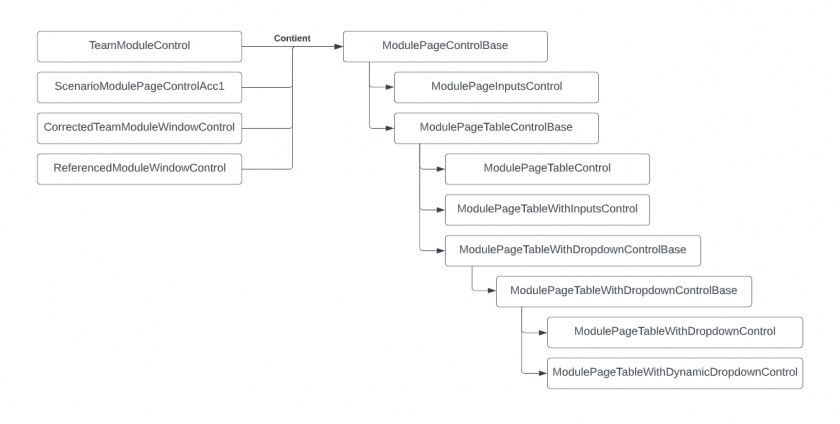
![](https://wiki.uniksim.com/uploads/images/gallery/2022-12-Dec/scaled-840-0/image-1669993225991.png)

### Pages

![](https://wiki.uniksim.com/uploads/images/gallery/2022-12-Dec/scaled-840-0/image-1669991723295.png)

### SubModulePageInputsControls

![](https://wiki.uniksim.com/uploads/images/gallery/2022-12-Dec/scaled-840-0/image-1669992423025.png)

### Tables

![](https://wiki.uniksim.com/uploads/images/gallery/2022-12-Dec/scaled-840-0/image-1669995240099.png)

### Sections

![](https://wiki.uniksim.com/uploads/images/gallery/2022-12-Dec/scaled-840-0/image-1669993421714.png)

### Rows

![](https://wiki.uniksim.com/uploads/images/gallery/2022-12-Dec/scaled-840-0/image-1669993146169.png)

### Input Cells

![](https://wiki.uniksim.com/uploads/images/gallery/2022-12-Dec/scaled-840-0/image-1669992078019.png)

# Procédure annuel pour updater les taxes (Deprecated)

### <span style="text-decoration: underline;">**Deprecated**</span>: Veuillez regarder la nouvelle marche à suivre dans la page "*Procédure annuel pour updater les taxes (updated version 2026)*"

<p class="callout info"><span style="text-decoration: line-through;">[https://docs.google.com/spreadsheets/d/1PMzc2vGeanmDXVKw8s8-hKepxstYUCIR\_W1q4XSa5lE/edit#gid=0](https://docs.google.com/spreadsheets/d/1PMzc2vGeanmDXVKw8s8-hKepxstYUCIR_W1q4XSa5lE/edit#gid=0)</span></p>

##### <span style="text-decoration: line-through;">Onglets</span>

- <span style="text-decoration: line-through;">taxes</span><p class="callout info"><span style="text-decoration: line-through;">[https://docs.google.com/spreadsheets/d/1PMzc2vGeanmDXVKw8s8-hKepxstYUCIR\_W1q4XSa5lE/edit#gid=1321289989](https://docs.google.com/spreadsheets/d/1PMzc2vGeanmDXVKw8s8-hKepxstYUCIR_W1q4XSa5lE/edit#gid=1321289989)</span></p>
    
    
    - <span style="text-decoration: line-through;">duplicté une colonne d'une année précédente et l'intituler : $"{année}(str)"</span>
    - <span style="text-decoration: line-through;">Modifier les valeurs associés aux Uids sauf pour \["**school**", "**municipal**"\]</span>
        - <span style="text-decoration: line-through;">Les informations peuvent être trouvé sur un site comme celui-ci : [https://empirecpa.ca/canadian-sales-tax-rates-for-2023/](https://empirecpa.ca/canadian-sales-tax-rates-for-2023/)</span>
- <span style="text-decoration: line-through;">income\_taxes</span><p class="callout info"><span style="text-decoration: line-through;">[https://docs.google.com/spreadsheets/d/1PMzc2vGeanmDXVKw8s8-hKepxstYUCIR\_W1q4XSa5lE/edit#gid=407446484](https://docs.google.com/spreadsheets/d/1PMzc2vGeanmDXVKw8s8-hKepxstYUCIR_W1q4XSa5lE/edit#gid=407446484)</span></p>
    
    
    - <span style="text-decoration: line-through;">duplicté une colonne d'une année précédente et l'intituler : $"{année}(str)"</span>
    - <span style="text-decoration: line-through;">Modifier les valeurs associés aux Uids</span>
        - <span style="text-decoration: line-through;">Certains identifiants ont des sources associés afin facilité la recherche d'information</span>
    - <span style="text-decoration: line-through;">Il faudra aussi ajouter un nouveau document googleSheet dans le folder suivant</span>
        - <span style="text-decoration: line-through;">[https://drive.google.com/drive/u/0/folders/1-7PMGfURsl47mcbA4z\_Pb0y8\_BUSUma4](https://drive.google.com/drive/u/0/folders/1-7PMGfURsl47mcbA4z_Pb0y8_BUSUma4)</span>
        - <span style="text-decoration: line-through;">il faudra alors remplir un onglet pour chaque impot possible (en utilisant le format de 26 période de paie) à l'aide de "sim\_accounting\_1" et de ses liens</span>
            - <span style="text-decoration: line-through;">Note: Les retenues d'impôt est le même pour Ontario (On), Nouveau Brunswick (NB) et L'île-du-Prince-Édouard (PE)</span>
        - <span style="text-decoration: line-through;">Utiliser [https://www.adobe.com/ca/acrobat/online/pdf-to-excel.html](https://www.adobe.com/ca/acrobat/online/pdf-to-excel.html) afin de transformer les chartes d'impot en format Excel </span>
            - <span style="text-decoration: line-through;">Utiliser la macro suivante afin de remplacer la colonne de min\_salary</span><span style="text-decoration: line-through;">![](https://wiki.uniksim.com/uploads/images/gallery/2023-07-Jul/scaled-840-0/image-1689339715880.png)</span>
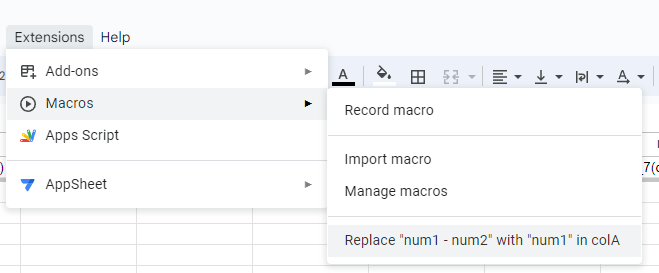
                
                ---

<span style="text-decoration: line-through;">**Conflit avec la Macro**</span>

- - - - - <span style="text-decoration: line-through;">Si la macro n'est pas disponible dans le menu, pour cela il faut:</span>
                    - <span style="text-decoration: line-through;">Dans le menu Extensions&gt;Macos</span>
                    - <span style="text-decoration: line-through;">Faire un "Record macro" puis arrêter immédiatement la macro, afin de créer une macro rapidement</span>
                    - <span style="text-decoration: line-through;">Faire un "Manage macros" dans une année précédente (possèdent la macro "Replace "num1 - num2" with "num1" in colA")</span>
                    - <span style="text-decoration: line-through;">Cliquer sur les ![](https://wiki.uniksim.com/uploads/images/gallery/2024-05-May/scaled-840-0/image-1715264721834.png), puis "Edit Script"</span>
                    - <span style="text-decoration: line-through;">Copier le code de macros.gs</span>
                    - <span style="text-decoration: line-through;">Faire un "Manage macros" dans le sheet en vigeur</span>
                    - <span style="text-decoration: line-through;">Cliquer sur les ![](https://wiki.uniksim.com/uploads/images/gallery/2024-05-May/scaled-840-0/image-1715264721834.png), puis "Edit Script"</span>
                    - <span style="text-decoration: line-through;">Coller le script copié précédamment</span>
                    - <span style="text-decoration: line-through;">Renommer votre macro avec les mêmes valeurs que celui copié</span>
                - <span style="text-decoration: line-through;">S'il y a un problème de "Authorization required" ou autre durant l'exécution de la macro, voici la version manuel:</span>
                    
                    
                    - <span style="text-decoration: line-through;">Faites un clique droite sur la colonne A, puis ajouter une nouvelle colonne à gauche</span>
                    - <span style="text-decoration: line-through;">![](https://wiki.uniksim.com/uploads/images/gallery/2024-05-May/scaled-840-0/image-1715267033668.png)</span>
                    - <span style="text-decoration: line-through;">Copié le code ci-dessous</span>
                        - <span style="text-decoration: line-through;">**<span class=" default-formula-text-color" dir="auto">=</span><span class=" default-formula-text-color" dir="auto">ArrayFormula</span><span class=" default-formula-text-color" dir="auto">(</span><span class=" default-formula-text-color" dir="auto">IF</span><span class=" default-formula-text-color" dir="auto">(</span><span class=" default-formula-text-color" dir="auto">REGEXMATCH</span><span class=" default-formula-text-color" dir="auto">(</span><span class=" default-formula-text-color" dir="auto">TO\_TEXT</span><span class=" default-formula-text-color" dir="auto">(</span><span dir="auto">B2:B</span><span class=" default-formula-text-color" dir="auto">)</span><span class=" default-formula-text-color" dir="auto">,</span> <span class=" string " dir="auto">"\[–|-\]"</span><span class=" default-formula-text-color" dir="auto">)</span><span class=" default-formula-text-color" dir="auto">,</span> <span class=" default-formula-text-color" dir="auto">TO\_PURE\_NUMBER</span><span class=" default-formula-text-color" dir="auto">(</span><span class=" default-formula-text-color" dir="auto">REGEXREPLACE</span><span class=" default-formula-text-color" dir="auto">(</span><span dir="auto">B2:B</span><span class=" default-formula-text-color" dir="auto">,</span> <span class=" string " dir="auto">"(\\D+\\.\*\\D+.\*)"</span><span class=" default-formula-text-color" dir="auto">,</span> <span class=" string " dir="auto">""</span><span class=" default-formula-text-color" dir="auto">)</span><span class=" default-formula-text-color" dir="auto">)</span><span class=" default-formula-text-color" dir="auto">,</span> <span class="number" dir="auto">0</span><span class=" default-formula-text-color" dir="auto">)</span><span class=" default-formula-text-color" dir="auto">)</span>**</span>
                    - <span style="text-decoration: line-through;">Coller le code sur la case A2 ou avant les rangées à modifier (sur la colonne A)</span>
                    - <span style="text-decoration: line-through;">À ce point normalement, les cases de la colonne A devrait-être à jour</span>
                    - <span style="text-decoration: line-through;">Copié la colonne A à B</span>
                        - <span style="text-decoration: line-through;">**ATTENTION**, il se peut que certaines valeurs ne sont pas bien modifiées. Prenez seulement les valeurs adéquates</span>
                    - <span style="text-decoration: line-through;">Supprimé la colonne A</span>
                    
                    
                    ---
            - <span style="text-decoration: line-through;">Remplacer toutes les instances de "**,**" (virgule) par "**.**" (point) </span>
                
                
                - <span style="text-decoration: line-through;">À l'aide de (Ctrl + H)</span>
                - <span style="text-decoration: line-through;">![](https://wiki.uniksim.com/uploads/images/gallery/2024-05-May/scaled-840-0/image-1715264243002.png)</span>
        - <span style="text-decoration: line-through;">Il faudra alors updater {AllSimsRepository}/node.js/exports/exportAllData.js afin de pouvoir exporter les nouveaux document créer avec la structure suivante:</span><span style="text-decoration: line-through;">![](https://wiki.uniksim.com/uploads/images/gallery/2023-07-Jul/scaled-840-0/image-1689347925339.png)</span>
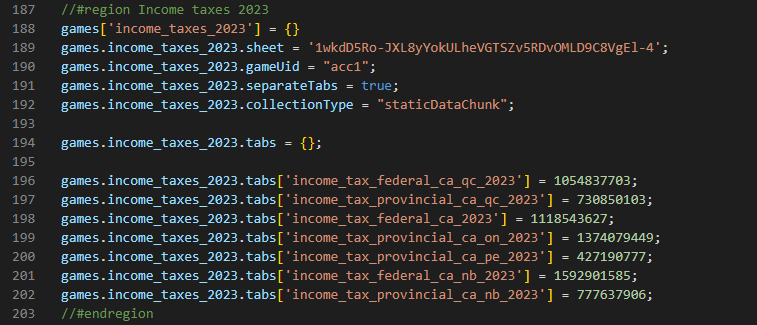
            
            
            - <span style="text-decoration: line-through;">Dans la zone de "games.income\_taxes\_X.sheet" : Mettre la première partie de l'url (après "d/") du document "income\_taxes\_X"</span>
            - <span style="text-decoration: line-through;">Dans les autres plus specifiques ("games.income\_taxes\_X.tabs"): Mettre le "gid" de l'url</span>
- <span style="text-decoration: line-through;">employer\_income\_taxes</span><p class="callout info"><span style="text-decoration: line-through;">[https://docs.google.com/spreadsheets/d/1PMzc2vGeanmDXVKw8s8-hKepxstYUCIR\_W1q4XSa5lE/edit#gid=754552986](https://docs.google.com/spreadsheets/d/1PMzc2vGeanmDXVKw8s8-hKepxstYUCIR_W1q4XSa5lE/edit#gid=754552986)</span></p>
    
    
    - <span style="text-decoration: line-through;">duplicté une colonne d'une année précédente et l'intituler : $"{année}(str)"</span>
    - <span style="text-decoration: line-through;">Modifier les valeurs associés aux Uids</span>
        - <span style="text-decoration: line-through;">Certains identifiants ont des sources associés afin facilité la recherche d'information</span>
- <span style="text-decoration: line-through;">interests</span><p class="callout info"><span style="text-decoration: line-through;">[https://docs.google.com/spreadsheets/d/1PMzc2vGeanmDXVKw8s8-hKepxstYUCIR\_W1q4XSa5lE/edit#gid=1745231992](https://docs.google.com/spreadsheets/d/1PMzc2vGeanmDXVKw8s8-hKepxstYUCIR_W1q4XSa5lE/edit#gid=1745231992)</span></p>
    
    
    - <span style="text-decoration: line-through;">duplicté une colonne d'une année précédente et l'intituler : $"{année}(str)"</span>
    - <span style="text-decoration: line-through;">Modifier les valeurs associés aux Uids</span>
        - <span style="text-decoration: line-through;">Certains identifiants ont des sources associés afin facilité la recherche d'information</span>

##### <span style="text-decoration: line-through;">Modifications liés à l'année par défaut</span>

- <span style="text-decoration: line-through;">Modifier le champs year pour l'année par défaut voulu</span><span style="text-decoration: line-through;">![](https://wiki.uniksim.com/uploads/images/gallery/2023-07-Jul/scaled-840-0/image-1689349217892.png)</span>

    
    <p class="callout info"><span style="text-decoration: line-through;">{AllSimsRepository}\\game\\Assets\\GameSpecific\\acc1\\Resources\\data\_acc1\\act\_settings.json</span></p>
    
    
    - <span style="text-decoration: line-through;">duplicté une colonne d'une année précédente et l'intituler : $"{année}(str)"</span>
    - <span style="text-decoration: line-through;">Modifier les valeurs associés aux Uids</span>
        - <span style="text-decoration: line-through;">Certains identifiants ont des sources associés afin facilité la recherche d'information</span>
- <span style="text-decoration: line-through;">Modifier l'année par défaut pour la création des sims démo</span>
    
    <p class="callout info"><span style="text-decoration: line-through;">{uniksimweb}\\uniksim-back-end\\src\\node.js\\server\\backend\_braincloud.js</span></p>
    
    <span style="text-decoration: line-through;">![](https://wiki.uniksim.com/uploads/images/gallery/2025-04-Apr/scaled-840-0/image-1743609472785.png)</span>

##### <span style="text-decoration: line-through;">Document PDF accessible en jeu</span>

- <span style="text-decoration: line-through;">Ajouter un document liés à l'année dans ce dossier</span>
    
    <p class="callout info"><span style="text-decoration: line-through;">[https://cloud.digitalocean.com/spaces/uniksim-data?path=acc1/](https://cloud.digitalocean.com/spaces/uniksim-data?path=acc1/)</span></p>
- <span style="text-decoration: line-through;">Il faudra alors un document PDF intitulé "{thème}\_{langue}" pour chacun des thèmes et langue suivantes, le tout dans le format "26 périodes de paie par année" (en public). N'oubliez pas de retirer l'extension .pdf</span>
    - <span style="text-decoration: line-through;">Thème</span>
        - <span style="text-decoration: line-through;">cpp\_ca</span>
        - <span style="text-decoration: line-through;">employment\_insurance\_ca</span>
        - <span style="text-decoration: line-through;">employment\_insurance\_ca\_qc</span>
        - <span style="text-decoration: line-through;">income\_tax\_federal\_ca</span>
        - <span style="text-decoration: line-through;">income\_tax\_federal\_ca\_nb</span>
        - <span style="text-decoration: line-through;">income\_tax\_federal\_ca\_qc</span>
        - <span style="text-decoration: line-through;">income\_tax\_provincial\_ca\_nb</span>
        - <span style="text-decoration: line-through;">income\_tax\_provincial\_ca\_on</span>
        - <span style="text-decoration: line-through;">income\_tax\_provincial\_ca\_pe</span>
        - <span style="text-decoration: line-through;">income\_tax\_provincial\_ca\_qc</span>
        - <span style="text-decoration: line-through;">rqap\_ca\_qc</span>
        - <span style="text-decoration: line-through;">rrq\_ca\_qc</span>
    - <span style="text-decoration: line-through;">Langue</span>
        - <span style="text-decoration: line-through;">fr</span>
        - <span style="text-decoration: line-through;">en</span>

##### <span style="text-decoration: line-through;">Finitions</span>

- <span style="text-decoration: line-through;">Executer la commande suivante sur node.js:</span><span style="text-decoration: line-through;">![](https://wiki.uniksim.com/uploads/images/gallery/2023-07-Jul/scaled-840-0/image-1689348151682.png)</span>

    
    
    - <span style="text-decoration: line-through;">Une fois avec les paramêtres suivants ![](https://wiki.uniksim.com/uploads/images/gallery/2023-07-Jul/scaled-840-0/image-1689348648533.png)</span>
    - <span style="text-decoration: line-through;">et une autre avec ceux-ci (remplacer par la bonne année)</span><span style="text-decoration: line-through;">![](https://wiki.uniksim.com/uploads/images/gallery/2023-07-Jul/scaled-840-0/image-1689348688286.png)</span>
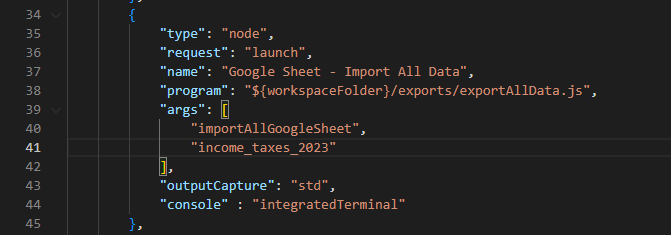
- <span style="text-decoration: line-through;">Une fois terminé les files suivants devrait avoir des modifications</span>
    - <span style="text-decoration: line-through;">pour "AllSimsRepository"</span>  
        <span style="text-decoration: line-through;">![](https://wiki.uniksim.com/uploads/images/gallery/2023-07-Jul/scaled-840-0/image-1689350868036.png)</span>
    - <span style="text-decoration: line-through;">pour "UniksimWebRepository"</span>  
        <span style="text-decoration: line-through;">![](https://wiki.uniksim.com/uploads/images/gallery/2023-07-Jul/scaled-840-0/image-1689353689899.png)</span>
- <span style="text-decoration: line-through;">Il nous reste qu'à exporter la data à la destination voulu (toujours sur node.js).</span><span style="text-decoration: line-through;">![](https://wiki.uniksim.com/uploads/images/gallery/2023-07-Jul/scaled-840-0/image-1689353835466.png)</span>

    
    
    - <span style="text-decoration: line-through;">Utiliser cette export pour le StaticData![](https://wiki.uniksim.com/uploads/images/gallery/2023-07-Jul/scaled-840-0/image-1689353848206.png)</span>

    - <span style="text-decoration: line-through;">Utiliser cette export pour le StaticDataChunk</span><span style="text-decoration: line-through;">![](https://wiki.uniksim.com/uploads/images/gallery/2023-07-Jul/scaled-840-0/image-1689353947856.png)</span>

        
        <span style="text-decoration: line-through;"> (Modifier le "args" de la requête pour chacun des requêtes)</span>

# Création d'une simulation (acc1)

##### Étape préliminaire pour la création de la simulation

<span style="text-decoration: underline;">Mettre à jour les taxes</span>

- - Avant de commencer, faire une mise à jour manuel des taxes si c'est pertinent pour l'année actuel: 
        1. <p class="callout info">[https://wiki.uniksim.com/books/programmeur/page/proc%C3%A9dure-annuel-pour-updater-les-taxes](https://wiki.uniksim.com/books/programmeur/page/proc%C3%A9dure-annuel-pour-updater-les-taxes)</p>

<span style="text-decoration: underline;">Rendre la simulation général</span>

- - - Si nécessaire, rendre la simulation original (copié) plus général afin de simplifier la nouvelle simulation. 
            - Si c'est le cas, le dossier **{allsims}/UI/SimByModule** est créé pour la base de acc1 ![](https://wiki.uniksim.com/uploads/images/gallery/2024-05-May/scaled-840-0/image-1715958456706.png)
            - Pour se faire, les fichiers modifiés doit avoir un namespace **namespace UnikSim.SimByModule** au lieu de **namespace UnikSim.SimByModule.acc1**
                - Si le fichier n'est pas dans gameSpecific, il n'est nécessaire le déplacer
            - Le nom du fichier doit aussi faire référence à "ByModule" (Ex: StaticDataAcc1 =&gt; StaticDataByModule) puisqu'il sera généralisé 
                - Si le fichier n'a pas de acc1 dans son nom, il n'est pas nécessaire de le rename
            - Les fichiers doivent aussi se faire déplacer/transfer à **SimByModule** dans le dossier correspondent
        - ##### Dupliquer une simulation intérieure

---

- - Avant de commencer, créer une branche au nom de la nouvelle simulation sur Git Extensions
    - N'oublie pas de voir les <span style="text-decoration: underline;">informations supplémentaires</span> à la fin de ce document pour certaines précisions

---

- <span style="text-decoration: underline;">Sur unity</span>: 
    1. Faire une copie de **GameSpecific/acc1** (Ex: acc2) ![](https://wiki.uniksim.com/uploads/images/gallery/2024-05-May/scaled-840-0/image-1715349059692.png)
    2. Renommer toutes les instances de code lié à l'ancienne simulation (Incluant les noms de fichiers et les codes). 
        - **ATTENTION**: Vérifier si les changement n'affecteront pas l'original, **avant** et **après** modifications ![](https://wiki.uniksim.com/uploads/images/gallery/2024-05-May/scaled-840-0/image-1715351827963.png)
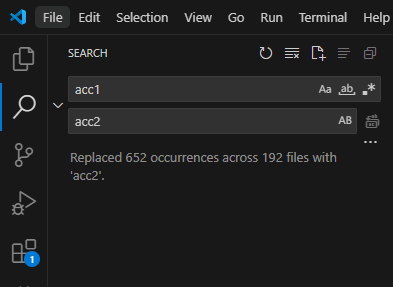
            
            <p class="callout info">Un script nommé "renameFiles" est disponible pour renommer les noms de fichiers. {allsims}/node.js/utils/renameFiles.js</p>
        - Pour utiliser **renameFiles**, il faudra créer une copie temporaire dans le nouveau dossier
        - Ajouter un **launch.js** temporaire avec les mêmes paramètres ![](https://wiki.uniksim.com/uploads/images/gallery/2024-05-May/scaled-840-0/image-1715973137905.png)
        - Puis modifier les paramètres suivant: ![](https://wiki.uniksim.com/uploads/images/gallery/2024-05-May/scaled-840-0/image-1715358703759.png)
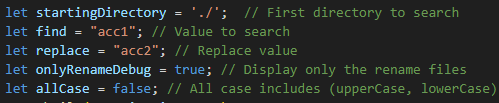
            
            
            - Note 1: Le **renameFiles** est case sensitive pour **find** et **replace**, il se pourrait qu'il faudrait le faire plus d'une fois
            - Note 2: Une fois les refactor des noms faits, il se peut que Unity ne pourra pas compiler. (Certains fichiers possèdent les mêmes noms) ![](https://wiki.uniksim.com/uploads/images/gallery/2024-05-May/scaled-840-0/image-1715374965933.png)

        - Pour régler ce problème, il faudra refactor avec **Visual Studio** chacun de ces fichiers ou refaire l'étape <span style="text-decoration: underline;">Rendre la simulation général</span>. 
            - **ATTENTION:** Si vous voulez le faire manuellement, assurer vous de ne pas impacter le code originel (copié)
- <span style="text-decoration: underline;">Sur node.js:</span>
    1. Faire une copie de **{allsims}/node.js/backend/braincloud/server\_scripts/acc1** (Ex: acc2) ![](https://wiki.uniksim.com/uploads/images/gallery/2024-05-May/scaled-840-0/image-1715358914757.png)
    2. Comme à l'étape précédente, renommer toutes les instances de code lié à l'ancien script (Incluant les noms de fichiers et les codes). 
        - **ATTENTION**: Vérifier si les changement n'affecteront pas l'original, **avant** et **après** modifications ![](https://wiki.uniksim.com/uploads/images/gallery/2024-05-May/scaled-840-0/image-1715351827963.png)

            
            <p class="callout info">Un script nommé "renameFiles" est disponible pour renommer les noms de fichiers. {allsims}/node.js/utils/renameFiles.js</p>
        - Pour utiliser **renameFiles**, il faudra modifier les paramètres suivant: ![](https://wiki.uniksim.com/uploads/images/gallery/2024-05-May/scaled-840-0/image-1715358703759.png)

            
            
            - Note 1: Le **renameFiles** est case sensitive pour **find** et **replace**, il se pourrait qu'il faudrait le faire plus d'une fois

##### Modification et ajout pour la nouvelle simulation

- <span style="text-decoration: underline;">Ajouter tous les switch case:</span>
    - Faites un **Ctrl + Shift + F** ensuite "acc1" pour trouver toutes les instances de acc1
    - Faites une copie de chaque case avec l'accronyme de votre nouvelle simulation. 
        - Par exemple : ![](https://wiki.uniksim.com/uploads/images/gallery/2024-05-May/scaled-840-0/image-1715971131716.png)

    - Note : Il ne sera pas nécessaire de faire de nouvelle fichier de traduction. En acc\_*X*, le même fichier sera utilisé
- <span style="text-decoration: underline;">Modifier la class static pour StaticDataByModule:</span>
    - Le fichier "StaticDataAcc*X*" (Renommer par l'étape précédent), devra être modifier afin d'identifier le fichier ![](https://wiki.uniksim.com/uploads/images/gallery/2024-05-May/scaled-840-0/image-1715970930378.png)
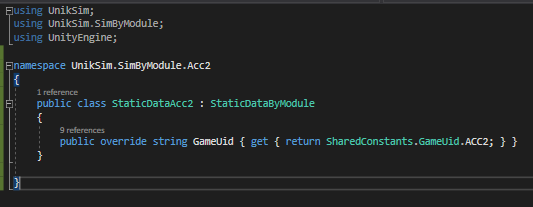
    - Ajouter la class static à **CreateStaticData** dans Factory ![](https://wiki.uniksim.com/uploads/images/gallery/2024-05-May/scaled-840-0/image-1715971062472.png)
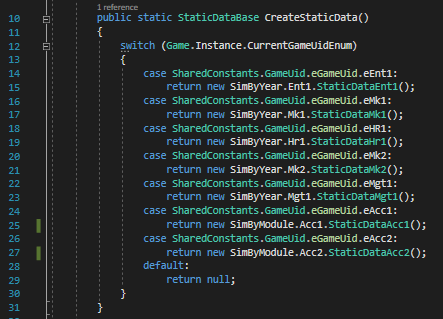
- <span style="text-decoration: underline;">Ajouter une nouvelle variante de MainControlStudentByModule et MainControlTeacherByModule:</span>
    - Si la copie de votre simulation ne contient pas de MainControlStudentAcc*X* ou MainControlTeacherAcc*X*, veuillez suivre les étapes suivantes, sinon passez cette étape  
        
        - Méthode 1: Faire une copie de **MainControlStudentAcc1** et **MainControlTeacherAcc1** dans la nouvelle simulation et le renommer en conséquent

<p class="callout info align-left">Situé à {allsims}/GameSpecific/acc1/Resources/Prefabs/UI</p>

- - - Méthode 2: Créer une variante avec **MainControlStudentByModule** et **MainControlTeacherByModule**

<p class="callout info">Situé à {allsims}/UI/SimByModule/acc1/Resources/Prefabs/UI</p>

- - - - Clique droite, puis **Create&gt;Prefab Variant**
            - Déplacer le fichier au bons endroit et le renommer en conséquent
- <span style="text-decoration: underline;">Partie Doozy:</span>

<p class="callout info">Situé à Resources&gt;MainGraph</p>

- - Ajouter un nouveau output sur **Login** avec le nom approprié (Ex: acc2) ![](https://wiki.uniksim.com/uploads/images/gallery/2024-05-May/scaled-840-0/image-1715978028871.png)
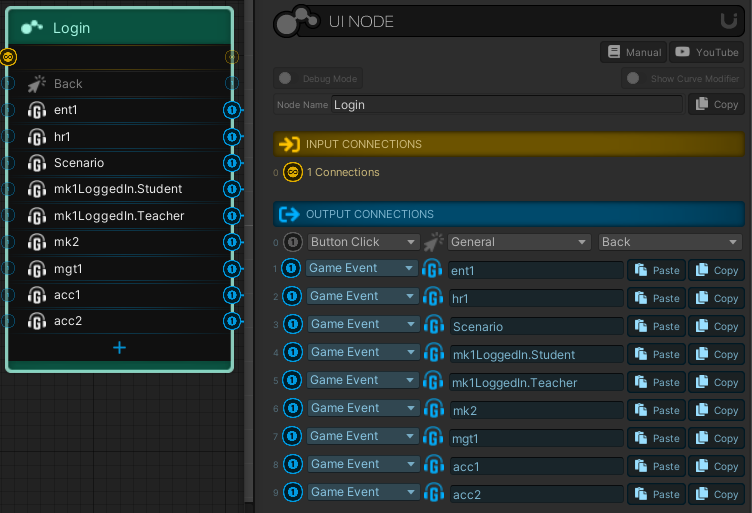
    - Ajouter un nouveau node (clique droite) avec un nom approprié ![](https://wiki.uniksim.com/uploads/images/gallery/2024-05-May/scaled-840-0/image-1715978158264.png)
        
        
        - Dans ce node, ajoutez le Acc*X*SubGraph ![](https://wiki.uniksim.com/uploads/images/gallery/2024-05-May/scaled-840-0/image-1715978434812.png)
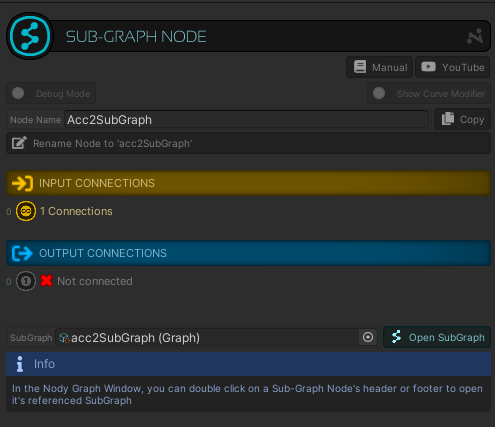
    - Connecter le output avec le nouveau node
    - Si la duplication c'est bien terminé, il ne sera pas nécessaire de modifier Acc*X*SubGraph
- <span style="text-decoration: underline;">Modifier les scènes **acc*X*Teacher** et **acc*X*Student** :</span>

<p class="callout info">Situé à GameSpecific/acc*X*/Resources/Scenes</p>

- - Dans la section **DecisionsPanel** (Hierarchy), modifier le "Decisions Controls" pour votre simulation ![](https://wiki.uniksim.com/uploads/images/gallery/2024-05-May/scaled-840-0/image-1716315794590.png)
##### Modification des thèmes de la simulation

- <span style="text-decoration: underline;">Remplacer les images de la nouvelle simulation avec le thème choisi :</span>
    - Écran titre : **acc*X***
    - Écran de jeu : **bg**
    - Note : Il serait peut-être intéressant de demander les images à l'équipe pour éviter des problèmes de choix esthétiques ou de design

<p class="callout info">Situé à GameSpecific/acc*X*/Resources/images</p>

- - Pour modifier **bg**, il faudra allé sur la scène de la nouvelle simulation (**acc*X*Teacher** et **acc*X*Student**, vous devriez le faire sur les deux scènes)

<p class="callout info">Situé à GameSpecific/acc*X*/Resources/Scenes</p>

- - - Dans **MainView**, modifier "Source Image" ![](https://wiki.uniksim.com/uploads/images/gallery/2024-05-May/scaled-840-0/image-1716315374300.png)
- <span style="text-decoration: underline;">Ajouter le titre dans **LoginControl**:</span>
    - Faire une copie de la simulation originel (copié) et le renommer ![](https://wiki.uniksim.com/uploads/images/gallery/2024-05-May/scaled-840-0/image-1715978670608.png)
    - Modifier le script **LoginTitle** dans le menu de l'inspecteur ![](https://wiki.uniksim.com/uploads/images/gallery/2024-05-May/scaled-840-0/image-1715978741446.png)
    - Ajouter dans le google sheet **shared\_text**
        - **acc*X*\_theme\_label** (la couleur)
        - **acc*X*\_login\_title** (le titre principal, dans ce cas "Comptabilité X")
        - **acc*X*\_login\_subtitle** (le nom de la nouvelle simulation) ![](https://wiki.uniksim.com/uploads/images/gallery/2024-05-May/scaled-840-0/image-1715979871555.png)

    - Dans **AccXTitle&gt;Title2**
        - Modifier le Text Uid pour **acc*X*\_login\_title**
    - Dans **AccXTitle&gt;Title3**
        - Modifier le Text Uid pour **acc*X*\_login\_subtitle**
    - Faire un **importTextShared** pour voir les changements

<p class="callout info">Situé à {allsims}/node.js/exports/importTextShared.bat</p>

- <span style="text-decoration: underline;">Modifier le thème de couleur de la simulation :</span>
    - Sur la scène de **game**, dans **LoginBackgroundControl**, ajouter le "Login Title" dans "Login Titles" ![](https://wiki.uniksim.com/uploads/images/gallery/2024-05-May/scaled-840-0/image-1716318345076.png)
<p class="callout info">Le login title à ajouter devrait se trouver à GameSpecific/acc*X*/Resources/Acc*XSkin*</p>

- - Dans Acc*XSkin* : 
        - Modifier le gameUid
        - Modifier le thème de couleur

##### Google Sheet et StaticData

- <span style="text-decoration: underline;">Faire une copie du googleSheet sim\_accounting\_1 :</span>

<p class="callout info">Situé à "Shared With Me/Dev/Games/acc1 - compta\_cegep/sim\_accounting\_1"</p>

- - Faire une copie du fichier ![](https://wiki.uniksim.com/uploads/images/gallery/2024-05-May/scaled-840-0/image-1716561266690.png)
    - Renommer le fichier (modifier le numéro)
    - Modifier le fichier si nécessaire 
        - Note : Un fichier de base existe pour tous les simulations accounting

<p class="callout info">sim\_byModule</p>

- <span style="text-decoration: underline;">Modifier les imports de fichiers :</span>
    - Il faudra alors updater **{AllSimsRepository}/node.js/exports/exportAllData.js** afin de pouvoir exporter les nouveaux document créer avec la structure suivante: ![](https://wiki.uniksim.com/uploads/images/gallery/2024-05-May/scaled-840-0/image-1716563572879.png)
        
        
        - Si nécessaire, modifier **importAllDataGoogleSheet** avec "withBaseV = true" pour import aussi la base (sim\_byModule). ![](https://wiki.uniksim.com/uploads/images/gallery/2024-05-May/scaled-840-0/image-1716583010299.png)

    - Mettre la première partie de l'url (après "d/") du document **sim\_accounting\_*X***
    - Dans les autres plus specifiques (Ex : partners): Mettre le "gid" de l'url 
        - games.acc*X*.tabs = obtenir les valeurs sur googleSheet
        - games.acc*X*.additionalData = les valeurs sont à l'extérieurs du googleSheet (se trouve directement sur Unity)
- <span style="text-decoration: underline;">Importer les fichiers **sim\_accounting\_*X*** pour la nouvelle simulation :</span>
    - À l'aide de la commande "**Google Sheet - Import All"** de node.js avec les valeurs appropriés
- <span style="text-decoration: underline;">Exporter les fichiers sur Braincloud :</span>
    - À l'aide de la commande "**Google Sheet - Export All Data"** de node.js avec les valeurs appropriés (StaticData)
    - À l'aide de la commande "**Google Sheet - Export All Data"** de node.js avec les valeurs appropriés (StaticDataChunk)

##### Information supplémentaire

- Note 1 : Les simulations en "accounting" ou "acc*X*" sont tous mis dans une base nommé **byModule** (ex: braincloud&gt;staticData, node.js&gt;...&gt;byModule\_utils, UI&gt;SimByModule, etc.)
- Note 2 : Certains/Plusieurs changements risquent de briser Unity. Il faudra alors faire un "Reimport All" ![](https://wiki.uniksim.com/uploads/images/gallery/2024-05-May/scaled-840-0/image-1716906903097.png)
# Modification de la valeur des stocks, PEPS

1. Il y avait un problème dans la génération de différents prix pour les stocks. Ce problème se trouvait dans le acc1\_utils\_answer\_key\_module et le acc1\_utils\_create\_bills, puisque le prix statique était utilisé et non le prix généré: ![](https://wiki.uniksim.com/uploads/images/gallery/2024-05-May/scaled-840-0/image-1717012192018.png)(**acc1\_utils\_answer\_key\_module.js**)


    
    ![](https://wiki.uniksim.com/uploads/images/gallery/2024-05-May/scaled-840-0/image-1717012243005.png)
    
    (**acc1\_utils\_create\_bills**)

# Bénéfices et pertes

1. Le système de bénéfices et pertes dans les modules qui utilise l'état des résultats est basé sur un multiplicateur de prix comme qui suit: ![](https://wiki.uniksim.com/uploads/images/gallery/2024-05-May/scaled-840-0/image-1717012113673.png)(dans **acc1\_utils\_create\_module\_type\_data.js**)

    
    Originalement, ce multiplicateur était basé sur une valeur de 0.6 en cas de perte, ce qui causait des problèmes. Il a été changé pour une valeur de 0.1 pour régler le problème: ![](https://wiki.uniksim.com/uploads/images/gallery/2024-05-May/scaled-840-0/image-1717010035930.png)

# Remise et remboursement de taxes

1. La fonctionnalité de remise et de remboursement de taxes n'était pas fonctionnel. Pour l'implémenter on a commencé par modifier le dropdown existant (qui était basé sur pertes ou bénifices): ![](https://wiki.uniksim.com/uploads/images/gallery/2024-05-May/scaled-840-0/image-1717011675940.png)(le google sheet)

    
    ![](https://wiki.uniksim.com/uploads/images/gallery/2024-05-May/scaled-840-0/image-1717011740755.png)(les pages qui ont été modifié pour afficher le bon texte)
2. Par la suite, nous sommes allé cherché du côté serveur l'option sélectionné dans le dropdown (comme pour bénéfices et pertes): ![](https://wiki.uniksim.com/uploads/images/gallery/2024-05-May/scaled-840-0/image-1717011958575.png)(**acc1\_utils.js**)

    
    ![](https://wiki.uniksim.com/uploads/images/gallery/2024-05-May/scaled-840-0/image-1717012002821.png)(**acc1\_utils\_create\_module\_type\_data**)